Former Aperture user. One of the Aperture features I liked was that it created a “film roll” which held all newly imported images. It made it really easy to see the last group of images I imported and to work on those while ignoring the rest of the library.
I see that Darktable has film rolls, but they work differently, and are not useful with my workflow. I usually mount the camera’s SD card, then rsync its full contents to my network storage. I don’t organize anything at this point, just copy. I have one destination per camera, ex. library/photo/Camera/Canon 5D Mark III/ – under that is a DCIM/100EOS5D, where every photo ends up. In Darktable, this means that every photo from that camera ends up in a single “100EOS5D” film roll.
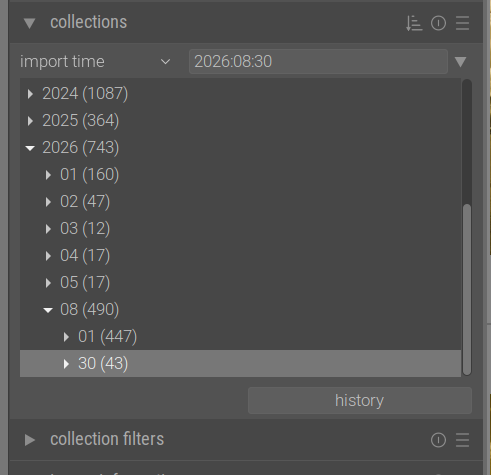
I found the collections filter, which has an “import time” setting, however, it holds the import time of each individual photo, not the group of photos as a whole. Since it takes a few seconds, a single import ends up split into one-second granularity, for example, there’s a 22:22:59 entry, a 22:23:00, 22:23:01 etc. What I want is for all photos in the import job to get organized with the timestamp the import operation as a whole began, rather than the precise time the photos were imported during the bulk import process.
You have to decide on your own file storage organisation system that works for you. But I would imagine adding a date folder within the camera folder would be more helpful as the years go on and your collection grows. The DT copy and import feature would be great for this.
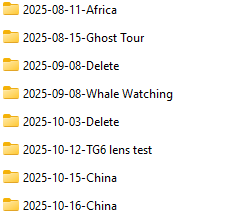
Here is the system I use with images placed with a year folder, which in your case could be a camera folder. I use jobcode to add a description such as Africa, China, Whale watching etc.
Since I started digital photography, I’ve been taking the initiative to organize my photos by event and date as they’re imported. Every event has a name and date, and all those events are under the master camera directory. That way I can see not only when and where the photos were taken, but with which camera. I can sort by capture time, edit time, or camera as needed.
IOW, do the organization when you import the photos, not after you have 100,000 of them in a directory. It’ll save a ton of time later and you can identify the events on your computer without even entering the photo editor. If your photos all contain metadata, that can be used to narrow down the search or visibility of them too.
I have, but I quit using it after I accidentally hit the adjacent button (which doesn’t make a copy), then deleted the files from my SD card. Whoops. Now I make certain the files are on my network storage before I do anything else.
Not the way you seem to want it done (Aperture isn’t darktable).
But, if you have one import per day (at most), you can use the “import” filter in darktable, just select the day of the import (you don’t have to go down to the exact time).
Another vote for using folders on your camera and importing to your computer by year/month/folder-name. I keep the camera folder name, because it maintains the sort order, and append -event-name" to it.
I have been doing this since the beginning of [photos-on-pc]-time so it wouldn’t matter what software I using.
It’s good to see how we can make a new piece of software fit our workflow, but sometime we have to make small alterations to the workflow.
(I’ve never tried dt’s import-from-camera functionality. Because … I just haven’t, but also because I like to copy my pics to a staging area on disk (I also use rsync, in its grsync incarnation). I clear it down when I feel like it. Only last week I had a delete “Whoops, OMG!” deletion moment and it was a quick way to save the day)
It depends a bit how many import jobs you do per day, but you can filter for the whole day. Ofc, it gets a bit more complicated if you start the import at 23:59:50
But yeah, I agree that it would be really nice if each import jobs gets assigned its own ID (basically the start datetime as you said), so you can easily filter for those.