I think I found what was going on. Your CHDK DNGs only carry a tiny preview image, so FerrumPix had to develop each file in full before it could show anything, and it did that in a pretty wasteful way. That cost around three seconds per image, on Windows and Linux alike.
Version 0.9.56-8 is out now with a few changes aimed at exactly this. On my machine those files now show up in about a quarter of a second.
The main trick is that FerrumPix now develops RAWs at half resolution wherever it only needs a picture for the screen. That is many times faster, and at window size you won’t see a difference. The catch is that when you zoom in to 100 %, fine detail is a bit softer than a full development. So there are two new switches under Settings > RAW development:
Develop RAWs at full resolution in the viewer. This only matters when the viewer develops RAWs itself, i.e. when “Develop edited RAWs in the viewer” or “Develop unedited RAWs in the viewer too” is on. Otherwise the viewer shows the preview embedded in the file, as before. With the switch on, you get full sharpness when zooming in, and opening the image in the editor afterwards is instant. The price is the old waiting time per image.
Develop RAWs at full resolution in the comparison. The same choice for the side-by-side comparison. Leave it off for quick culling. Turn it on if you use the comparison to judge focus and sharpness up close.
Both are off by default. The quick preview (SPACE) in the gallery always uses half resolution, since it never zooms.
For what it’s worth, I had a look at how RapidRAW manages it: it actually doesn’t use LibRaw but its own Rust decoder, and when you browse it shows the camera’s embedded JPEG if that is large enough, and otherwise develops the RAW with a fast, reduced-resolution demosaic, which is essentially what FerrumPix does now as well.
Could you give it a try and let me know whether browsing through those DNGs feels noticeably faster now? I’d be especially interested in whether the delay when moving from one image to the next has improved, since that’s the part making culling frustrating for you.
Not yet. On Linux, FerrumPix currently runs through XWayland rather than native Wayland. I did try Avalonia’s Wayland backend, but a few things like window scaling were still a bit unreliable, so for now I’ve stayed with X11.
Because of that, the new Wayland color management protocol can’t really help FerrumPix yet. At the moment the compositor basically treats the app as sRGB.
Little thing, in the gallery I’ve set up the thumbs to show shutter speeds, among others. Most are in the (normal) form of 1/60 etc., except for three speeds, they show 0,05, 0,02 and 0,01 instead of 1/20, 1/50 and 1/100.
Well done Patrick! I’ve checked how long it takes now to advance from one image to the next in the viewer and it’s roughly 1 second on my Windows system. Fast enough for culling purposes. You’re right, I never zoom to 100% when culling so developing the raw at half resolution is an acceptable tradeoff for the increased speed. And thanks for making me aware of how RapidRaw is actually developing raw images. I was under the impression they were using libraw but nope, my bad. Have a great day!
Hi everyone, another FerrumPix follow-up on 0.9.58
Layers & G’MIC
Individual layers, or several selected layers at once, can now be sent directly to G’MIC from the layer context menu. Text, shapes and layer adjustments are rasterized on the way, and the result comes back as a new layer. aligned or distributed from the top bar: left, right, top, bottom, centered, or evenly spaced.
Rasterizing a layer now turns it into an image layer in place instead of merging it into the photo.
Layers can be trimmed to their visible content, and selected layers or groups can be flattened when needed.
Layer-based selections, masks and clipped adjustments now respect the actual visible area of the layer much more consistently, including its mask.
Retouching
The healing brush now looks more carefully at the area before repairing it. On smooth surfaces it prefers other smooth areas, so removing something like one line of text is much less likely to drag in parts of nearby lines.
Faster browsing
RAW files without a usable embedded preview especially CHDK DNGs now appear in the gallery and viewer much faster.
Viewer, quick preview and image comparison can use half-resolution RAW development, which makes stepping through images much quicker. Full resolution can still be enabled when needed for checking fine detail.
Gallery & filmstrip
Filmstrip tiles can now follow each photo’s real aspect ratio , so portrait images stay narrow and landscape images wide.
Photo Wall tiles are calmer by default: stars, favourite and other controls only appear while the mouse is over the image. This can be switched off if you prefer the old behaviour.
Editor improvements
FerrumPix now uses a new unified color picker throughout the editor, with opacity, hex values, recent colors and a direct comparison between the previous and new color.
Undo and redo now keep selected layers selected, including multi-selections.
Resizing several selected layers together no longer makes the bounding frame jump into the wrong shape.
RAW metadata
There were also a few fixes around RAW metadata: shutter speeds are shown as fractions again, RAW dimensions are read more reliably, and portrait images are stored upright in the catalog so width-based sorting and filtering matches what you actually see.
Thanks again to everyone testing FerrumPix and reporting the odd little workflow problems.
The new Repair brush works much better now than earlier versions. I used to struggle a bit with the older version: when removing sensor dust I could remove them, but there was always a kind of smearing involved, not very nice. But that’s solved now, thanks!
I noticed that when I do a Save as and go back to the viewer, the new file does not show up when I navigate with the arrows. I have to hit Esc to go back to the gallery to see her/him/it.
When I do a Save as and want to quit the editor, FerrumPix still tells me that there are unsaved edits. I suppose that when I hit Save the edits are written to the fpxmp sidecar?
The first one was definitely a bug. The editor kept the list of nearby photos from when it was first opened, so a new copy saved into the same folder wasn’t picked up by the viewer navigation. That’s fixed for the next build. The saved copy will now appear right after the original.
The second one is intentional, although I can see why it feels a bit odd. After Save As , FerrumPix stays on the original image by default, and that original still has unsaved changes. That’s what the prompt is referring to. The new copy has already been saved and is safe.
If you prefer to continue working on the new file after Save As, there’s a setting in the Editor section to open the saved file automatically. With that enabled, you won’t get that prompt.
And about the sidecar: Save only writes an .fpxmp for RAW and PSD files, since FerrumPix doesn’t overwrite those. JPEG and PNG files are saved directly, while an .fpx project just updates the project file itself.
FerrumPix was too keen to pick a Nikkor when the camera only says something like “10-20mm f/3.5”. That’s why your Sigma 10-20 turned into a 20mm Nikkor. It won’t do that anymore in the next build. The same fix also helps Sigma and Tamron lenses on Canon, Sony and Fuji bodies, so you’ve done a few other people a favour too.
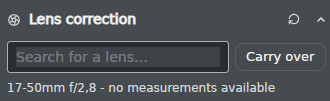
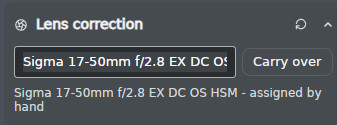
The 17-50 is a bit trickier. Your D-series body only writes “17-50mm f/2.8” into the file, without saying who made the lens, and Sigma and Tamron both make one like that. So FerrumPix won’t guess there. Assigning it by hand, like you did, is the way to go. It’s remembered for that lens, so you only have to do it once.
Your 50mm f/2.8 Macro just isn’t in the lens database FerrumPix uses, so there’s nothing to assign at the moment. It was confusing that the panel kept saying “No lens named in the shot data” after you searched, though. Now it tells you when there’s no match for what you typed. Searching like “Sigma 2.8/17-50” works now too.
If you ever want to undo a manual assignment, clear the search field and press Apply, or use the reset button in the group header.
When I look in gThumb - Exif I see “Lens 17-50mm F2.8”, but a bit lower I see Lens ID Number, that one says “Sigma 17-50mm F2.8 EX DC OS HSM”. Does that help to make it less trickier?
I had a look at FerrumPix and have to say, I’m impressed. I need only a viewer but it seems that even the editor is not too bad. Two things which I miss or haven’t found:
How can I delete pictures which are not in my home folder?
I have a separate partition which holds all my pictures. Everytime I want to delete a picture via FerrumPix it tells me, I am not able to delete, because it is not home. It is for sure not the worst decision to protect folders outside of home, but it would also make sense if one is able to define folders where it is allowed to have full rights. (I anyway think this shouldn’t be the task of a viewer/editor but the permission system of the OS).
Is there a possibility to show the whole picture in gallery view. At the moment I can’t even tell if a picture is portrait or landscape. I have to open it in the viewer.
That “Lens ID Number” is exactly the hidden code we read from Nikon files. Your Sigma 17-50 just wasn’t in our list yet. It is now, so the next version 0.9.59-3 should pick the right profile on its own. If it still shows only “17-50mm F2.8” after the update, could you send me one NEF? Then I can check whether your copy reports a different code.
Deleting outside your home folder: Right now FerrumPix only copies, moves, renames and deletes inside your home folder. That’s why it refuses on your separate partition. There’s a workaround that should do what you need. Put a symlink to the partition in your home folder, e.g.
ln -s /mnt/photos ~/Photos-Disk
Then go to Settings > Gallery and turn on “Follow links out of the personal folder”. If you open your pictures through that link, deleting works there too. Viewing and editing were never restricted, by the way, only the file operations.
I take your point that this really belongs to the OS permissions. Letting you name trusted folders directly would be cleaner than the symlink detour. I’ll take that idea with me.
Seeing the whole picture in the gallery: Yes, switch to the “Photo wall” view. It shows every picture in its own aspect ratio and nothing is cropped, so portrait and landscape are easy to tell apart. The normal grid crops everything to squares, which is why you couldn’t see it there.
First of all, let me say I’m impressed with what you’ve made so far, the speed at which you’ve improved it, and the responsiveness to user feedback. I just heard of this project a few days ago, tested an appimage and then read this thread and it’s amazing to realize it’s been not much more than a month.
I’m looking for a move away from Lightroom (accompanied/motivated by a move from Windows to Linux). I’m testing all the usual suspects and came across FerrumPix. In many ways, it’s the best alternative to Lightroom for Linux. That said, I’m understandably concerned about business models, lock-in and portability.
You’re a one-man shop (with some Claude assistants, I understand) and have obviously been putting in a lot of work for so far little to no compensation. That is impressive, but also has me worried. Two likely eventual outcomes are that a) you eventually move to monetize this, or b) the pace slows or gets abandoned. A third outcome is that the tent expands to become a genuine community project. I see no sign of the third outcome, and a few comments of yours on DPReview hinted at eventual monetization. So I have some questions.
Beyond features, can you share your plans or hopes for the future in regards to business and development model? What reassurance is there that FerrumPix will be around, maintained and aligned with my interests in 10 years? I feel comfortable that combos like RawTherapee and DigiKam will be (or if not, someone will offer a transition path).
Pardon my ignorance here. Perhaps others here more accustomed to open-source photo packages already are up to speed on this. If I use FerrumPix for a few years and want to move away, what concerns do I have for portability and transition? I know I keep my images in a folder/file structure. I know there are XMP sidecars. Do the sidecars transition between different programs (understanding values like Exposure+10, Highlights-15, etc. will be rendered differently). Do stars and ratings transition? What does and what doesn’t?
Finally, a slightly different question. I use compact laptops. Which means integrated graphics. Primarily Intel, but possibly AMD. Assume a late model, as I’ll be upgrading soon. This is a gotcha with some of the recent open-source projects, that full features or performance require a dGPU. I see it coming up on this thread already. Can you share exactly which features/modules perform well on Intel or AMD iGPUs and which require a discrete card? Even if I’d love FerrumPix on a desktop with the right hardware, it may or may not be the best choice on an iGPU laptop.
Reassurance in 10 years? None I guess, though I can’t speak for @bitpainter75 of course. This is an open source project. Open source project may die tomorrow, after one year or never (GIMP, RawTherapee are many years among us).
That reassurance can only be delivered by commercial companies that sell their sofware and who can pay developers, now and in 10 or 20 years.
Reassurance in 10 years? None I guess, though I can’t speak for @bitpainter75 of course. This is an open source project. Open source project may die tomorrow, after one year or never (GIMP, RawTherapee are many years among us).
Fair enough. Perhaps my question came off as too demanding. But though I’ve been on Windows and Lightroom, I’m not new to the open source world. I’d argue that some projects give more reasons to be confident of their longevity than others. And history bears that out.
To be clear, I wouldn’t necessarily fault him if he decides he should monetize this in some way, or if he decides he can no longer keep up this pace or even maintain it at all. I can’t imagine keeping up his current pace on top of however he earns his income.
I’m already looking at an annoying transition because of how long I’ve been on Lightroom. I don’t want to repeat it in two years. I’m simply looking to understand where FerrumPix might go so I can reduce the chances of that in the future.
And if his answer is ‘I don’t know’ or ‘I don’t want to say yet,’ that’s his right. I’m just asking.