Hello, I’ve started using darktable today.
Since I’ll likely be using it for a long time, I have a question.
Is it possible to remove the “import into darktable” option from the Explorer right-click menu that is created during installation through darktable’s settings?
While it is possible to remove it from the Windows side, it would be quite a hassle if it were to reappear every time I update darktable.
Hey @otoro, welcome to the forum. There is currently no option out of the box for removing/not adding the right click menu entries. Though that could probably be implemented with the installer.
This would happen at most twice a year; I wouldn’t call that a hassle, nor would I say it justifies cluttering the installation process for many other users with yet another setting. Besides, Microsoft is currently rolling out improvements to File Explorer that will allow such menu items for specific applications to be moved into a separate submenu (including even the complete hiding of this app extensions submenu):
I can totally live with not introducing a toggle for the context menu entry but I’d say: Cluttering peoples context menu is worse then adding another checkbox to the windows installer. It’s not adding a lot of code complexity.
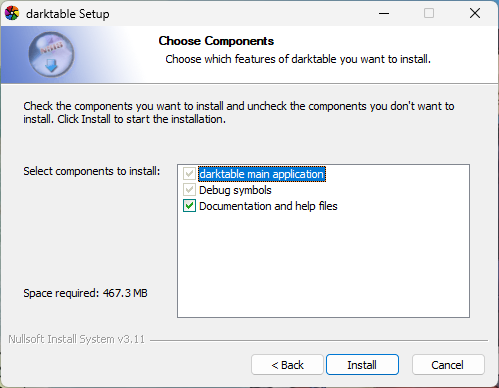
Are you sure that having to select an install path, a start menu folder and one checkbox is so much that adding anything would “clutter” the installer…? Like you could just add one more tick box here:
Unless you change the install path for parallel installs, on Windows you’re just clicking the same Next button like 5 times and that’s it. Or am I missing something?
The PR has been merged. Starting with tomorrows nightly it will be possible to deselect the context menu integration. @otoro unless you are using development versions you’ll have to wait a couple of months for 5.8.
@Vente FYI your screenshot is showing the NSIS Installer, the “official” builds use Inno - so it will a bit look different.
I suspect the screenshot you showed is either from Bill’s weekly builds or self compiled or from an older version? Those aren’t any less “official”. I was just referring to the nightly builds and the current releases, which use the Inno installer.
It’s a 5.4.1 installer that I kept around when I was downgrading from 5.6.x versions. So I guess I will need to check out the new one, but I doubt it’s that much worse, right
To add a little more, this isn’t too much trouble if it’s just one app, but it becomes really annoying when you have a lot of apps registered to the right-click menu, like in the days of Windows 98 or Me.
Also, since I operate without looking at the text, even if just one menu item is misaligned, I will make a mistake.
I was planning to wait and see for a while, but thank you so much.