While using Linux for image editing and color-critical work, I’ve run into the well-known problem that, although there are solutions that may work under Wayland, they aren’t particularly user-friendly, and managing ICC profiles across multiple monitors can be cumbersome. In addition, DisplayCAL doesn’t seem to be actively maintained anymore.
To solve this problem, I developed KelvinCal—an open-source suite for display calibration and profiling designed from the ground up for modern Wayland environments (specifically KDE Plasma 6).
Hardware-First Optimization via DDC/CI:
Instead of doing everything via software LUTs, KelvinCal talks directly to your monitor’s internal hardware via DDC/CI (ddcutil):
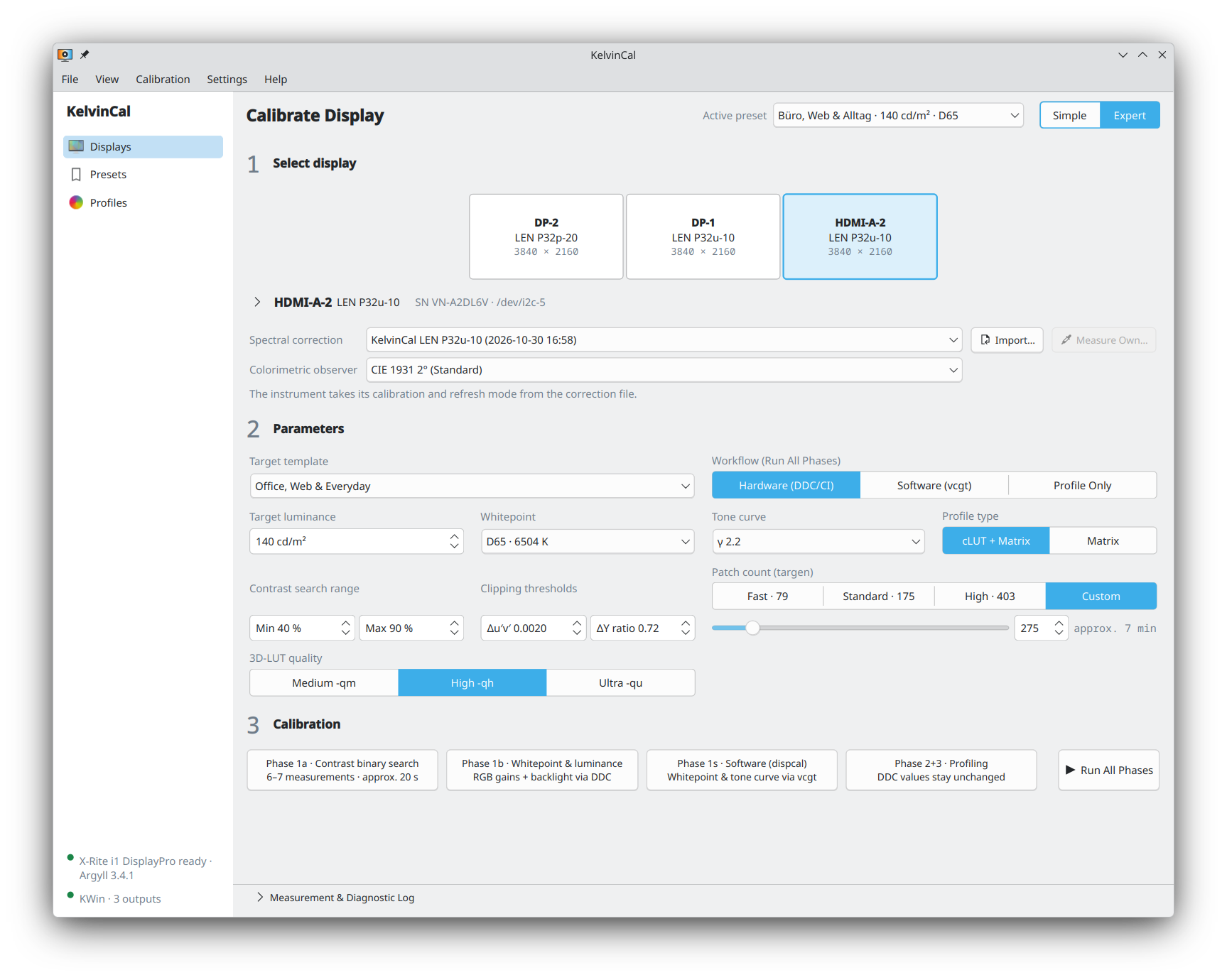
Automated Contrast Search: Uses a binary search to find the highest contrast setting before white-level clipping or tint shifts occur.
Automated D65 Whitepoint & Luminance Regulation: Closed-loop measurement that adjusts your monitor’s physical RGB gain registers and backlight brightness to hit target D65 and luminance (e.g., 120 cd/m²) before profiling begins.
Applies the resulting ICC profiles directly through KWin’s Color Management DBus interface (org.kde.KWin.ColorManager). No manual copying or X11 atom hacks needed.
Pre-Save Profile Review & Kink Check:
Lets you inspect the generated tone response curves (TRC), pointwise gamma \gamma(x), and gray balance before saving.
Includes an automated “Knick-Check” (kink / discontinuity detector) to catch measurement glitches, along with a live A/B comparison toggle in the compositor.
Multi-Monitor Presets & Plasma 6 Widget:
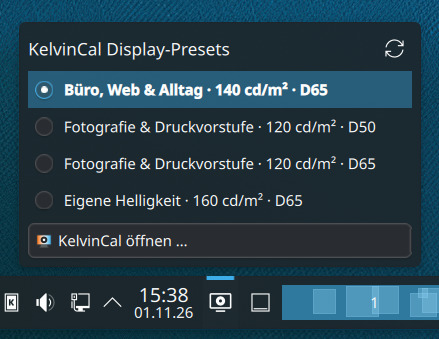
Save your complete setup (DDC values + active ICC profile for each connected display) into presets (e.g. Office/Web, Photo Editing, Evening).
Includes a native KDE Plasma 6 desktop widget (Plasmoid) for one-click switching.
Hi! Great question, and this touches on a core design decision when moving from X11 to Wayland:
In the traditional X11/DisplayCAL workflow, “calibration” meant running dispcal to generate 1D curves loaded into the GPU gamma ramps (the vcgt tag) prior to profiling. Under pure Wayland, user-space applications cannot directly inject LUTs into the CRTC/GPU ramps anymore—the compositor (KWin) owns the entire color pipeline.
KelvinCal takes a different, “hardware-first” approach to calibration:
Hardware Calibration via DDC/CI (before profiling):
Instead of compressing bit depth in the GPU LUT to achieve D65 and correct luminance, KelvinCal adjusts the monitor’s internal hardware directly:
Finds the maximum contrast without white-level clipping (binary search).
Regulates the physical RGB gain registers and backlight brightness via DDC/CI to hit D65 and target luminance.
This ensures the monitor is in its optimal hardware state before any test patches are read.
Profiling & Compositor-level 3D-cLUT (instead of 1D vcgt):
Patch measurement (dispread) is performed directly on this hardware-optimized state. KelvinCal then generates a high-quality 3D-cLUT profile (colprof -qh -aX), which KWin applies directly through its color management engine. The 3D-cLUT handles tone response curves, gray balance, and gamut mapping with much higher precision than traditional 1D calibration curves without causing banding in the GPU LUT.
That said, if you have a workflow where a specific pre-conditioning curve or dispcal-style calibration step is preferred, I’d love to hear more about your use case!
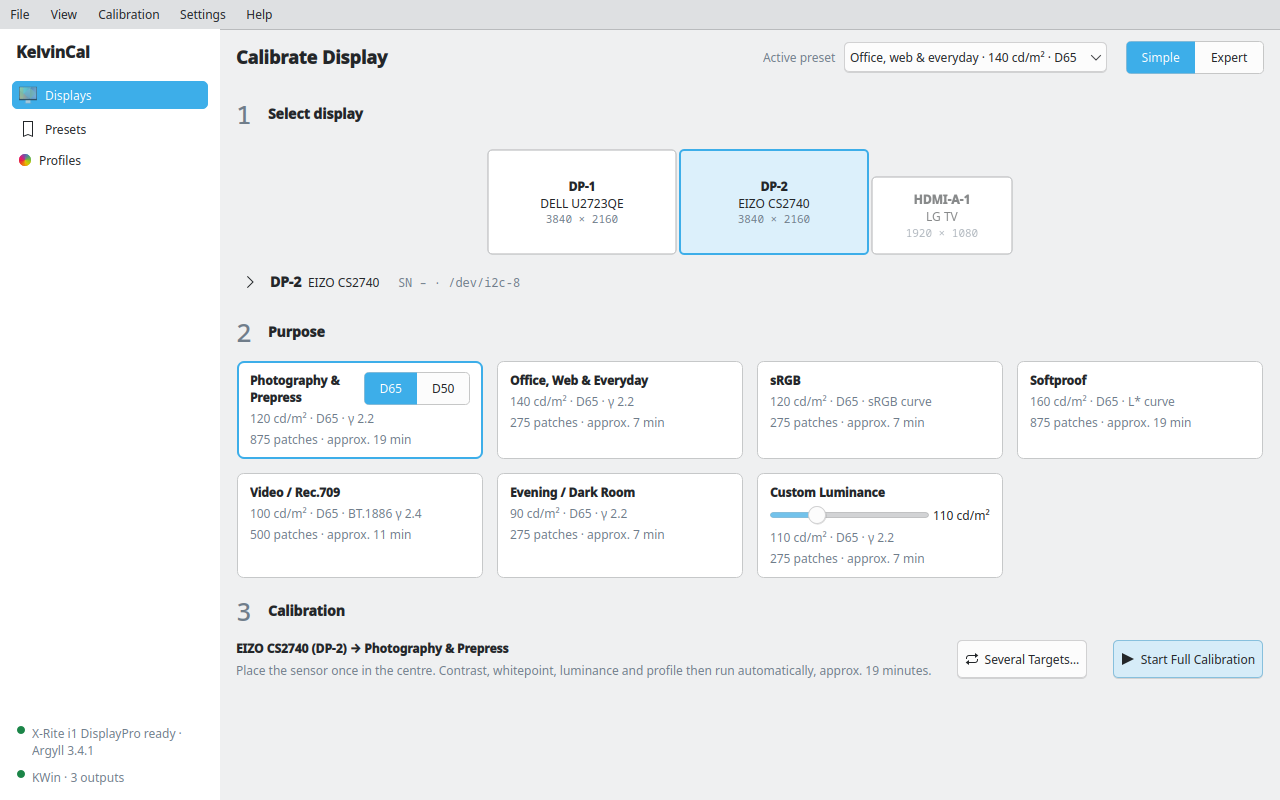
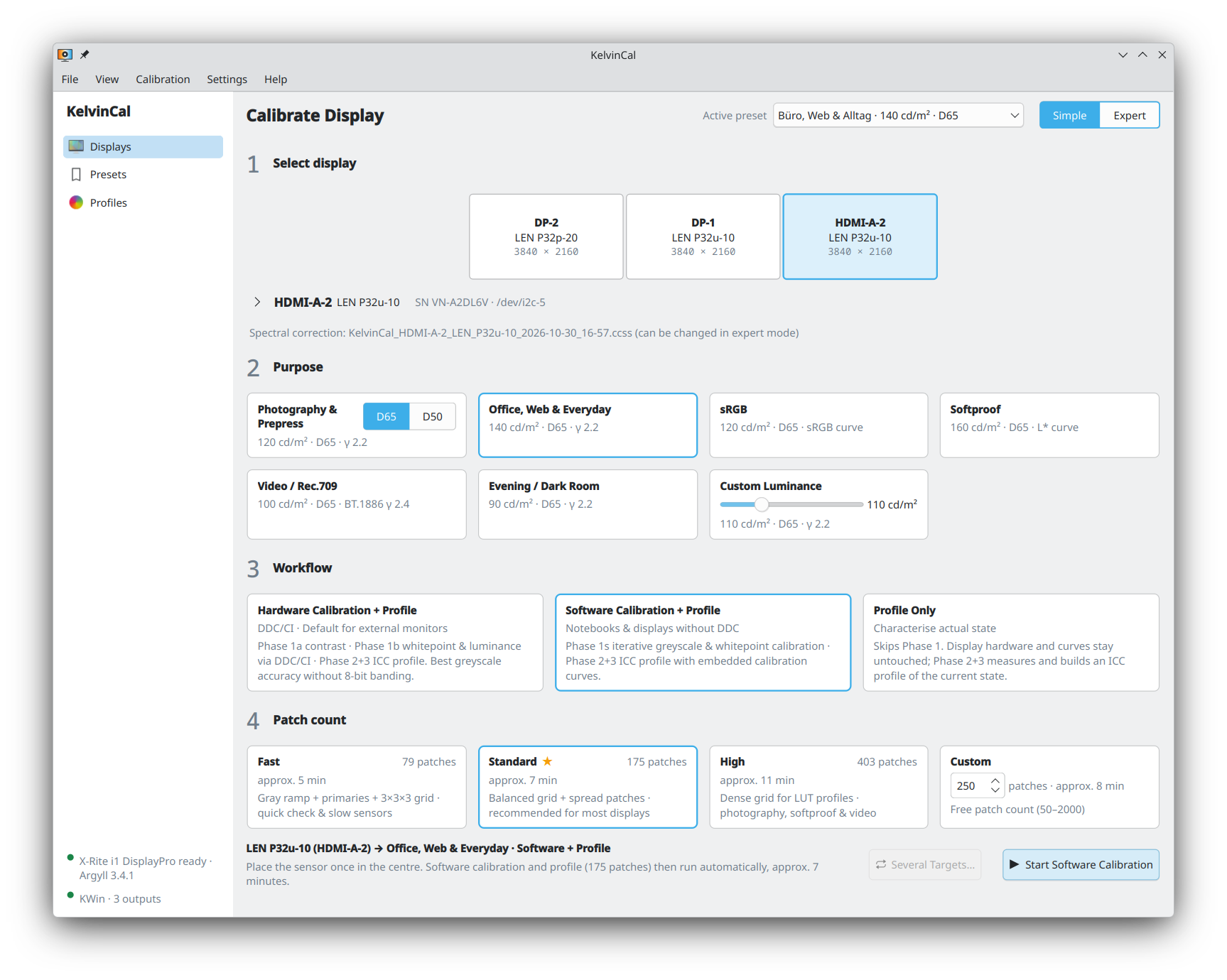
I’d like to add one more thing: I wanted to make the calibration as simple as possible. That’s why there’s a “Simple” mode, which makes the whole process easy and convenient. But in the later steps, you get to see all that cool data ;-). Maybe it can be simplified even further. I’m not sure.
KelvinCal was developed with extensive help from AI. The code, the tests and the documentation were written by Google’s Gemini and Anthropic’s Claude under my direction. Requirements, design decisions, review and all tests with real displays and measuring instruments are my own.
Whats the difference between the plasmoid and non plasmoid packages? Does it run on other desktop environments too? Does it produce and icc profile which can be used with software such as darktable that does not yet have the wayland color management protocol implemented?
The plasmoid package contains only the KDE Plasma 6 desktop widget for quick one-click preset switching. The other package is KelvinCal itself.
In its current state, KelvinCal rely on KWin’s DBus interface (org.kde.KWin.ColorManager). However, the codebase is modular with an abstract CompositorBackend, so backends for GNOME (Mutter / colord) or wlroots can be added. I haven’t implemented the GNOME backend yet simply because I don’t have a GNOME test environment, but contributions and testing are very welcome!
Regarding Darktable and ICC profiles:
Yes, absolutely! KelvinCal generates a standard ICC profile (.icc) saved to ~/.local/share/icc/.
Because it’s built via ArgyllCMS (colprof -qh -aX), it includes both a high-resolution 3D-cLUT and standard matrix/shaper fallback tags. Any color-managed application—like Darktable, RawTherapee, or GIMP—can use this file directly as its display profile, making it fully usable even if the application hasn’t implemented the Wayland color management protocol yet.
Ok, I gave this tool a try and ran into one issue: after the profiling (phase 2?) kelvincal says something like that 50 measurements are significantly different from what they should be, yet when I click on re-measure, it says that my spyder is not connected - this happened twice. The second time I just clicked on calculate profile despite the differences and the profile was created. However, the second time I had to reduce the number of the patches because 875 patches take a very long time to measure with my old spyder. The profile that I successfully created seems to be ok, the pics look ok and the profile data seems ok too. The white point is not 100% D65 but with my screen, it is not possible to change the red, green and blue values (with the buttons of the monitor - so I am not surprised kelvincan did not touch that either).
If I understand it correctly, it’s easy to just swich from evening to day with kelvincal, that seems to be handy.
However, I don’t see a possibility to do just a profiling, and that seems to be a disadvantage.
Besides, I do think that a lot of more “normal” (non pro) screens do profit from calibration curves as far as e.g. (color) banding is concerned, and with laptops, there is no other way to set the white point. I am not a dev but I think it should not be such a big deal to add the possibility to apply a calibration curve before profiling since kde plasma 6.x can deal with profiles that have a calibration curve pretty well.
This is the very first public version and my main target was to make profiling with DDC easy.
Profiling only (without DDC):
You’re right, non-DDC workflows need better support. However, you can actually just hit the “Phase 2+3: Start ArgyllCMS Profiling” button directly and ignore Phase 1 completely. But you’re totally right—the UI makes it look like you must do all the steps in order. Anyway, I’ll review the handling of non-DDC workflows.
Spyder:
Yeah, older Spyders can take forever on dark patches with large patch sets! 175 patches is already a bit of a wait, so a dedicated “fast” preset with fewer patches for older meters is definitely a good idea.
The disconnect problem seems to be a timing issue. I’ll look into that.
I will look into those things in the next days. Feel free to open issues on GitHub, but I will provide updates here too.
I think there’s a lot of research going on at the moment in to calibration because the narrow primaries used aren’t well matched to CIE 1931, so having an actively developed tool which may follow any new recommendations will be useful.
KelvinCal uses ArgyllCMS under the hood, so any device supported by ArgyllCMS works out of the box (see the ArgyllCMS instrument list). I develop and test with an i1 Pro and ColorMunki Display.
Regarding narrow primaries and CIE 1931: I ran into the exact same issue with different wide-gamut displays looking visibly different side by side despite measuring identical D65 coordinates. To solve this in practice, KelvinCal includes a Visual White Point Match tool to visually match a display to a reference monitor via hardware DDC gains and save the resulting xy offset per display for all future calibrations.
My knowledge on these topics is very limited, but my AI agent says ;-):
You can either calibrate/profile directly with a spectro, or use it in KelvinCal to measure a high-resolution (-H) custom .ccss correction for a colorimeter (the raw spectral .ti3 is also kept alongside it).
We also have backend hooks for Argyll’s -Q observer flag (e.g. 2015_2), though it’s not exposed in the GUI yet.
Hey are you actually adding the creation of calibration curves? Because this was so far thr biggest weakness of displaycal, the impossibility to load the calibration curves before the profiling. On wayland at least
DisplayCAL fails on Wayland because the compositor blocks apps from loading .cal curves directly into the GPU hardware LUT before profiling.
KelvinCal works around this by driving ArgyllCMS (dispcal and dispread) in -d dummy mode through its own Wayland patch window while KWin’s color management is temporarily disabled for that screen:
dispcal measures and creates the .cal curves (after an interactive brightness/RGB check).
dispread -k <file.cal> applies those calibration curves directly to the RGB patches it sends to our patch window—so it doesn’t need to touch the Wayland video LUT during measurement at all.
colprof embeds the curves as a vcgt tag into the final .icc profile, and KWin 6 applies both the vcgt curves and the ICC profile natively.
(And for external monitors with DDC/CI, KelvinCal calibrates contrast, brightness, and RGB gains directly in the monitor hardware, so you normally don’t even need vcgt curves there.)
I’m afraid I have to confirm @betazoid’s experience.
Even in our photography group, the topic of calibration was either unknown or deliberately ignored for up to two presentations. Even my offer to lend my Spyder to others received no response.