Hello @Masterpiga. I had a chance to play with the flexi panel, and have some notes - in no particular order. The notes are based on this playraw edit.
- The plentiful functions of the flexi panel are very nice. The fact that I can do a lot of things with each individual element is what decides of the new panel’s power. The fact that all of them are documented in the popup tooltip makes them all somewhat accessible. However, I wonder if these are all easy to use? There is so much that can be done, but the shortcuts are… so many, and so disjointed. For example, ctrl+click:
- when selecting a mask element tool - allows to add multiple elements one-by-one quickly
- when interacting with the mask group header, allows renaming
- when interacting with a specific mask, inverts it
…this will definitely go beyond the scope of what you are asking, but perhaps it is worth noting here anyway - such shortcuts also matter when considering other modules. For example, ctrl+click OR right-click both make the pipette in the color picker module select area instead of a point. But in the channel masks, we have two pipettes, one of which works similarly, and the other… doesn’t? Sorry, this is not a constructive point, and again - likely out of scope - but hope worth highlighting.
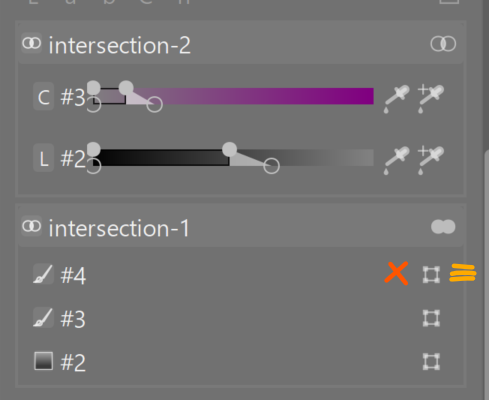
- I think I would appreciate an interface that surfaces more functionalities. For example, each individual mask element can have it’s opacity adjusted by hovering over it in the image canvas with the mouse, and the ctrl+scrolling. I would be happy to see the current opacity of each element in the flexi panel - and perhaps little icons that allow actions like delete an element, or a ‘scrubber’ handle to grab-and-reorder? A truly atrocious illustration of what I am thinking of is at the bottom of this post.
- I think I may have lost the ability to visualise the hue channel by mousing over the relevant mask and hitting the ‘c’ key (itself one of the super useful features, but very obscure to know about - and sometimes fiddly to trigger. Maybe it would warrant its own UI button?)
- When using the ‘import an existing shape, or reuse another’ button, it does not appear to parse correctly special characters in other module names. I see “contrast & ; texture” rather than “contrast & texture” listed
- in the same menu, when I pick something from the list “use the same shapes as”, the new shapes are appended, rather than replacing existing ones. Which I think is desirable, but the wording “use the same shapes as” suggests a replacement will happen.
- This is probably beyond the scope of what you set out to do, but I think still worth highlighting. I do the following:
- I create a mask in the flexi panel (just a simple one to test, one shape only) on module 1
- in another module 2, I use the “use the same shapes as” and select module 1
- the effect is as expected, module 2’s mask now is the same as module 1’s
- I go back to module 1, and make two modifications to its mask a) I change the existing shape, and b) I add a new shape
- I go again to module 2, and observe that change (a) was reflected, but change (b) was not. Therefore, my masks for modules 1 and 2 are not “synced” anymore. This makes sense and I understand the logic behind it - the “use the same shapes as” only imported the shapes as a one-off instead of placing a permanent sync between the two modules’ masks. But - maybe that would be worth considering as an additional option, so that I can in the beginning define my main areas of masking and then use multiple sets of modules per each masked area - and if I want to refine mask of any one area, all these refinements are then propagated to all the relevant modules. I hope this is a helpful suggestion, and apologies for bringing this up again if not. I am still tremendously impressed and grateful for the flexi panel anyway.
- Lastly. I could not reproduce it so cannot provide any useful detail, but when I was moving mask elements around and turning them on and off, darktable crashed for me once. No error, just instant window shutdown. I am on Windows 11.
Phew, sorry for this mess of a brain dump. I really hope this might be a little helpful. I am keen to do more testing if you think it’s worth it?