And yeah, Negs deserves a dedicated thread in the Spektrafilm category. Create one and makes posts about updates and development there. This thread is messy as is. 
In my opinion the film border with “Kodak” is a bit much in terms of fakery, it would be cooler if it was saying “spektrafilm v0.14” instead.
Let’s continue here. I will need to update the original post there to match the current progress.
I added both and I’ll try uploading it to FlatHub. I hope they accept it.
I added that to my feature Backlog.
1 Like
Apologies for not being up to speed on things, but with all these forks, I’m getting a little confused.  I’m using the Dyeworks version. After trying other versions, this is the one that I prefer.
Is the DyeWorks version still being developed? Also, I haven’t been able to find a separate thread (or topic) for discussion on this version - is there one?
1 Like
Dyeworks thread is this one -
1 Like
Great - thanks!
Is there any plan currently to add more on the negative scanning side of things? That’s the missing link for me personally - I think the majority of film shooters I know scan the negs directly and skip the print (and most minilabs scan the neg and then print it).
At the moment spektrafilm spits out lovely virtual negs which can be processed in Neg Lab Pro and other workflows but it’s quite cumbersome and time-consuming.
I’d love to see a module that simulates the negative scanning process so you can emulate Aura/Frontier/Noritsu etc output. I don’t know whether the technical data is out there to do it to spektrafilm standards.
Might I suggest trying out the Darktable spektrafilm module, disable the print/paper and use the native negative inversion module called negadoctor? Ive been playing with that combo exclusively lately and I am sure that with some adjustments youre gonna get real close to the scanner outputs. Some starter looks here for example - Spektrafilm "presets" share thread (+darktable styles) - #45 by bazdesh
1 Like
Cheers, just had a look! Somehow I didn’t really enjoy the spektrafilm implementation in Darktable when I tried it but I’ll give it a more thorough look.
Btw, I suppose one way to get the accurate film base colour would simply be to process a neutral grey image through spektra? Giving you a virtual blank frame to read it from. Or an image of a colourchecker.
I dont think neutral grey is good for the film base setting, if youre processing film scans, youre instructed to include some unexposed base in your scan, which is “pure” transparency, so a 100% black input.
Having a colourchecker shot from which you can build a look is not a bad idea - you could then do a digital + film combo and get much more accurate.
2 Likes
The fact that I can basically use spektrafilm on my GRIII with GRKit is just amazing. Thanks for starting this @arctic
1 Like
interesting! how can you do it?
4 Likes
I’ve got them working on Leica Q3 as well! A bit fiddly but there are tools to convert LUTs into Leica Looks and flash them to the camera by hijacking a wifi app session.
1 Like
 I’ve never heard of GRKit! That’s crazy!
1 Like
I got these working on my RIcoh GR. They suffer from someone of the same issues as the default profiles on the apps: Faded / lifted blacks, extremely clamped whites killing details, etc.
After doing some custom adjustments and re-exporting the luts with better starting points, they work well on the Ricoh. Not quite as accurate (only a 3x3 matrix and three tone curves) so its doing a ton of simplification but great none the less.
Mine sharing yours?
1 Like
Hi,
sharing here a post I made on another thread following @bazdesh suggestion.
Meanwhile I also tried Spektrafilm 0.3.4 still within Darktable: results were pretty similar although improvement is visible specially using artic2026b4 spectral upsampling.
I also spent quite a lot of time trying all my best to correct the yellow cast upstream of spektrafilm tone mapping in DT workflow but didn’t succeed.
I will do more test this week using a colorchecker as well to have no doubt about initial color calibration, regardless positive film simulation in spektrafilm seems “more difficult” to make natural, at lest from my perspective which can be wrong.
Reposting here then.
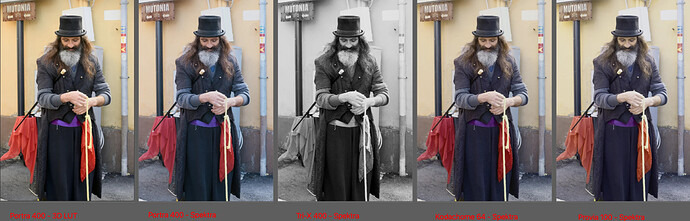
Hi all,
first post here and first of all I would like to thanks @arctic for the awesome job!
What I am posting here is the same image with same settings but different tone mapper / tone mapper settings.
First image is AGX+3D LUT using t3mujinpack luts, all the rest is Spektrafilm.
I am having trouble with positive film simulation like Provia and Velvia and less so with Kodachrome: there is a quite strong yellow cast on mid-tones while dark tones are towards blue which I was not expecting.
It is not clear to me how this should be corrected within Spektrafilm module or if behavior is expected.
Does anyone have any comment to make?
1 Like
Hey! Care to share the raw file? And also, the look youre trying to achieve? Its better to have the things side by side.
I made a thread some time ago and posted these slide inspired looks - Spektrafilm "presets" share thread (+darktable styles) - #8 by bazdesh and Spektrafilm "presets" share thread (+darktable styles) - #15 by bazdesh - to use those you need to either use the experimental branch of the spektrafilm python app or, and this is easier - download Negs here - Negs — Native and GPU accelerated Spektrafilm on MacOS, Windows and Linux - and drag and drop the .json files into the preset section there.
Slide emulations in spektrafilm are quite hard to get right, and I cant say I succeeded too much with the ones in my share thread, but - starting with a colder input color temperature works better (colder than the daylight D65 6503K thats usually set in darktable or as a default input color temperature in spektrafilm, lets say 5000K-ish), or in the experimental python version/negs - using the “film base” section can help you skew the casts.
1 Like
Been enjoying your works using spektrafilm. Do you have website/portfolio we can follow?