I am going to start to use Dark table for RAW images.
Are there any tasks that I will need to export a JPG and open it in Gimp, or can Darktable do everything that Gimp can do?
Interesting question. Frankly, I don’t know whether there is a need to use Gimp. What I can tell is, that after developing and processing images in Darktable still I do the final retouching of my photos in Gimp. The tools I find more comfortable to use in Gimp are mainly
- clone
- heal
- doge and burn
Occasionally, I also use wavelet decomposition (removing small blemishes).
Anything related to combining two or more images is done in Gimp.
To preserve image quality I don’t use jpg (8 bit color depth), but png (16 bit).
5 Likes
When I first started using darktable years ago I did just a couple of operations in darktable and then exported to GIMP to finish.
As I got better with darktable (and the tools improved) I used GIMP less and less.
When retouch was added to darktable I quit using GIMP to as part of my development workflow.
Now I use GIMP for composites and such.
3 Likes
Welcome to the forum, Ollie!
For me I really only use GIMP in my workflow for cloning/healing to remove dust spots. It seems to work more intuitively for me than DTs retouch tool. Having said that, I really haven’t put much time in using retouch.
DT handles everything else for me impressively, inc. watermarking images.
I usually save to low res jpgs for uploading to Flickr, but categorise them so I can easily create a 16bit tif when required.
Hope that helps.
2 Likes
Hello. Welcome to this active community.
Darktable does not do everything that GIMP does, because it is not designed to do so, as both programs have different functionalities. Darktable is a raw developer, capable of handling various raw image formats and getting the best out of them in terms of dynamic range, colors, etc. GIMP, on the other hand, is a program focused on image manipulation from a more graphic approach, so to speak, since it handles layers among other features.
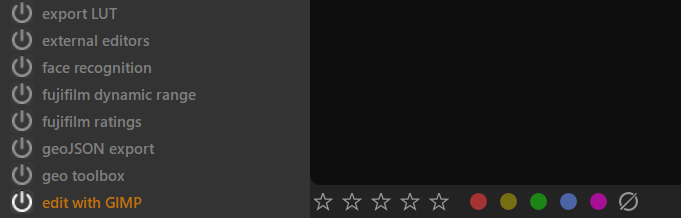
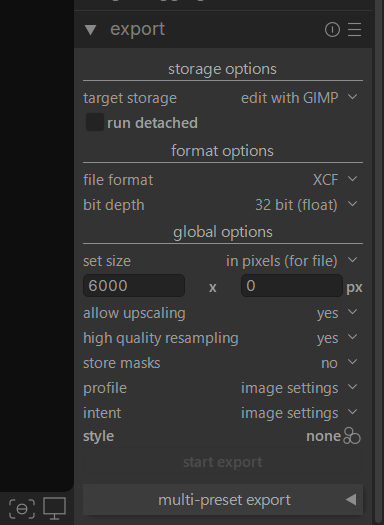
I, like many users here, use darktable and when necessary, we transfer the images to GIMP to make certain adjustments. As @Gerd mentioned, we sometimes export the image to GIMP. To do this, darktable has a built-in LUA script (thanks to @wpferguson among others) that is activated and, in the export module, gives us the option of launching the file as .XCF at 32-bit (float) so that no quality is lost in the process, and then making the necessary adjustments in GIMP.
LUA script
Export module
Greetings from Mérida, Yucatán.
5 Likes
@difrkaguilar I didn’t know about the LUA script to export .XCF files, despite the fact that .XCF is listed in the pull down menu to select the file format for export.  Thanks for the hint.
3 Likes
Works better than png 16 bit 
2 Likes
Although I love the darktable retouching module because I can visualize the wavelet decomposition, when I make heavy use of this module retouching skin for example, removing marks, wrinkles and blemishes, my PC, which is not so modern, tends to suffer. So for details like these I switch to GIMP, which by the way I have to test version 3 in detail and see how much easier the non-destructive editing process is for me.
3 Likes
The masking abilities of DT mean that 99% of the work I needed to use GIMP can be done in DT. However, there are still some occasions when GIMP has a role to play. I agree with above comments about dust removal when doing photo restoration. There are also times I need composites, layers or special effects available in GIMP but not DT. DT is an incredible program but GIMP still has a place in my world.
3 Likes
I agree with the other posters: dust removal from product shots can be easier in the GIMP, especially since it doesn’t slow down if you add thousands of heals (hopefully, you won’t have to do that, though).
Personally though, aside from that, I find the GIMP unnecessary. Darktable just does everything for processing a single Raw file.
2 Likes
Because I’m allergic to Darktable’s interface, I only use it for demosaicing and very rough exposure adjustments, and I do all my processing with Gimp.
Everything can be done with Gimp (?), except cataloging (which I definitely don’t trust Darktable with!) and demosaicing.
1 Like
Just out of curiosity, do you have any evidence for this? I have more than 100000 images in the database and now I wonder if I should start to become anxious …
2 Likes
Thanks very much for all the replies, I’ll keep Gimp and continue learning the differences from the generous replies.
1 Like
DT is a masterpiece, but it is made by humans, and they do mistakes sometime … so, to avoid big loss of data, you can do something:
- regular backups of ./config/darktable
- very good organization of files on your hard drive (folder structure and file name)
- do not use tags and grouping. Or use it, but do not make it very important for your image collection, i.e. in case your DT database is broken, and you don’t have backups , you can just import again all your images, and you are good to go …
I assume, that you already do regular backups of your images and edits (*.xmp)
1 Like
Sidecars help here, as tags are stored using well recognised xml tags. So those at least can be read by other programs.
The editing information, otoh, is only useful within darktable (but sidecars can help as a secondary backup against loss of the darktable database).
2 Likes
ah, sorry, yes. So only grouping is really lost, in case database is broken … much better! 
1 Like
I have nothing against Darktable cataloging, which I think is reliable, but I don’t like software that does everything, and I prefer my images to be stored wherever I want, backed up when and how I want, without the “concepts” of film, library, etc.
1 Like
I also prefer deciding myself where and how I organise my files.
That said, a file system gives you only one view of the images. Sometimes I like to filter or use a different view. Then tagging and searching come in handy, and the ability to store a somewhat complicated search is nice as well. So dt’s film rolls have a function, just not as the primary organisation of images (for me!)
2 Likes
Sure, .config goes into regular backup, and .xmp is in git along the git-annexed raws. Furthermore, raws are in YYYY-[MM-][DD-]Event_or_month/Photographer/ where Photographer is for those the family did, mine are in the root of each folder.
OK, so no negative experience so far … Basically I wanted to understand if it is bad experience, missing features or another reason. Thanks!
I only use darktable, no Gimp anymore.