Tested it now, it works great! The lens correction is automatically applied too.
Only when I export the photo to Piwigo, I do not see the EXIF data of the lens… Perhaps I would need to fiddle with the export settings? Is there a variable I could use to overwrite the EXIF from the database?
Only thing that may be good: when applying a lens, you should get some info toast message that it was applied or that there was an error. At the moment it just applies it without any further information, is that right?
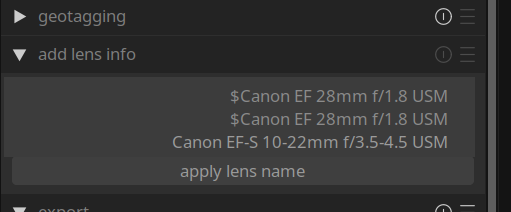
I think there may be a small bug. I added the 28mm lens yesterday and opened darktable today to add the 10-22mm and I see the 28mm now twice and with a trailing $:
Could that be a bug when no lens was added initially? I changed the configuration file to read
lua/add_lens_info/lenses=Canon EF 28mm f/1.8 USM$Canon EF-S 10-22mm f/3.5-4.5 USM
and now see the correct list.
but I solved the Piwigo issue: You can use the following pattern to replace the lens: Exif.Photo.LensModel → $(LENS)
There seems to be another bug with the UI: when I start darktable, the selection is on “apply lens” but the UI is in the “add new lens” mode.
I had a look at the code but I’m not familiar with darktable lua plugins - so at this point it is just guessing what needs change
edit: Now it starts correctly? Maybe it is just a matter how you exited darktable that it may run into a broken state?