yes, but it’s essentially the same tool that is called “color wheels” in other software, whose operation is often referred to as “color correction”. So I don’t think the name is that inaccurate…
yes, that makes sense. No need to be super precise here if people understand what the sliders do. Technically, I think “slope/offset/power” has a very precise definition (by ACES), whereas “lift/gamma/gain” is somewhat more vague (the actual formulas used depend on the specific software), but it probably doesn’t make much sense to be nitpicking here.
On my side, I would have 2 requests, really nice if you can/accept to add them in the program.
I often need to write notes about the work I’m doing. I can add write a small file text, of course, but it would be great to add somewhere (like in the bottom of the tools on the right), always visible, a kind of notepad where we can write things. Just text. No bold, italic, no formatted text, just plain text. And it would be saved with the file, of course. I think that would help a lot.
Is it possible when we pick a point for “white balance”, that the point is created and saved with the profile ? When created I could move it (so the balance is re-calculated), delete it (with ctrl + right click) or replace it by clicking elsewhere… It would be helpful for me when I modify an old work and I don’t remember where I clicked the first time. Typical use for me is when I have 2 resembling shots of the same scene, I worked the 1st, stopped for a reason, and want to use the same point for the 2nd but I don’t remember where I took it. Another situation is where we clicked somewhere and the result is not that good, moving the point is more useful to find the right point than pick pick and pick.
Personally, I use keyboard shortcuts ‘w’ for WB pick and ‘h’ to go back to hand, and find it very convenient. To be honest, I feel like dragging point for WB pick would be less convenient.
Sounds like just copying WB parameters (temp/tint) from the first shot should work, or am I missing something? I usually just manually set values (instead of copy processing profile with WB params only) from the shot I want.
FWIW, I agree that “Colour Correction” sounds too restrictive for what it does, but Alberto’s take on it is also accurate. With other image editors, tonal editing and colour editing are often separated into separate groups, but not always. In fact Adobe mixes them up quite a bit with Camera Raw and Lightroom, having a “Basic” group with tonal editing, WB and saturation; then another group for tone curves and HSL adjustments; and then a separate colour grading module.
My initial impression was that the tool in Art was dedicated to colour because of the name, so when I found out it did tonal adjustments equally, it was a surprise. Take that for what it’s worth.
I find it really unfortunate that we have “lost” the function which used to display false colors from the tonal equalizer. Many users find it more logical to invert the “tone map” and false colors buttons. ”There remains the problem of the small window that appears when the false colors are activated (not very useful if this function is present in the equalizer tonal) Would that be possible?
no, no, before the addition of the tonal map there was if memory serves there were only false colors activated by the checkbox at the bottom of the tonal equalizer module. The tonal map came after and the button above the image window was then created to show the false colors. Turning the tone map on hides the false colors in the image and you have to turn the tone map on and off to see the (false) colors on the tonal equalizer sliders. It is illogical and uncomfortable in use …
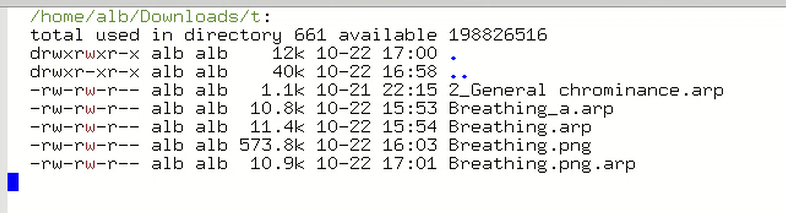
Base file (breathing) : 11.4 ko
the automatic saved file during your test : 10.9 Ko, like my example file Breathing_a, which has been saved on my side. Loss of information.
The file is saved, but only the basic file, not with all stuff done for the picture.