Operator error.  After working with it some more I’ve been able to get an acceptable edit. It has a very different starting point from what I’m used to but now I see some consistency in how my images will have to be edited. I actually like how the adjustment sliders are dialed in. They’re not overly sensitive. I’ve also got the lens correction to work. Great work you’ve been doing on CalibRaw. Thanks again!

1 Like
Hey, sorry I didn’t see your message. Thanks for giving CalibRaw a try :D. And sorry for the inconveniences.
I’m not home at the moment and will take look later, but may I ask how did you fix the lens correction problem? The raw that was uploaded here does not appear to carry any information about it.
Have fun editing:D
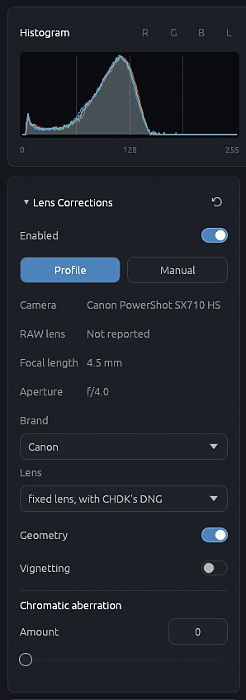
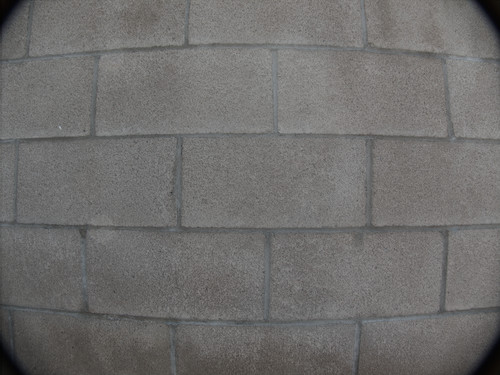
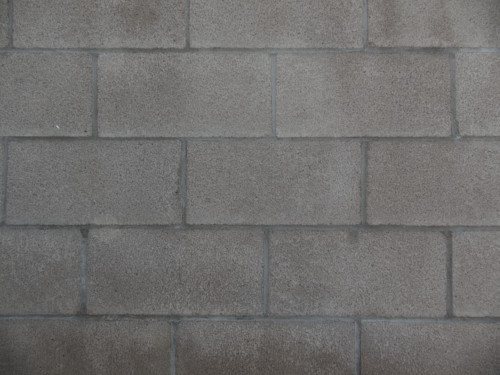
It wasn’t entirely accurate that I got the Lens Correction to work. I’m able to get it to make the correction using the settings shown, but I have to do it manually. CalibRaw recognizes the camera but not the lens so I have to manually set it to “fixed lens, with CHDK’S DNG”. It seems to do a pretty decent job of making the correction (cinder block wall images) but every image develops totally colorless and really dark as you can see in the histogram. I realize they’re raw files and that’s common but I usually have to adjust the exposure by anywhere from 1 to 2 full stops. That’s a bit more than what I’m used to but I don’t think it’s a problem since it still provides a decent image. Just thought I’d point it out.
And one small request if I may, would it be possible to include an option in the settings to have the current tool you’re working with collapse when you start working with another tool? It makes for a lot less scrolling the menu in the editor. Thanks again!
1 Like
This has been implemented and will appear in the next version.
And regarding the lens correction, I will have a look at why your raw doesn’t seem to read out and lens data. Sorry for the inconviniences. Thanks for the feedback 
And I will have a look at the output color/exposure too!
1 Like