Is your display profile set up correctly? Try the command-line utility darktable-cmstest. For me, it prints:
$ ./darktable-cmstest
darktable-cmstest version 3.7.0+358~geb1ddbe1a
this executable was built with colord support enabled
darktable itself was built with colord support enabled

primary CRTC is at CRTC 0
CRTC for screen 0 CRTC 1 has no mode or no output, skipping
CRTC for screen 0 CRTC 2 has no mode or no output, skipping
CRTC for screen 0 CRTC 3 has no mode or no output, skipping

DP-2    the X atom and colord returned the same profile
        X atom: _ICC_PROFILE (967072 bytes)
                description: [...]
        colord: [...]
                description: [...]

Your system seems to be correctly configured
But, if I force a broken config, it’ll tell me:
DP-2    the X atom and colord returned different profiles
        X atom: _ICC_PROFILE (0 bytes)
                description: (none)
        colord: ...
                description: ...

Better check your system setup
 - some monitors reported different profiles
You may experience inconsistent color rendition between color managed applications
Is colour management correctly configured in Gwenview?
Does KDE use the same rendering intent (way of converting image colours to display colours) as darktable? I left Gwenview at defaults, I think (at least I don’t remember if I ever configured these settings), and it uses perceptual:
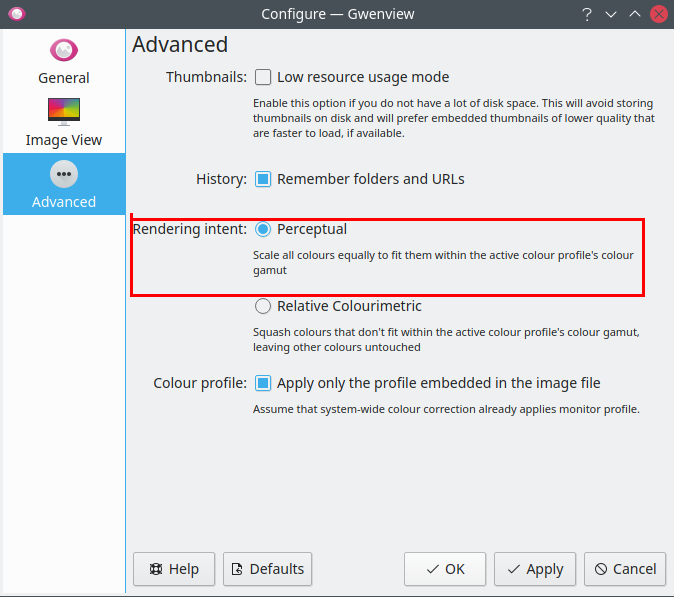
However, perceptual is a weird beast, AFAIK relative colorimetric is a safer option.
In darktable, you can set this if you enable LCMS2 in the config (normally it’s disabled, I think because it is slower and usually the differences are negligible). Which rendering intent is used if that option is disabled is not documented:
https://www.darktable.org/usermanual/3.6/en/special-topics/color-management/rendering-intent/
More info on rendering intents: