Thanks for your very fast testing so far!!
A memory and cpu time eating example:
gmic.run(“repeat 59 sp $> done to_rgb append_tiles , tic +b 5 b. 5 toc display”)
[gmic]-2./ Elapsed time: 20.646 s.
[gmic]-2./ Display images [0,1] = ‘apples, apples_c1’, from point (4608,4200,0).
[0] = ‘apples’:
size = (9216,8400,1,3) [885 Mio of floats].
data = (0,0,0,0,0,0,0,0,0,0,0,0,(…),0,0,0,0,0,0,0,0,0,0,0,0).
min = 0, max = 255, mean = 82.0775, std = 82.1838, coords_min = (0,0,0,0), coords_max = (3716,358,0,0).
[1] = ‘apples_c1’:
size = (9216,8400,1,3) [885 Mio of floats].
data = (1.41653e-36,1.41778e-36,1.41927e-36,1.42097e-36,1.42289e-36,1.42499e-36,1.42719e-36,1.42941e-36,1.43152e-36,1.43337e-36,1.43479e-36,1.43562e-36,(…),0,0,0,0,0,0,0,0,0,0,0,0).
min = 0, max = 255, mean = 82.0778, std = 78.2777, coords_min = (7181,7286,0,0), coords_max = (3548,2466,0,0).
It ran nearly 2 times quicker than the clang native apple cli build!
(MacBook Pro (Retina 13 Zoll, Anfang 2015)
wow nice!! I do not really know why, as obviously your tic/toc timer is dug deep into the expression, so the libG’MIC interpreter’s DLLs load, config warm up and destroy phases are not counted (common to both gmic.run() and gmic CLI executable).
setup.py uses -Ofast and -flto… would that be faster than your -O3 -flto?
But can you please tell if “display” now works and opens up a window on Mac OS?
If you use Macports, then what’s the strategy which you would recommend to install libX11 headless / by command line? It seems per Macports’ website that XQuartz has not been updated since 2016, so it should be avoided. I could try to remove the @6 llvm version constraint in my build script, install macports’s x11 (with no xorgserver package I guess…?) my post-build unit tests work even with no display enabled), then build with -lX11, then run delocate to repair the wheel’s missing shared libraries.
The maintainer of cibuildwheel, a magic cross platform building tool for Python wheels, has just spotted a fresh wheel’s shared libraries repairing tool for Windows, named delvewheel by adang1345, with support for Windows >=7 and Python >=3.6… this will relieve much pain for us once gmic-py gets built for Windows with MSVC. The related stalled WIP gmic-py windows compile recipe was here.
Compile options are the result of a cumbersome search concerning machine code errors. So I’ll change their nothing, although -march=native might be difficult.
“display” works as far as the pkgconfig finds the x11! opencv (camera and apply camera) works too. I have the separate XQuartz installed, not the one from MacPorts. To build gmic-py with X11 it was necessary to define PGK_CONFIG:PATH with the location of X11, here /opt/X11/lib/pkgconfig! Actually, with gmic I don’t see any alternative to X11! gmic without display reduces it to a mere filter, without or little possibility to develop scripts. By the way, the gmic cli make looks actually for /usr/X11 to include display. On my machine I have a symbolic link form /opt/X11 to it.
How to proceed for packaging gmic-py with either MacPorts or brew I have no idea, maybe @Carmelo_DrRaw could help. Still his things (at least the osx gmic cli package with libraries) stalled since some time. I am using my own builds since I had already MacPorts installed. gmic-gimp plugin works with native Gimp build, still needs gimp MacPorts installed. Problems are with zart, not initializing the camera since some time.
mp-clang-6.0: I don’t know the specifies of the compilers, only that with it openMP is usable! Actually I have selected this as my (cli) builder. MacPorts uses Apple native clang! Compared to the latest clang 6 builds, the MacPorts version, actually gmic 2.9.4 is fairly slow. A skeleton on a 8kx4k binary image runs night-long against 2 mins. Besides mp-clang 6.0 I have in MacPorts mp-clang-11 and mp-clang-9.0 installed.
Hello KaRo,
thank you for your feedback on macports / xquartz / pkg-config / clang6 x openmp.
I have just noticed that despite MacPorts’s online documentation stating that XQuartz is not recommended, the latter project’s website now shows a 2.80 alpha version in progress, and the related official Github repository shows ultra-fresh commits by an Apple Inc. employee in Cuppertino.
What makes me wonder is how Inkscape managed to get rid of the XQuartz dependency recently… Because the less people have to install extra things, the happier I feel for them.
I am a bit too distant from GIMP, gmic-qt and zart’s guts for now, but as far as gmic-py builds are concerned, once a proper build recipe is found, it should be easy to have it maintained and shipping for every stable release, using the gmic-py’s Github Workflow/Actions tools (a sort of Github’s free Travis service), as they are already working well for Linux.
As to OpenCV, the policy decided with @David_Tschumperle for gmic-py, was to avoid packaging it into the Python wheels, although it does get linked against when DIY compiling (you have done it yourself) for anyone who has libopencv installed and detectable by pkg-config (or equivalent for Windows when a proper Windows compile chain lands and gets documented). The reason is that libopencv and its subdependencies are too big (dozens of megabytes).
Unless @Carmelo_DrRaw wants to comment, there is now enough information for me to retry to tune the Mac OS gmic-py builds for 2.9.4 and make them support X11.
XQuartz:
Interesting, however I could not start the actual alpha version! I think inkscape is similar to Gimp. I am using X11 mostly with gmic. Years ago it was a must for work remotely. I think to use another window system on Mac is a question of man power and time in Caen, of course the number of Mac gmic users is probably quite limited and not just inviting for such a task! (Still there is a lot of appealing progress!)
gmic(-py) python bundle:
I don’t know how such bundle is structured and organized, still for Mac it would be helpful to have a self-fulfilled package without the need of Xcode installation, similar the osx bundle from @Carmelo_DrRaw. I think he is using a Travis script (Release Continuous build · aferrero2707/gmic-osx · GitHub) too. Still it would be good to have the possibility to compile gmic(-py) locally, best with test for MacPorts or homebrew. Using gmic from MacPorts there is also libgmic.dylib ready built in the library path! In my trial I added the XQuarts pkg-config folder to the PKG_CONFIG_PATH, maybe that is nothing for normal Mac Users. Perhaps a test for /usr/X11 or /opt/X11 could be helpful to ensure existence of X11. As I already said for gmic usage as a filter, there is no display inside gmic necessary, still for gmic script development in python using gmic-py that becomes without display very inefficient.
openCV
You (and @David_Tschumperle) are quite right, the camera is not so important, still nice for quick picks. Years ago I had the camera of a microscope attached for immediate analysis and processing. Besides, the openCV package is possibly a bit to large and to complex just for driving a camera and nothing more. Additionally there is already an opencv4 waiting!! The step from opencv to opencv 3 was quite cumbersome. I think at that time David was near to abandon it, similar to his position concerning Mac and gmic.
Thank you for thorough answers.
Thank you for your feedback on the non-working recent alpha Quartz for you.
I would not mind fixing gmic-py for MacOS if I some lent me such a computer, even if it is many years old.
From the Github link of aferrero2707’s gmic-macosx project’s 2018 Travis-built release which you pasted
I see that it has a gmic-cli executable + ships the following shared libraries in a subdirectory:
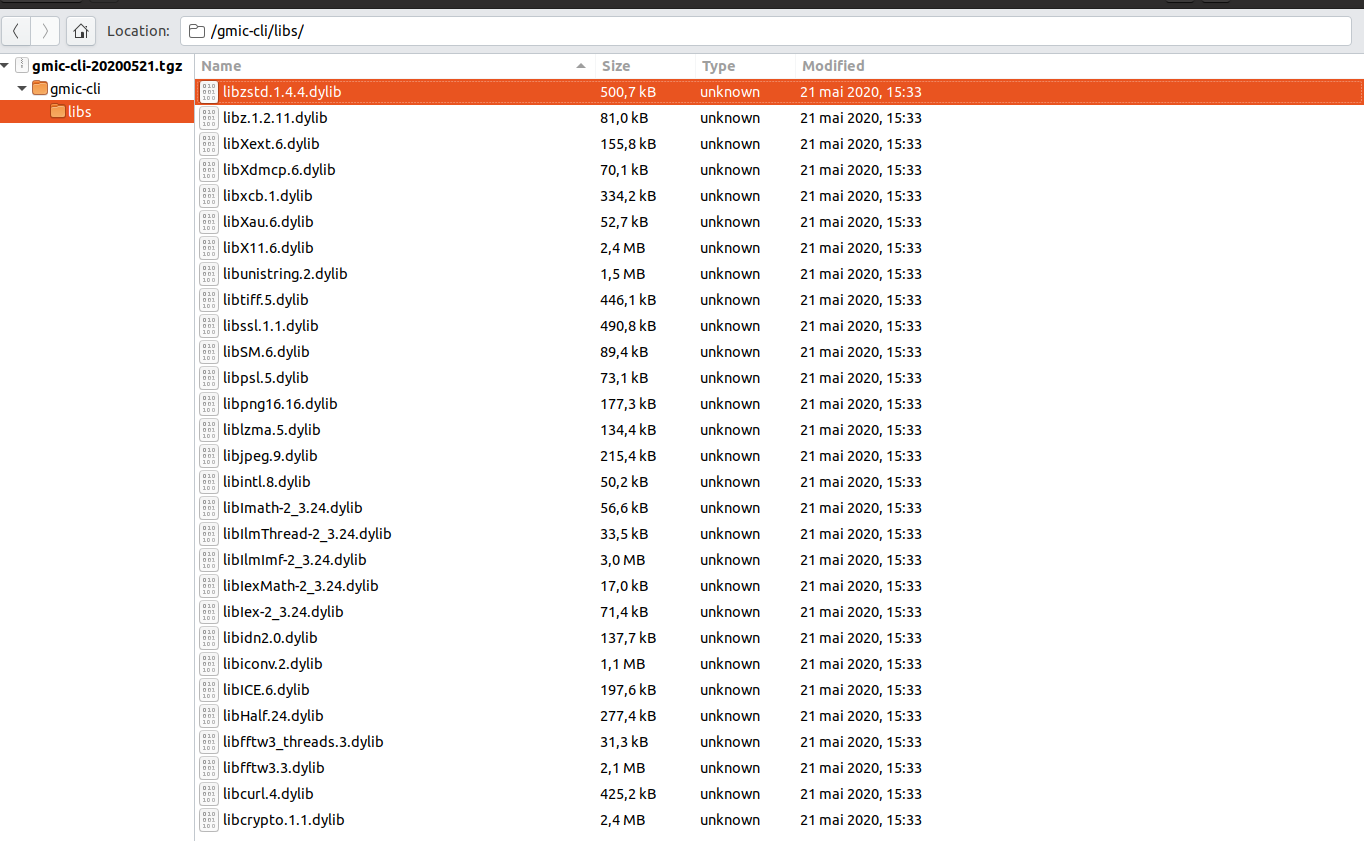
include libX11. But the build scripts shows no mention of how X11 is installed, be it using
brew installed or otherwise. Since the project dates back to 2018, maybe it has relied on X11.app, which used to be included silently on Mac OS.
The G’MIC from Macports release which you mention is very up to date (provides G’MIC 2.9.4) lives here, its build recipe is here, but it builds only libcgmic aka gmic-clib, gmic-qt and gmic, whereas gmic-py relies on libgmic (with no c between lib and gmic).
I see that X11 support is included in what is being built, so it could be a good simplifying news for a gmic-py buildchain and end-users setup process.
Could you confirm that with Macports G’MIC, you have a “libgmic.dylib ready built in the library path”, and that it is not just a libcgmic.dylib (with a C between lib and gmic)? If you run pkg-config gmic --libs --cflags (or so…) do you see some nice output?
If a libgmic.dylib is there, I could tune gmic-py’s setup.py a bit to skip rebuilding libgmic if pkg-config can find it…
Since several generations X11 is not part of MacOS anymore. I think there is no difference in the installed xorg-server. Possibly there is a link in /usr/X11 to ensure the existence besides a launch agent.
Concerning libgmic, there is no gmic.pc file for png-config installed. On MacPorts:
$ port content gmic
Port gmic contains:
  /opt/local/bin/gmic
  /opt/local/include/gmic.h
  /opt/local/lib/cmake/gmic/GmicConfig.cmake
  /opt/local/lib/cmake/gmic/GmicTargets-release.cmake
  /opt/local/lib/cmake/gmic/GmicTargets.cmake
  /opt/local/lib/libgmic.1.dylib
  /opt/local/lib/libgmic.a
  /opt/local/lib/libgmic.dylib
  /opt/local/share/bash-completion/completions/gmic
  /opt/local/share/man/man1/gmic.1.gz

MacPort contains gmic, gmic-gimp, gmic-qt and gmic-clib ports. The last two I don't have installed.

$ otool -L /opt/local/lib/libgmic.1.dylib
/opt/local/lib/libgmic.1.dylib:
/opt/local/lib/libgmic.1.dylib (compatibility version 1.0.0, current version 0.0.0)
/opt/local/lib/libcurl.4.dylib (compatibility version 12.0.0, current version 12.0.0)
/opt/local/lib/libX11.6.dylib (compatibility version 11.0.0, current version 11.0.0)
/opt/local/lib/libfftw3.3.dylib (compatibility version 9.0.0, current version 9.8.0)
/opt/local/lib/libfftw3_threads.3.dylib (compatibility version 9.0.0, current version 9.8.0)
/opt/local/lib/libopencv_dnn.3.4.dylib (compatibility version 3.4.0, current version 3.4.13)
/opt/local/lib/libopencv_highgui.3.4.dylib (compatibility version 3.4.0, current version 3.4.13)
/opt/local/lib/libopencv_ml.3.4.dylib (compatibility version 3.4.0, current version 3.4.13)
/opt/local/lib/libopencv_objdetect.3.4.dylib (compatibility version 3.4.0, current version 3.4.13)
/opt/local/lib/libopencv_shape.3.4.dylib (compatibility version 3.4.0, current version 3.4.13)
/opt/local/lib/libopencv_stitching.3.4.dylib (compatibility version 3.4.0, current version 3.4.13)
/opt/local/lib/libopencv_superres.3.4.dylib (compatibility version 3.4.0, current version 3.4.13)
/opt/local/lib/libopencv_videostab.3.4.dylib (compatibility version 3.4.0, current version 3.4.13)
/opt/local/lib/libopencv_calib3d.3.4.dylib (compatibility version 3.4.0, current version 3.4.13)
/opt/local/lib/libopencv_videoio.3.4.dylib (compatibility version 3.4.0, current version 3.4.13)
/opt/local/lib/libopencv_imgcodecs.3.4.dylib (compatibility version 3.4.0, current version 3.4.13)
/opt/local/lib/libopencv_features2d.3.4.dylib (compatibility version 3.4.0, current version 3.4.13)
/opt/local/lib/libopencv_video.3.4.dylib (compatibility version 3.4.0, current version 3.4.13)
/opt/local/lib/libopencv_photo.3.4.dylib (compatibility version 3.4.0, current version 3.4.13)
/opt/local/lib/libopencv_imgproc.3.4.dylib (compatibility version 3.4.0, current version 3.4.13)
/opt/local/lib/libopencv_flann.3.4.dylib (compatibility version 3.4.0, current version 3.4.13)
/opt/local/lib/libopencv_core.3.4.dylib (compatibility version 3.4.0, current version 3.4.13)
/opt/local/lib/libGraphicsMagick++.12.dylib (compatibility version 18.0.0, current version 18.0.0)
/opt/local/lib/libGraphicsMagick.3.dylib (compatibility version 26.0.0, current version 26.0.0)
/opt/local/lib/libtiff.5.dylib (compatibility version 12.0.0, current version 12.0.0)
/opt/local/lib/libpng16.16.dylib (compatibility version 54.0.0, current version 54.0.0)
/opt/local/lib/libz.1.dylib (compatibility version 1.0.0, current version 1.2.11)
/opt/local/lib/libjpeg.8.dylib (compatibility version 8.0.0, current version 8.2.2)
/opt/local/lib/libIlmImf-2_3.24.dylib (compatibility version 25.0.0, current version 25.0.0)
/opt/local/lib/libImath-2_3.24.dylib (compatibility version 25.0.0, current version 25.0.0)
/opt/local/lib/libHalf.24.dylib (compatibility version 25.0.0, current version 25.0.0)
/opt/local/lib/libIex-2_3.24.dylib (compatibility version 25.0.0, current version 25.0.0)
/opt/local/lib/libIexMath-2_3.24.dylib (compatibility version 25.0.0, current version 25.0.0)
/opt/local/lib/libIlmThread-2_3.24.dylib (compatibility version 25.0.0, current version 25.0.0)
/usr/lib/libc++.1.dylib (compatibility version 1.0.0, current version 400.9.4)
/usr/lib/libSystem.B.dylib (compatibility version 1.0.0, current version 1252.250.1)

Surprisingly /opt/local/bin/gmic is not build with /opt/local/lib/libgmic.1.dylib
Here is the Port file, maybe you should contact the maintainer
maintainers         {mps @Schamschula} openmaintainer

# -*- coding: utf-8; mode: tcl; tab-width: 4; indent-tabs-mode: nil; c-basic-offset: 4 -*- vim:fenc=utf-8:ft=tcl:et:sw=4:ts=4:sts=4

PortSystem          1.0
if {${subport} eq "gmic-clib"} {
    PortGroup       makefile        1.0
} else {
    PortGroup       cmake           1.1
}
if {${subport} ne "gmic" && ${subport} ne "gmic-clib"} {
    PortGroup       qt5             1.0
    PortGroup       active_variants 1.1
}

name                gmic
version             2.9.4
revision            1
license             CeCILL
categories          science graphics
platforms           darwin
maintainers         {mps @Schamschula} openmaintainer

description         G'MIC is an interpreter of image processing macros

long_description    G'MIC stands for GREYC's Magic Image Converter. It is \
                    focused on the design of possibly complex pipelines for \
                    converting, manipulating, filtering and visualizing \
                    generic 1d/2d/3d multi-spectral image datasets. This \
                    includes classical color images, but also more complex \
                    data as image sequences or 3D volumetric images. G'MIC \
                    has been designed with portability in mind and runs on \
                    different platforms (Windows, Unix, Mac OS X).

homepage            https://gmic.eu
master_sites        https://gmic.eu/files/source/

use_parallel_build  no

distfiles           ${name}_${version}${extract.suffix}

checksums           rmd160  f2b8179bd16d7a04b8c47355bb5582c268edb075 \
                    sha256  790bee48f496765f6b59067dfb10dc34e1eb576caf9a95f30af0d567026eacc7 \
                    size    7279628

depends_lib         port:curl \
                    path:lib/libavcodec.dylib:ffmpeg \
                    port:fftw-3 \
                    port:GraphicsMagick \
                    port:ilmbase \
                    path:include/turbojpeg.h:libjpeg-turbo \
                    port:libpng \
                    port:opencv \
                    port:openexr \
                    port:tiff \
                    port:zlib

patchfiles          patch-CMakeLists.txt.diff \
                    patch-src-Makefile.diff

compiler.cxx_standard           2011

subport ${name}-qt {
    configure.args-append       -DGMIC_QT_HOST=none
    description-append          (GUI application)
}

subport ${name}-gimp {
    configure.args-append       -DGMIC_QT_HOST=gimp
    depends_lib-append          port:gimp2
    description-append          (GIMP plug-in).
}

subport ${name}-clib {
    description-append          (C library).
}

if {${subport} eq ${name}} {
    description-append          (C++ library and stand-alone binary).

    depends_build-append        port:pkgconfig

    # CMakeLists.txt assumes variables CMAKE_CXX_FLAGS_${cmake.build_type}
    #    (CMAKE_CXX_FLAGS_DEBUG and CMAKE_CXX_FLAGS_RELEASE)
    if {[variant_isset debug]} {
        cmake.build_type        Debug
    } else {
        cmake.build_type        Release
    }

    configure.args-append       -DCUSTOM_CFLAGS=ON \
                                -DENABLE_OPENMP=OFF \
                                -DENABLE_X=OFF

    variant x11 {
        configure.args-replace  -DENABLE_X=OFF \
                                -DENABLE_X=ON

        depends_lib-append      port:xorg-libX11 \
                                port:xorg-libXext \
                                port:xorg-libice \
                                port:xorg-libsm
    }
    default_variants-append     +x11

    livecheck.url               https://gmic.eu/files/source/
    livecheck.regex             ${name}_(\[0-9.\]+)${extract.suffix}
} elseif {${subport} eq "${name}-clib"} {
    # see SOVERSION in ${worksrcpath}/CMakeLists.txt
    set soversion               1

    depends_build-append        port:pkgconfig

    build.dir                   ${worksrcpath}/src
    build.target                libc

    makefile.override-append    PREFIX
    makefile.prefix_name        USR

    variant x11 {
        depends_lib-append      port:xorg-libX11
    }
    default_variants-append     +x11

    pre-build {
        # see ${worksrcpath}/src/Makefile
        if {[variant_isset x11]} {
            set x11_cflags     "-Dcimg_display=1 [exec ${prefix}/bin/pkg-config --cflags x11]"
            set x11_libs       "[exec ${prefix}/bin/pkg-config --libs x11] -lpthread"
        } else {
            set x11_cflags     "-Dcimg_display=0"
            set x11_libs       "-lpthread"
        }
        build.args-append       X11_CFLAGS="${x11_cflags}" \
                                X11_LIBS="${x11_libs}"
    }
    build.args-append           NO_STDLIB=Yes \
                                OPT_CFLAGS="" \
                                SOVERSION=${soversion}

    destroot {
        xinstall -m 0644 ${worksrcpath}/src/gmic_libc.h                 ${destroot}${prefix}/include
        xinstall -m 0644 ${worksrcpath}/src/libcgmic.a                  ${destroot}${prefix}/lib
        xinstall -m 0755 ${worksrcpath}/src/libcgmic.${soversion}.dylib ${destroot}${prefix}/lib
        ln       -s      libcgmic.${soversion}.dylib                    ${destroot}${prefix}/lib/libcgmic.dylib
    }
} else {
    # CMakeLists.txt assumes variables CMAKE_CXX_FLAGS_${cmake.build_type}
    #    (CMAKE_CXX_FLAGS_DEBUG and CMAKE_CXX_FLAGS_RELEASE)
    if {[variant_isset debug]} {
        cmake.build_type        Debug
    } else {
        cmake.build_type        Release
    }

    depends_lib-append          port:${name}
    require_active_variants     ${name} x11

    cmake.source_dir            ${worksrcpath}/gmic-qt
    configure.args-append       -DENABLE_DYNAMIC_LINKING=ON \
                                -DENABLE_LTO=OFF \
                                -DGMIC_PATH=${worksrcpath}/src

    qt5.depends_build_component qttools

    depends_lib-append          port:xorg-libX11 \
                                port:xorg-libXext \
                                port:xorg-libice \
                                port:xorg-libsm
}
Hope that helps
1 Like
Thank you KaRo
Options for Mac OS gmic-py are :
- gmic-py wheel containing libgmic (static or locally compiled) + X11 (if absent install through macports or xquartz)
- gmic-py wheel + macport libgmic + X11 (if absent, idem)
I would go for option 1. for now.
Since 2.9.5 is about to be released as stable… I want to reprioritize checking the latter out for Linux, and especially check its level3d manifoldness in Blender3d and fix its pytest unit tests suite which has been failing too much for some releases now. David had told me that a small article would be written for it on a french free software community website.
gmic-py 2.9.5 builds libgmic 2.9.5 flawlessly on Linux, will now focus on unit tests fixing
I have just reached out per e-mail to Marius Schamschula who is responsible for the G’MIC subprojects Macports, regarding the addition of gmic-py. Wait and see…
1 Like
Great work is going on with Marius now. I am grateful for the open source community at large.
MacOS’s MacPorts gmic-py will have libopencv4 enabled by default and will not depend on a libgmic package. For now manual network retrieval by curl and X11 window tests work on 2 Mac OS releases and 3 python 3.x versions. The blockers for the MacPorts release are now mostly my not focusing yet on fixing the gmic-py pytest suites for Linux (which will then be green for MacOS most probably).
Ok, with “python3.9” I can call gmic. Looking into the gmic library gmic.cpython-39-darwin.so I see that still opencv 3.4.13 is linked. I think I have it activated for my cli gmic. Trying gmic.run with proper strings works. For X-WIndows interactions one has to move the mouse into the X window, otherwise terminal catches the input!
At least this level of gmic works. Still I don’t know enough Python to try to exchange data between python and gmic!
Congratulations Jonathan
Actually MacPorts builds py-gmic with version 2.9.4. It would be very good to have a dev version with the prerelease, considering David’s release management!
OK so you might be earliest known tester of py-gmic mac ports! Congratulations!
Yes OpenCV is enabled on purpose ; to me it is OK to have it linked if a release maintainer is behind, you may try OpenCV related commands if you like, for example G'MIC - GREYC's Magic for Image Computing: A Full-Featured Open-Source Framework for Image Processing - Reference Documentation - video2files requires OpenCV if I am not mistaken … Now we might have OpenMP issues (a related unit test does not work).
You may also try this openCV-dependent gmic-py example if you have a webcam.
You should have some effects like this:
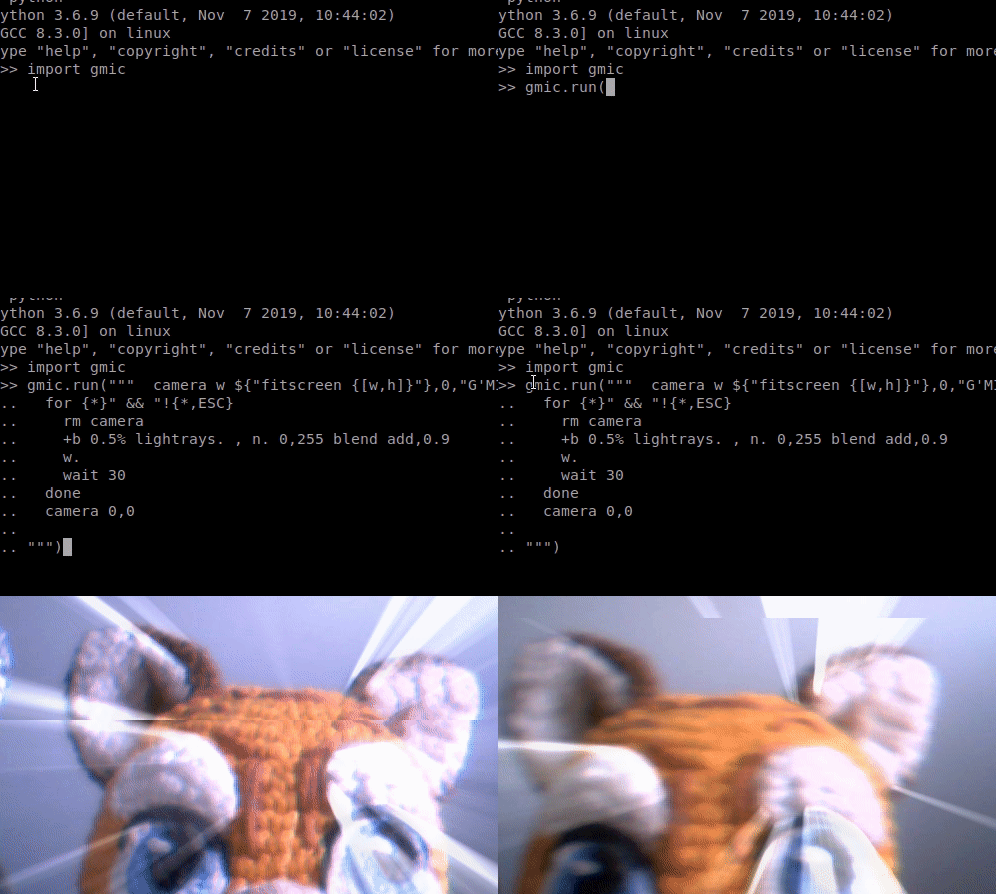
Thanks for the X11 testing report you have made, I think that the mouse focus switching is not a big issue, please tell if this is very cumbersome for you though…
I will talk to Marius (the release manager) about packaging or not the prereleases… OK
Karo, could you please run the following and tell me if it works:
python -c “import gmic; gmic.run(‘https://placekitten.com/g/200/300 display’)”
python -c "import gmic; gmic.run('200,200,1,3 fill_color 200,230,0 display')"

python -c "import gmic; gmic.run('sp apples display')"

cat > /tmp/gmic_eval_openmp.py <<EOF
import gmic; gmic.run("v - sp lena eval. \"end(run('echo_stdout[] ',merge(t,max)))\"")
EOF

python /tmp/gmic_eval_openmp.py # should be > 0
It tests downloading, display, and openmp. So far you have given me feedback on display only for this MacPorts package.
For internet legacy, the MacPorts build files for py-gmic are here on Github.
KaRo - in terms of users accessibility - is that OK for Mac users, do you think, if I do not build gmic-py for MacOS on pypi.org (so pip install gmic will not work or try a possibly failing build from source), and people just port install py-gmicor so ?
I have tried it with camera and apply_camera, both were ok.
The other test without the last one worked too. The last one delivers “0”. I think it is a problem of proper quoting! Maybe you remind you, some long time ago I asked for examples with quotes! Today I have not time to follow that track. Still I tried not python but python3.9, there is py-gmic as gmic installed by MacPorts.
Your last question I don’t know what to say. If pip is usable on a Mac without MacPorts installed than you should build something under pypi.org, otherwise I think (MacPorts installation is a bit cumbersome for it self) the port is sufficient with some explanations. By the way, a I said the port py-gmic was only installed for python3.9 already installed in my environment. I don’t know how MacPort packages are defaulting!
I’ll try perhaps tomorrow a bit with the quoting and your last trial
Ah, with gmic cli
gmic run “v - sp lena eval. \“end(run('echo_stdout[] ',merge(t,max)))\””
[gmic] *** Error in ./run/ *** Command ‘eval’: Unterminated string literal, in expression 'end(run(‘echo_stdout[]’.
[gmic] Command ‘eval’ has the following description:
…
quoting is also wrong!
Thanks for all the tests, the quoted OpenMP expression should indeed deliver a number, and you indeed have 0 which shows what Marius had. So we need to have it fixed on the package compiling/building side.
For testing any complex expression that command-line quoting issues with gmic CLI, the simplest way is to paste the expression in a .gmic file without escaped quoting and running it with:
gmic myfile.gmic
I never do it because I use gmic-py instead with understandable enough quoting for me in Python… But this is how @David_Tschumperle told me he does.
Hi Jonathan,
the latest MacPorts build of gmic cli (2.9.5) is as before built with openmp still threads from your small eval test are 0. I think you or Marius should change a little. My local build routine for gmic cli is
make -B CXX=clang+±mp-6.0 OPT_CLI_CFLAGS="-march=native -O3 -flto -fopenmp" OPT_LIBS="-lgomp" clean cli
or actually trying clang 11 and opencv4
make -B CXX=clang+±mp-11 OPT_CLI_CFLAGS="-march=native -O3 -flto -fopenmp" OPENCV_CFLAGS="-Dcimg_use_opencv -I/opt/local/include/opencv4" OPENCV_LIBS="-L/opt/local/lib/opencv4 -lopencv_calib3d.4.5 -lopencv_core.4.5 -lopencv_features2d.4.5 -lopencv_flann.4.5 -lopencv_gapi.4.5 -lopencv_highgui.4.5 -lopencv_imgcodecs.4.5 -lopencv_imgproc.4.5 -lopencv_ml.4.5 -lopencv_objdetect.4.5 -lopencv_photo.4.5 -lopencv_stitching.4.5 -lopencv_video.4.5 -lopencv_videoio.4.5" OPT_LIBS="-lgomp" clean cli
in fact “libomp” resp. “libgomp” is missing in the MacPorts gmic (2.9.5) build! To include opencv4 there must not be “-I/opt/local/include/opencv” as proposed in the gmic Makefile or even better port opencv should not be installed or deactivated!
Thank you, forwarded to Marius
I think that such an old clang compiler version was not OK to be used to him… -fopenmp was not accepted on more recent compiler versions…