I’m going to upgrade my CPU from a Ryzen 3700x to a 9600x very soon, should I do these tests with both systems and upload results here?
1 Like
Yes, I’d love to!
DSC06065.txt (15.3 KB)
DSC07828.txt (16.1 KB)
$ clinfo -l
Platform #0: Intel(R) OpenCL Graphics
 `-- Device #0: Intel(R) Arc(TM) B580 Graphics
1 Like

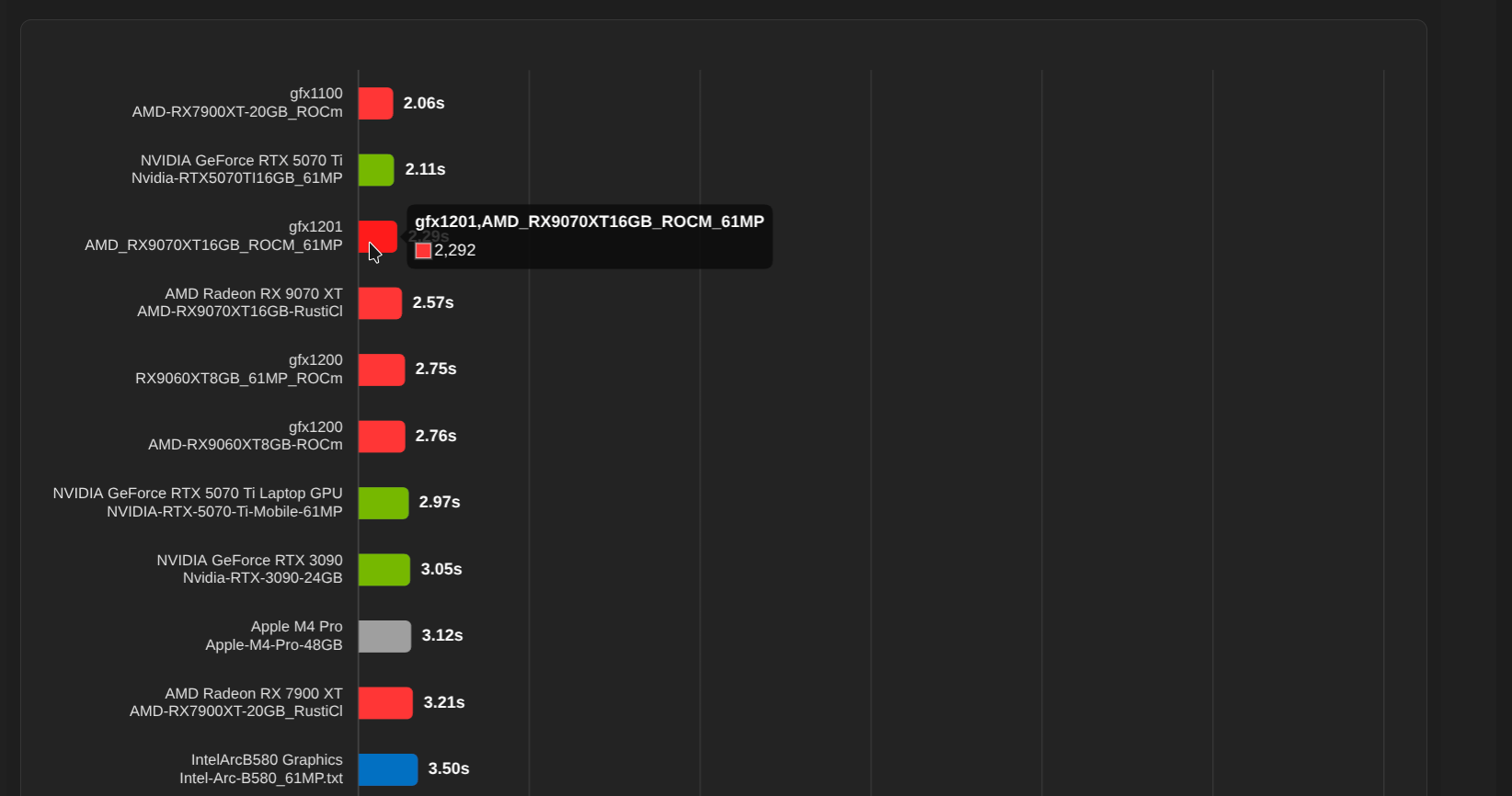
$ inxi -Cm
Memory:
  System RAM: total: 32 GiB available: 30.41 GiB used: 6.75 GiB (22.2%)
  Device-2: DIMMA2 type: DDR5 size: 16 GiB speed: 6400 MT/s
  Device-4: DIMMB2 type: DDR5 size: 16 GiB speed: 6400 MT/s
CPU:
  Info: 8-core model: AMD Ryzen 7 9700X bits: 64 type: MT MCP cache: L2: 8 MiB
  Speed (MHz): avg: 605 min/max: 605/5582
Debian Sid, Plasma desktop.
1 Like
First set of results. I’ve learned that one can use the --disable-opencl flag to easily and temporarily run Darktable without opencl (including in these testing commands!).
GPU is RTX 3070, system RAM is 16GB dual channel 3200MT/s
3700x-24mp-without-opencl.txt (9.1 KB)
3700x-61mp-without-opencl.txt (8.8 KB)
3700x-24mp-with-opencl.txt (17.5 KB)
3700x-61mp-with-opencl.txt (16.9 KB)
1 Like
4080m:
4080m_dt_b.txt (16.7 KB)
13700H IrisXe:
iris_dt_b.txt (17.1 KB)
13700H cpu:
13700h_dt_b2.txt (11.7 KB)
1 Like
Upgrade is up and running. 50% time taken on CPU only seems even better than I was expecting! I’m hoping I didn’t have a RAM bottleneck with the 3700x (it didn’t seem to want to use anywhere near the available 10GB or so that I had?)
Now I have 32GB DDR5 6000MT/s.
9600x-24mp-with-opencl.txt (16.0 KB)
9600x-24mp-without-opencl.txt (9.1 KB)
9600x-61mp-with-opencl.txt (15.9 KB)
9600x-61mp-without-opencl.txt (8.8 KB)
Now I need to edit my previous post, but I don’t have that option.
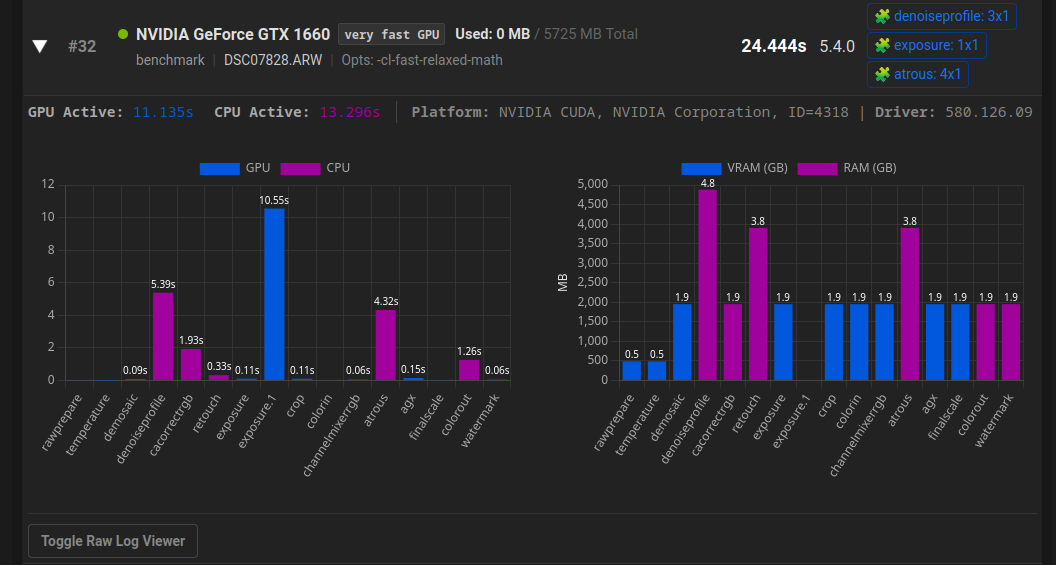
Please send me your log-file. thx.
1 Like
RX6700XT-61.txt (17.7 KB)
RX6700XT-24.txt (16.7 KB)
1 Like
benchmark.txt (15.6 KB)
1 Like
Thank you both for the logs.
There is currently a small problem with masks + exposure. I think this should be fixed by the 5.4.1 update at the latest.
I just updated to master [23b9e9af] and found, that the performance test for the larger file DSC07828 took significantly longer. Processing time raised from 19,8s (from a test I did with darktable 5.5.0+150~gcd56293fa7) to 27s (new test with darktable 5.5.0+259~g23b9e9af19).
Any ideas or anyone who experiences something similar?
1 Like
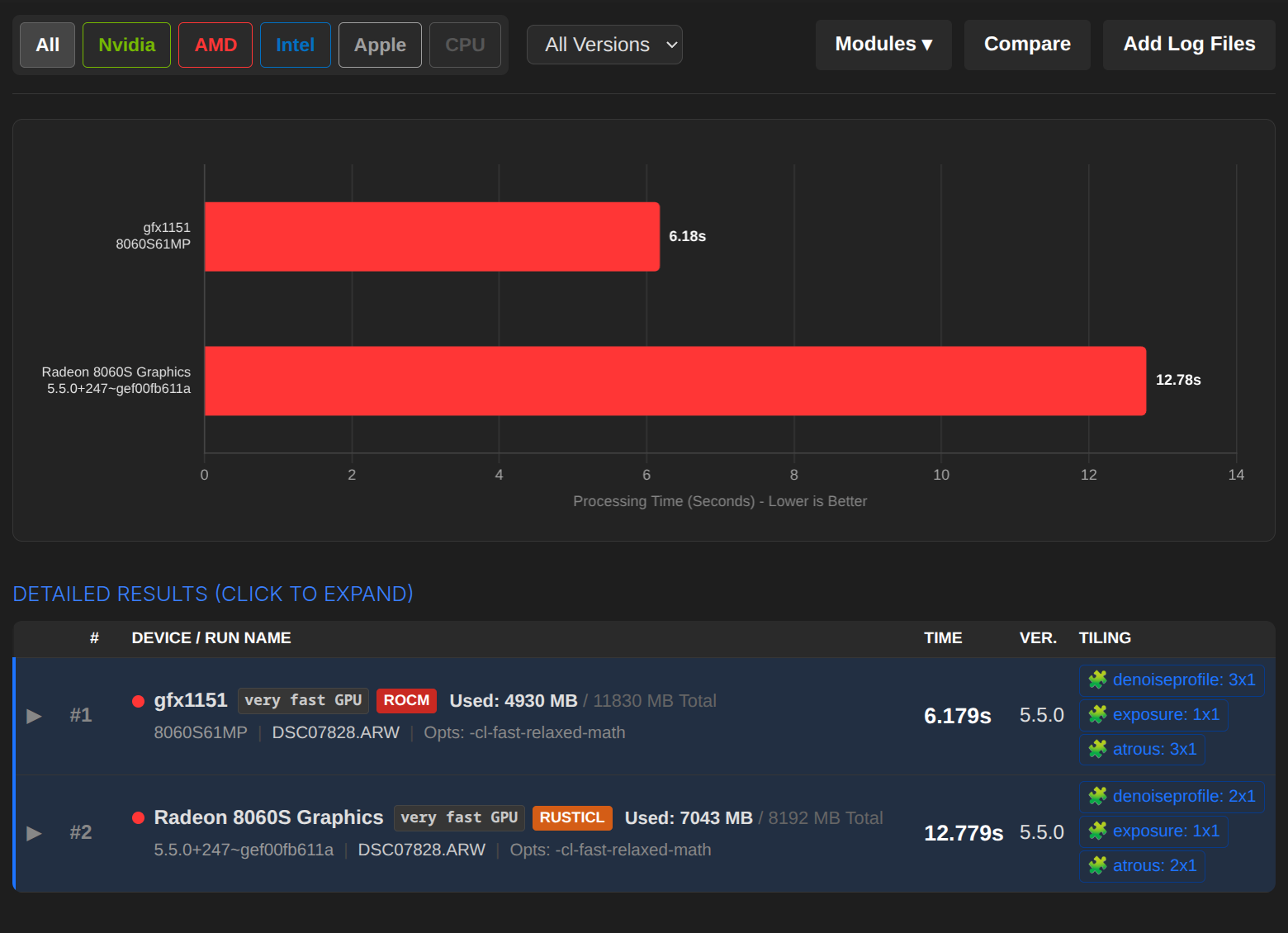
5.5.0+247~gef00fb611a.txt (15,8 KB)
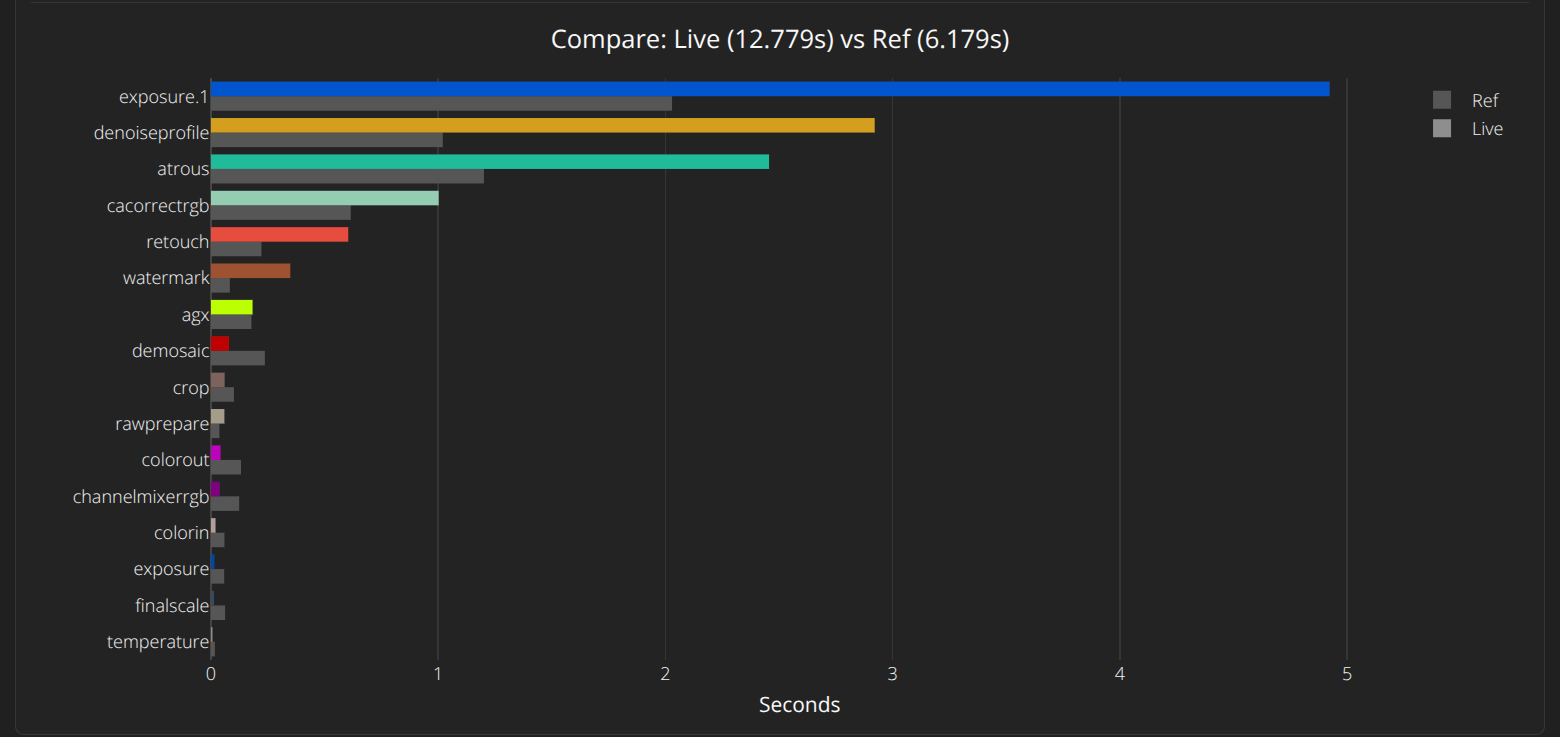
I can confirm that. - RustiCL usually runs faster for me than ROCm (due to a bug in ROCm).
1 Like
Thanks for testing in your side, Chris.
Asking @hannoschwalm => I’m not sure, if this performance drop arose from latest changes in the OpenCL code or something different may have caused that. Should I track an issue on github for that?
i would need verbose opencl & pipe logs from 5.4.1 and master on the same system.
1 Like
I checked everything again, and the power profile did not load correctly for me under Linux. So there is no deterioration for me.
Please sende me your Log, I have an idea what the problem might be.
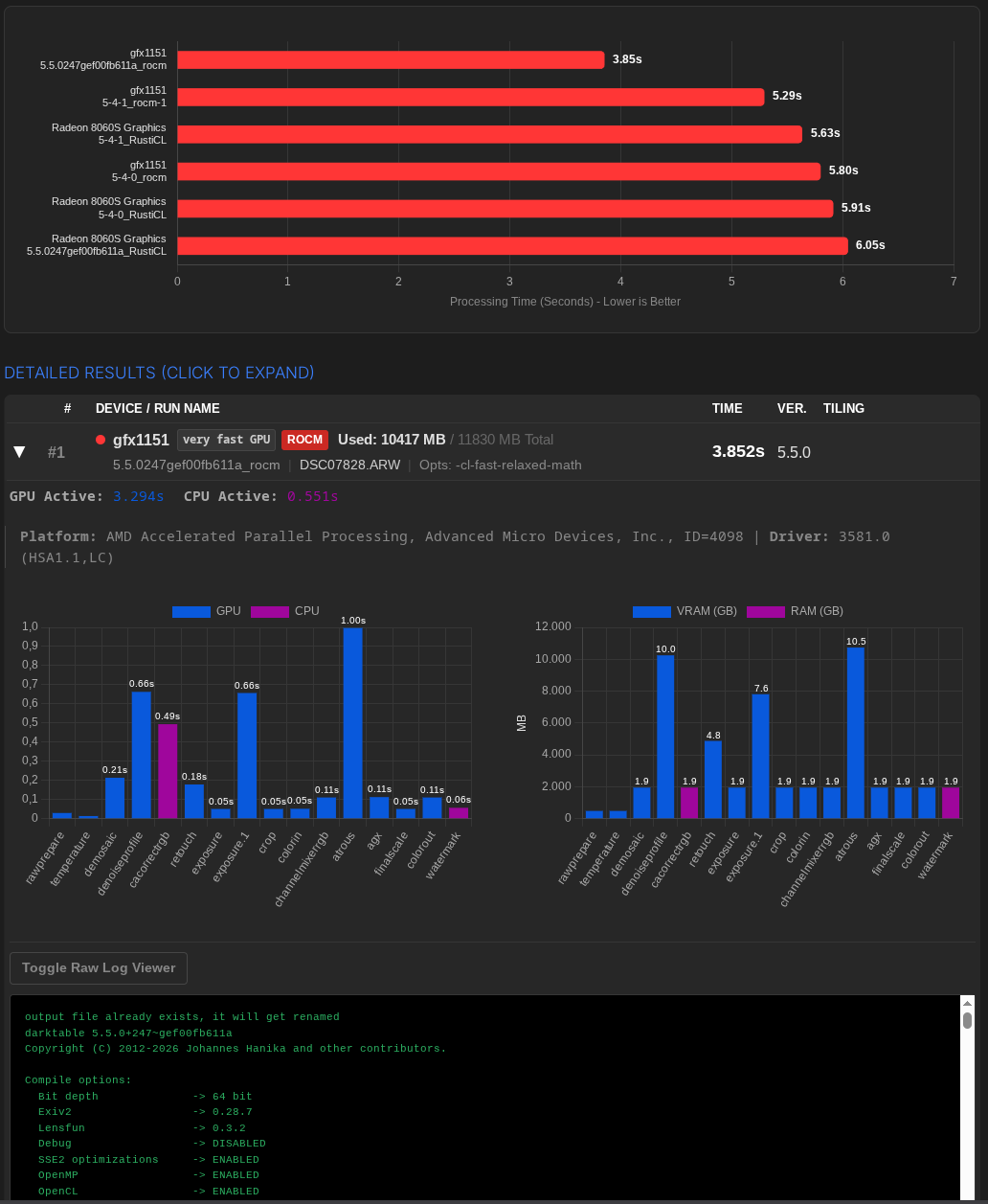
ROCm has become significantly faster on 8060S iGPU. Very nice! If you need the individual logs: At the very end of the “Detailed Results” (click to expand).
1 Like