For information and given the impossibility of updating the Rawpedia documentation
GHS assumes operation in the [0 - 1] range. This implies, in most cases, retouching the BP (black point) and WP (white point) . If this is not the case, either the images are under-exploited, or the datas are lost, with no way of recovering them.
Either because these values are, for example, 0.2 for the BP and 0.8 for the WP, or also because the WP values are high (2 or 3 or more), notably by using Color Propagation to recover highlights.
Furthermore, I added to the GHS algorithm, which was initially designed for astrophotography, the ability to process normal images, which are often both underexposed and overexposed. For that I added Local contrast, Midtones, Highlight attenuation which act after the GHS algorithm, but this (ghs) can give too strong values (depending on the GHS settings) for the HL or a perfectible balance of midtones, or an inappropriate local contrast. This case should not (or rarely) occur in astrophotography, unlike general images which often have a high DR of pronounced shadows and very high highlights.
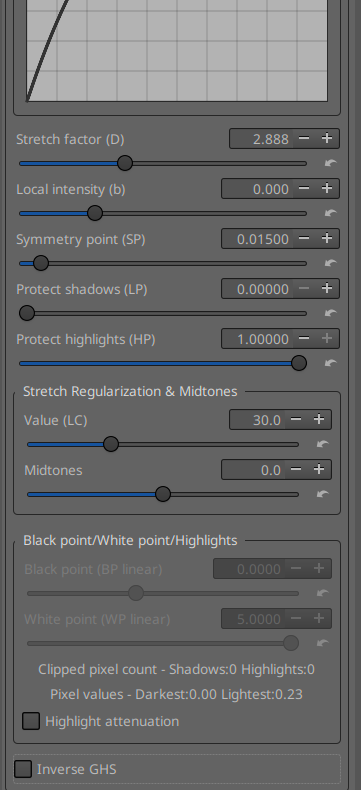
Observing the histogram and reading the information next to the BP and WP sliders allows you to fine-tune the BP and WP so that GHS is used fully and also to be able to use all the possibilities of HL (Color propagation, etc.). Note that this setting is done very differently from what is found elsewhere, for example in Log encoding (Black Ev and White Ev), where the data is examined very early on. Here, we examine the actual exact RGB data, just before initializing GHS.
This assumes that the GHS algorithm is enabled, so the Stretch Factor is greater than zero, but that its effect on the image is insignificant in order to adjust the BP and WP as closely as possible to reality.
I chose to allow the user to adjust BP and WP if the Stretch Factor is between 0.001 and 0.002.
If we want to observe the histogram - which I recommend doing in “working profile” mode and “without gamma” - it is also necessary that the histogram is not influenced by processes that I added downstream of GHS such as Local contrast, Midtones, or Highlight attenuation. Otherwise we no longer know what is acting on what.
Schematically to simplify the algorithm works in 3 phases:
- adjustment of BP and WP with GHS activated but almost no effect on the image (Stretch factor between 0.001 and 0.002)
- GHS adjustment
- correction of local contrast of midtones and excess HL
Therefore, to try to guide the user, I suggested to:
- gray out BP and WP when Stretch factor is different from 0.001 and 0.002, so that the BP and WP settings are correct.
- and gray out Local contrast and Midtones when Stretch factor is between 0.001 and 0.002, so that the reading of the histogram and in particular of the peak is not disturbed by Local contrast and Midtones.
Of course it is (very) easy to override this in the GUI and in the code and leave everything active all the time…
Excuse my bad english.
I just merge the GHS branch with “dev”. The main reason is that the executables were still in Beep6581. So I changed the information in the yml files in the workflow. Now windows.yml and appimage.yml use Rawtherapee instead of Beep6581
Executable are now (with Rawtherapee and ghs)
Rawtherapee Appimage and Windows
jacques