Hi Todd-
I’m back to this problem…
I’m implementing your suggestion to install dt into it’s own directory. It all goes fine until I try to install the --config folder.
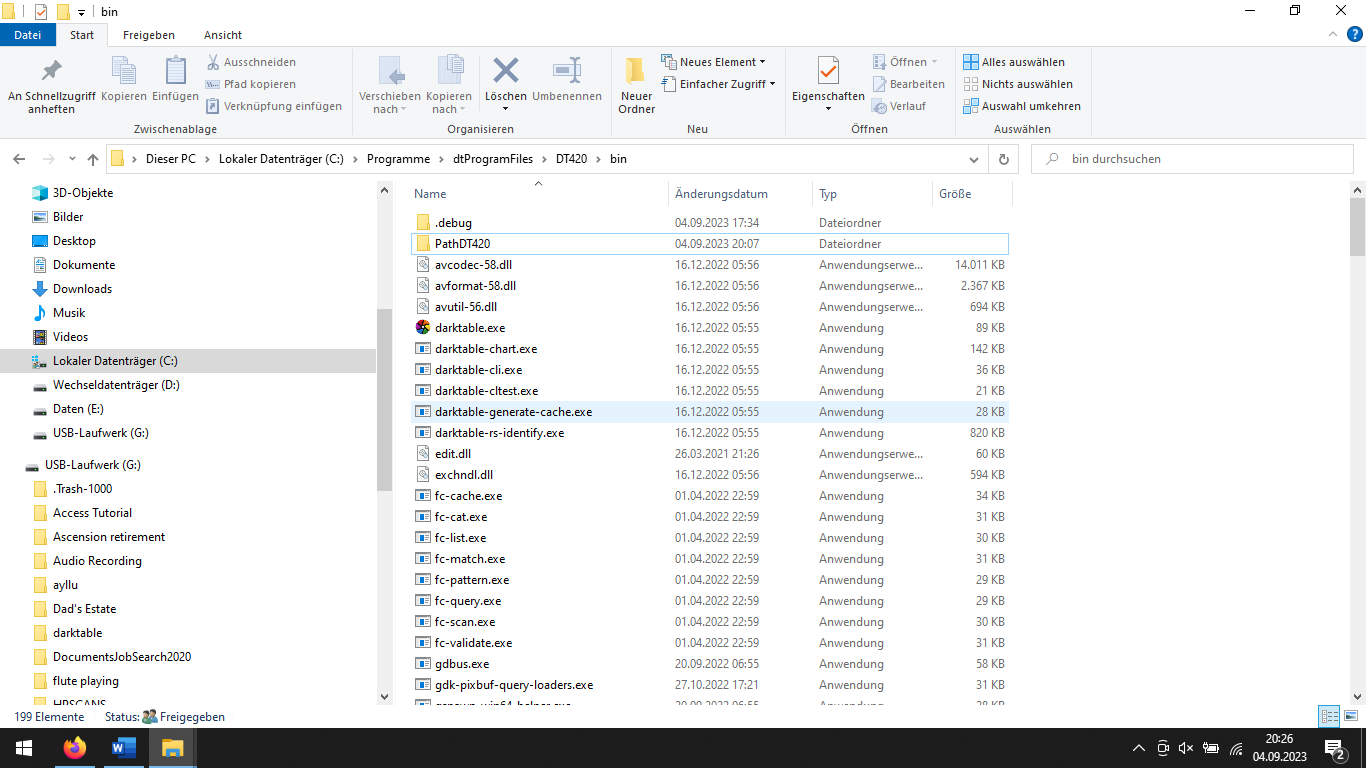
I have installed dt 4.2 into dtProgramFiles and named it DT420.
Inside DT420are folders bin, lib, share.
I have opened a shortcut to the bin folder and named it darktable, which shows on the START menu.
Inside bin, I created a new folder named PathDT420.
On the properties for the shortcut named darktable I have a target of C.\dtProgramFiles\DT420\bin.
But I cannot get Windows to accept --config"PathDT420" in the Start In field of the shortcut properties. I suppose I am making a syntax error. What would the correct syntax look like?
The name of the setting is --configdir, not --config
Add a space between --configdir and the path value, like --configdir "C:\dtProgramFiles\DT420\bin\PathDT420"
Also, C.\dtProgramFiles\DT420\bin will not work, it has to be C:\dtProgramFiles\DT420\bin (though I would simply create directories under C:\Program Files, not right in the root of the C: drive).
Ok- I’ve straightened some things out as you suggested:
I have installed dt 4.2 into C:Program Files\dtProgramFiles\DT420.
Inside DT420 are folders bin, lib, share.
I have opened a shortcut to the bin folder and named it darktable, which shows on the START menu.
Inside bin, I created a new folder named PathDT420.
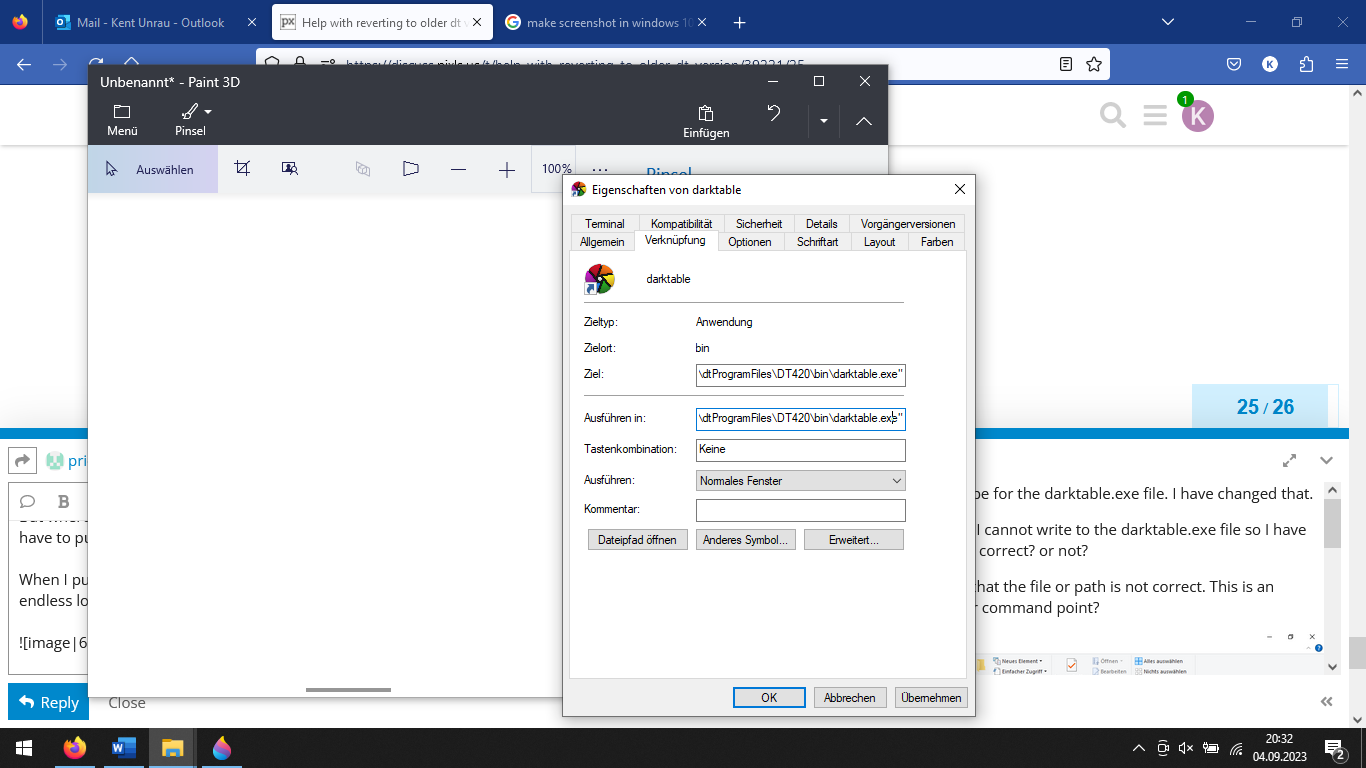
On the properties for the shortcut named darktable I have a target of C:Program Files\dtProgramFiles\DT420\bin.
When I put –configdir “C:\Program Files\dtProgramFiles\DT420\bin\PathDT420” in the Start In field of the shortcut properties I get an error: the folder refered to by --configdir is not good. Be sure the folder exists and is named correctly. I’m working on a German speaking computer so this is a translation…
The folder is in \bin and it is correctly invoked. It saying the folder PathDT420 does not exist in \bin, when it does.
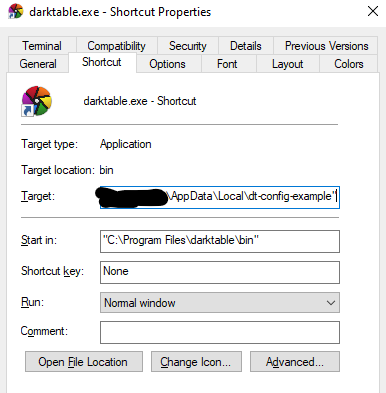
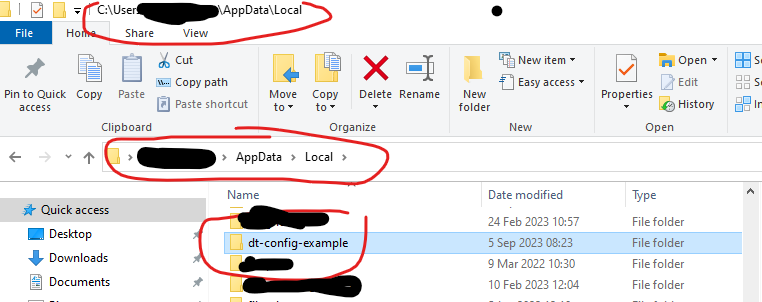
Could you please post screenshots of your Windows Explorer, showing the setup? And one of the shortcut, too.
Normally, paths under C:\Program Files are not writeable, except with Windows administrator privileges. I don’t know if you are running with such a user. Configuration files should be in your C:\Users\<your user>\whatever directories. So, if I were you, I’d create: C:\Users\<your user>\AppData\Local\dt420 and C:\Users\<your user>\AppData\Local\dt442 (or next to wherever your default darktable config is, for me that’s C:\Users\my_user\AppData\Local\darktable). Maybe the path is different in German, I don’t know.
Then, from the two darktable shortcuts, reference the corresponding config (one for 4.2.0, one for 4.4.2, or maybe in your case it’s 4.0.0 and 4.2.0 – you get the idea).
Are you going to the bin directory… I think so but the shortcut needs to be for the darktable exe file… you can right-click and choose to create a desktop shortcut… then add the configdir portion as described by @kofa… Then make sure the file folder you name in quotes exists
That is wrong… start in would be the bin path one level up… not the path to the config files…Start in is always or usually the path where the targeted exe file is
Yes Todd, I am wrong. The shortcut must be for the darktable.exe file. I have changed that.
But where does the --configdir file reside? I cannot write to the darktable.exe file so I have to put the folder for the --configdir in \bin, correct? or not?
–configdir “C:\Program Files\dtProgramFiles\DT420\bin\darktable.exe”
When I put that Start In, I get the above error that the file or path is not correct. Where should the --configdir command point?
I think it must point to the folder where the directory is. That can only be in \bin, but that also gives me the error that the folder does not exist or the path is wrong. So I come back to ask where does the folder go?
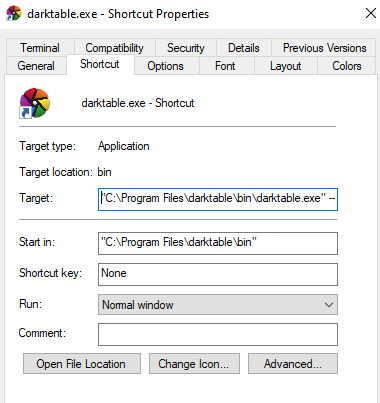
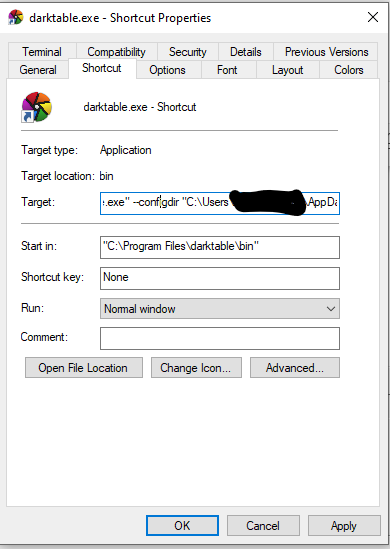
configdir can be any folder you want… The --configdir just tells dt where to look. I actually run only one version of DT…usually a fairly recent build of the master… so I live a bit dangerously but I am a hobbyist and not needing it to be rock solid although the dev’s do a good job… So I always update DT in the default directory (you would modify this so that you can keep both versions) but I do use custom configuration directories specified on the command line in a shortcut (as you will have to) that I use to run DT something like this.
I use three places to store the various files DT uses… one for the config files one for the cache files and one for temp files… this way I have easy access and can leave the default locations in full default. I also find it easy to edit or back these up… Finally I made symbolic links so the files are not actually in those locations but it makes the path names easy… Just forget that step though… so in your case you would do something like this in your short cut…
Install in "C:\Program Files\darktable442\bin\ so in your run line
“C:\Program Files\darktable442\bin\darktable.exe” --configdir “C:\DT_configdir” in the run line and the start line would or could be the exe path…
Sorry a few of my responses have been by phone and also I could have spelled it out better… If you get your directories strait it should not be an issue… I hope it fires up and all is good…
You would need two such config directories and two shortcuts, each pointing the Target to the corresponding darktable.exe file with full path, having --configdir with the right configuration directory, and having Start in: set to the directory that holds darktable.exe.
Ah Ha! Sorry I haven’t answered sooner. Thanks for all your help! I have dt up and running and I’m getting my project finished now. It’s really a great service to the dt community that expert users like you are willing to share their knowledge to help the rest of us use this great program. Probably, the best thing about dt is the user community that both helps other users and engages in meaningful dialog with the developers.