I corrected my pull request for exiv2.
If it is included, darktable will be able to at least read the manufacturer data from Panasonic files on distortion correction and chromatic aberration. It is up to a manufacturer lens correction module to make sense of the parameters. Even if the meaning is not exactly know yet, it will allow experimenting with different interpretation to reverse engineer the manufacturers model.
4 Likes
Yes, I know. Thanks.
But
https://www.andrewj.com/mft/algorithms.php
mentions 4 different models working with parameters 2,4,5,8,9,11 in different formulas.
To get it right we need a raw converter where we can try it out with immediate feedback.
1 Like
Just a quick note – I have a Sony RX100M2, and looked at the chromatic aberration data from the exif data. There are only 22 values (11 per channel). Interpretting the values as distortion for the radius from sensor center as 1+value/2^21.
Applying that to the bayer matrix data before demosaicing gives the best result by far (I’ve used libraw and libtiff to generate my own tiffs directly for stitching pano’s). The current DT raw TCA algorithm appears to be eliminating some saturated pixels that are in reality saturated, and missing R or B layer shifts on high contrast edges. The TCA applied by lensfun post demosaicing is also objectively worse than using this manufacturer correction. So this is very exciting
An efficiency gain can be had by utilizing the radial symmetry of the problem – for every pixel in the first quadrant of the image, there are 3 matching pixels in the other 3 quadrants with the same radius, only different by the signs of the distance (row or column) from the optical image center. I realize the DT module may not be able to take advantage of that symmetry in all situations, but it can save some calls to sqrt() .
Another efficiency gain could be had by recomputing the current values – which I just use a segmented linear function with the input as radius (I believe that is what I see in the DT module being built). It would be trivial to convert that to a form that uses radius^2 as the input. This new form then would eliminate all calls to sqrt(). Probably would want to increase the number of values for the new form to maintain good resolution of the distortion factor.
Many thanks for discovering the secret of the built in CA correction for Sony raw files. I wish there was a similar discovery for Canon CR2 raw files!
Cheers,
Jeff Welty
4 Likes
Square roots are really not that expensive these days. Maybe a 12 cycle latency (single precision, scalar) on a recent CPU. By comparison, an FMA is about five cycles of latency. Given a single square root will be reused three times (once for each channel) it really is negligible compared to everything else (spline evaluation and image interpolation).
If one really wanted to improve performance the thing to do would be to pre-compute factors of 1 / (xi[i] - xi[i - 1]) which appear in the interpolate function. Divisions are somewhat more expensive than square roots, and typically each call to interpolate will evaluate a several of them. Combine this with the fact we make three interpolate calls for each sqrtf call and one can see it is much more important.
Regards, Freddie.
2 Likes
Okay dokay. I’m still stuck in the old days (don’t ask  ) when we worried about that stuff. FWIW here’s my version of the interpolate function. It depends on equally spaced knots, but has no divisions. Doesn’t mean it would be faster. Just a FYI
float raw_tca_distort_amt_sq_basis(float x_sq, float *knots, int Nminus1)
{
// x is (squared radius from image center) / (maximum squared radius)
if(x_sq > .9999) return knots[Nminus1] ; // in case of rounding error computing x_sq

float fi = x_sq*(float)(Nminus1) ;
int i = floor(fi) ; // lower bounding knot is i
float p1 = (fi - i) ; // proprtion of knot i+1 to use
return (knots[i]*(1.-p1) + knots[i+1]*p1) ;
}
Cheers,
Jeff Welty
1 Like
Thank you for making this function first. I’m coding a small script that can merge the jpg generated by the Fuji camera with the color preset with the jpg generated by DxO PureRaw denoising, so users can transfer the color preset to the denoised raw-generated jpg image. I have a problem now. Fuji Cameras do lens correction for the jpg image automatically, which will cause the pixels of the two jpg images (generated by the Fuji camera and generated by DxO from the RAF) can’t be one-to-one corresponding. I have tried the lens correction you provided for DarkTable, and the output image seems bigger than the jpg from my camera, also the correction result is slightly different. I wonder whether you can improve it and make this function can generate exactly the same result as Fuji Camera does. So I can use such a correction algorithm on the DxO-generated jpg result and make my merging script work. I believe such a script will significantly save time for Fuji users.
@fdw do you know how to read and use the opcode list from DNG files?
20250425_R6_3725.CR3 (7.2 MB)
20250425_R6_3725_iri.dng (11.3 MB)
I extracted exiftool -b -m -OpcodeList2 20250425_R6_3725_iri.dng >file.opcode
file.zip (276 Bytes)
All the other metadata from the CR3 and DNG files.
20250425_R6_3725_CR3.txt (496.7 KB)
20250425_R6_3725_iri_dng.txt (37.3 KB)
All the details needed to make a parser are in the DNG spec. In addition, there is already some OpCode parsing done in the dt code (only GainMap, WarpRectilinear, and FixVignetteRadial so far).
2 Likes
Thanks!
I also found this tool GitHub - electro-logic/DngOpcodesEditor: Read, Write and Preview DNG Opcodes
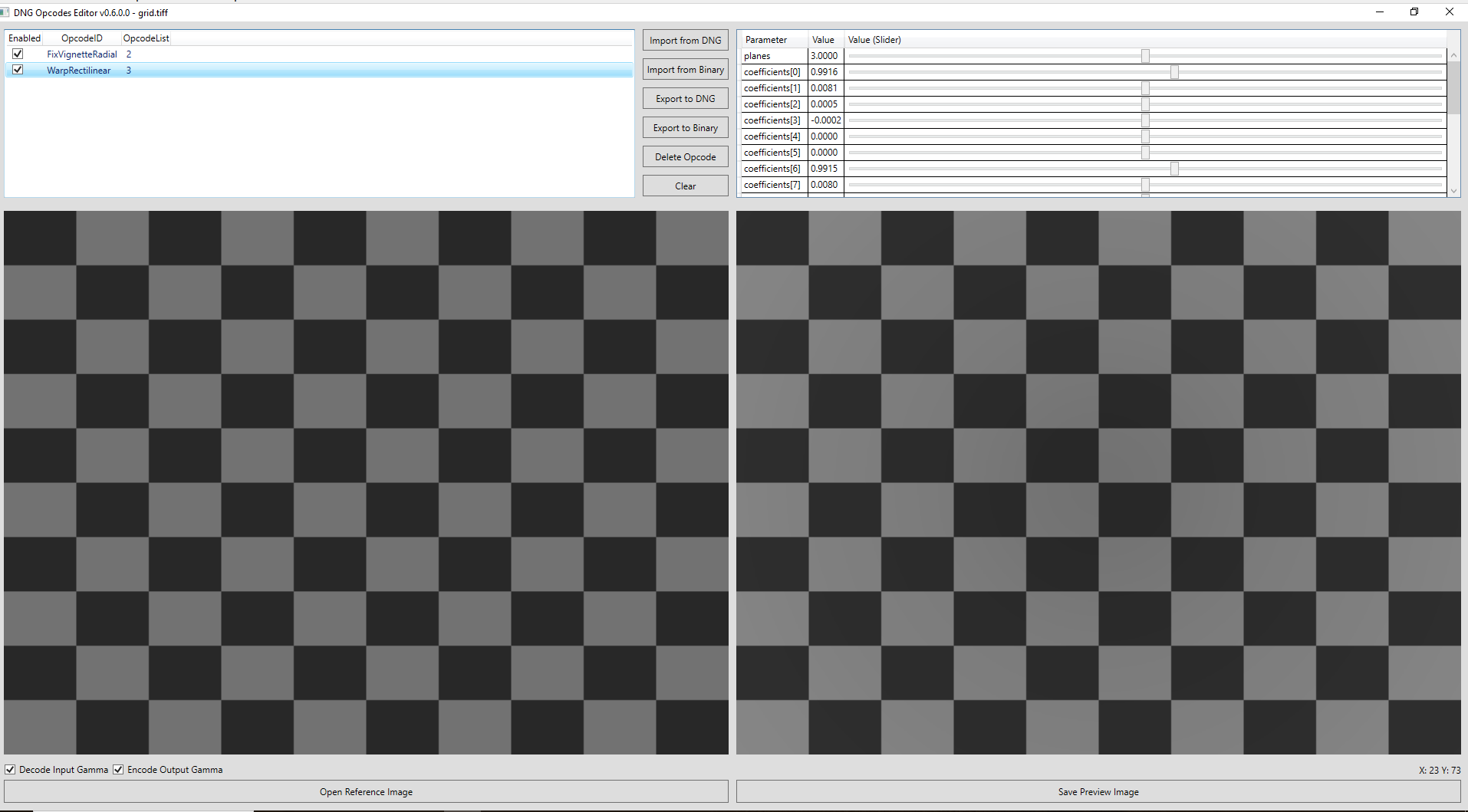
FixVignetteRadial
k0	2.1238376429520875
k1	-8.135498039047196
k2	16.970959339677663
k3	-16.37951107101318
k4	5.855323257975874
cx	0.5046695402298851
cy	0.5032362459546925
WarpRectilinear
|planes|3||
|---|---|---|
|coefficients[0]|0.9915323181152343||
|coefficients[1]|0.007989124118212594||
|coefficients[2]|0.0007490251027943173||
|coefficients[3]|-0.0002760703163146085||
|coefficients[4]|0||
|coefficients[5]|0||
|coefficients[6]|0.9915323181152343||
|coefficients[7]|0.007989124118212594||
|coefficients[8]|0.0007490251027943173||
|coefficients[9]|-0.0002760703163146085||
|coefficients[10]|0||
|coefficients[11]|0||
|coefficients[12]|0.9915323181152343||
|coefficients[13]|0.007989124118212594||
|coefficients[14]|0.0007490251027943173||
|coefficients[15]|-0.0002760703163146085||
|coefficients[16]|0||
|coefficients[17]|0||
|cx|0.5||
|cy|0.5||
For the Canon file in the sample above this part changed with aperture.
From f1/4:
[MakerNotes]    Canon Vignetting Corr Unknown 0x0043: 8191
[MakerNotes]    Canon Vignetting Corr Unknown 0x0044: 7863
[MakerNotes]    Canon Vignetting Corr Unknown 0x0045: 7373
[MakerNotes]    Canon Vignetting Corr Unknown 0x0046: 6857
[MakerNotes]    Canon Vignetting Corr Unknown 0x0047: 6381
[MakerNotes]    Canon Vignetting Corr Unknown 0x0048: 5934
[MakerNotes]    Canon Vignetting Corr Unknown 0x0049: 5498
[MakerNotes]    Canon Vignetting Corr Unknown 0x004a: 5072
[MakerNotes]    Canon Vignetting Corr Unknown 0x004b: 4641
[MakerNotes]    Canon Vignetting Corr Unknown 0x004c: 4220
[MakerNotes]    Canon Vignetting Corr Unknown 0x004d: 3808
[MakerNotes]    Canon Vignetting Corr Unknown 0x004e: 3400
[MakerNotes]    Canon Vignetting Corr Unknown 0x004f: 2999
[MakerNotes]    Canon Vignetting Corr Unknown 0x0050: 2604
[MakerNotes]    Canon Vignetting Corr Unknown 0x0051: 2394
to f/22
[MakerNotes]    Canon Vignetting Corr Unknown 0x0043: 8191
[MakerNotes]    Canon Vignetting Corr Unknown 0x0044: 8185
[MakerNotes]    Canon Vignetting Corr Unknown 0x0045: 8166
[MakerNotes]    Canon Vignetting Corr Unknown 0x0046: 8136
[MakerNotes]    Canon Vignetting Corr Unknown 0x0047: 8094
[MakerNotes]    Canon Vignetting Corr Unknown 0x0048: 8039
[MakerNotes]    Canon Vignetting Corr Unknown 0x0049: 7974
[MakerNotes]    Canon Vignetting Corr Unknown 0x004a: 7899
[MakerNotes]    Canon Vignetting Corr Unknown 0x004b: 7814
[MakerNotes]    Canon Vignetting Corr Unknown 0x004c: 7721
[MakerNotes]    Canon Vignetting Corr Unknown 0x004d: 7622
[MakerNotes]    Canon Vignetting Corr Unknown 0x004e: 7515
[MakerNotes]    Canon Vignetting Corr Unknown 0x004f: 7405
[MakerNotes]    Canon Vignetting Corr Unknown 0x0050: 7291
[MakerNotes]    Canon Vignetting Corr Unknown 0x0051: 7233
Being somewhat irritated. Using DNG lens correction since long on my camera’s DNG files.
Don
BTW Olympus is also supported.
2 Likes