Here maybe?
1 Like
Replying to myself here: perhaps with some knowledge of training CNNs in the first place, the g’mic part would be within grasp. Time to use the internet & read books! If anyone has a goldmine of info somewhere, I’ll gladly take it.
Added a couple cli commands for tiny neural nets (up to ~2k parameters).
Note: this is not about or using nn_lib stuff (although it’s part of my learning for that)!
gcd_nn_train : create and train a network
gcd_nn_output : generate output from a network
Details
Main purpose is to make it easy for folks to tweak and test very basic MLP neural nets in g’mic (including myself). The commands are small enough that others should be able to easily modify the code. This really is an ultra-basic toy example, don’t expect clever stuff from it!
Network design
- Just layers of fully connected nodes and weights (no layer types)
- There is a “hidden” bias node = 1 for each layer
- Raw error is used (not loss function)
- Online learning (not batches)
- input/output nodes are not separate layers (they are in first/last layers)
- Default size is 5 hidden layers of 18 nodes (19 including bias node)
Quirks
- Activation function is a linear sigmoid based on lrelu
- Bias weights beyond first layer are deliberately not trained
- Initial weights ensure functions of separate inputs aren’t summed until beyond the first hidden layer (but multiple functions of one input will be)
- Data order is only randomised once (regardless of iterations)
- If the data is small, I suggest duplicating/augmenting it for high iters
Training data
- Ranges are important and can have drastic effects
- Inputs should be (-1,1)
- Targets are auto normalised for training to [-0.495,0.495]
- Output will be approximately in range [-0.5,0.5]
- [x,y,z] dimensions of input/target must match (channels can differ)
Image layouts
- weights: nodes * (nodes+1) * layers
- nodes: nodes * layers
- Inbound weights for each node are a column
- Nodes for each layer are a row
To keep code readable it’s not heavily optimised. Training run time is about 6.5s to train 40k iters on my old core2 laptop. I’ve found 400k with learn rate 0.025 works quite well, but that takes about 1 minute. Output generation is about 2.5s for 40k vectors (e.g. a 200x200x3 image).
Examples
Random weights, image generation:
gcd_nn_random_2d_output : skip ${1=16},${2=7},${3=128}
  l[] {
    1 gcd_nn_train .,0,,$1,$2
    f[0] "u(2)-1"
    $3,$3,1,2,"[x,y]" n. -1,1
    gcd_nn_output[0,1] .,0,2 k..
  }

Matching a 1d function:
gcd_nn_match_1d_function :
  l[] {
    1024,1,1,1,x n -4,4 sin
    +f "[x,y]" n. -1,1
    +gcd_nn_train. ..,10000,0.05
    gcd_nn_output[-2,-1] [1],0 k[0,-1]
  }
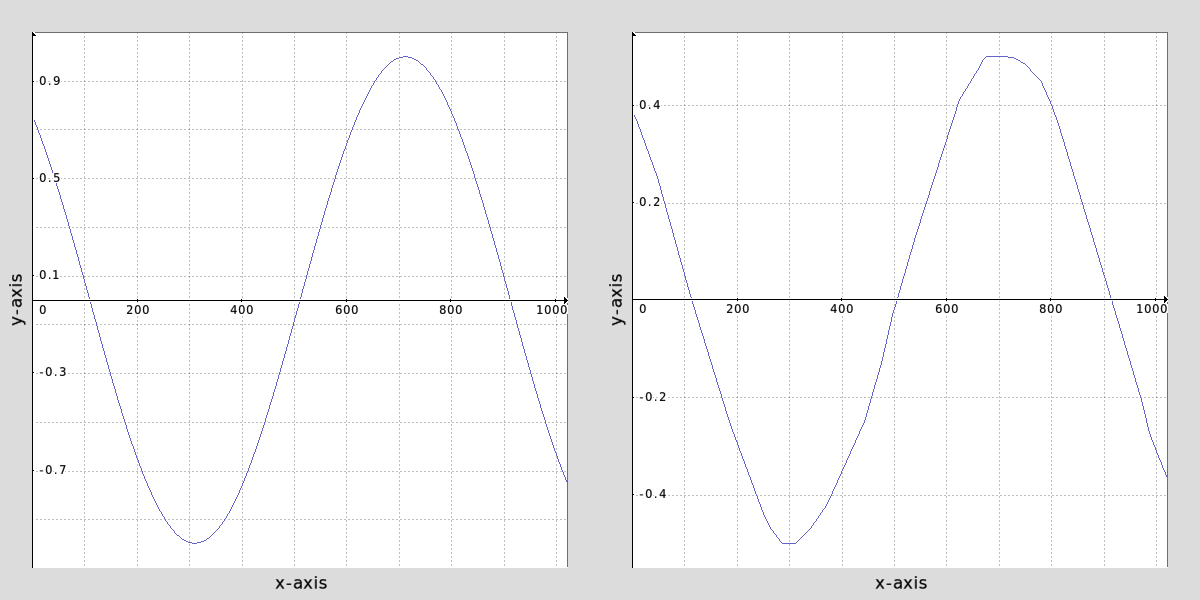
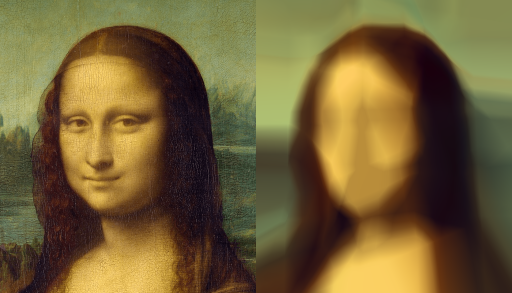
Matching a 2d function with 3d outputs (e.g. an image):
gcd_nn_match_2d_function : skip ${1=40000},${2=0.1}
  foreach {
     100%,100%,100%,2,"2*([x,y]+0.5)/w-1"
     +gcd_nn_train. ..,$1,$2
     gcd_nn_output[-2,-1] [1],0,{s#0-1} k[0,-1]
  }
4 Likes
Awesome! 
Training NN is definitely not as easy as it seems at first glance, so congrats for having achieved this.
If you need some tutorials to use the nn_lib, just let me know.
1 Like
Hah yes, slightest change and everything explodes!
In the beginning I spent a lot of time looking for bugs that turned out to be range problems, so it’s very hard to know if the code is correct. Thankfully g’mic makes it easy to visualise things. It’s great when you finally get a glimmer of promising output!
Here’s a look at the two main parts of the code, which I think is worth seeing as it’s really quite simple:
Feedforward:
_gcd_nn_forwardpass :
  eval "+
    const ML = d#0;
    N = vector(#h#0);
    W = vector(#wh#0);
    A = vector(#w#0);
    N[w#0] = 1; # bias

    repeat (ML,L,
      copy(N,i(#1,0,L,0,0),w#0);    # get activations of this layer
      copy(W,i(#0,0,0,L,0),wh#0);   # get outbound weights of this layer
      A = mul(N,W,w#0);             # weighted sum for next layer
      fill(A,k, F=A[k]; abs(F)<0.5?F:0.01*F+sign(F)*0.495 ); # act. function
      copy(i(#1,0,L+1,0,0),A,w#0);  # output to next layer
    );"
Backpropagation:
_gcd_nn_backwardpass :
    eval "+
      const ML = d#0;
      W = vector(#wh#0);
      N = D = vector(#h#0);
      A = E = vector(#w#0);
      N[w#0] = 1;                   # bias learning factor for first layer

      copy(A,i(#1,0,ML),w#0);           # get activations of last layer
      copy(E,i(#2),w#0);                # calculate error of last layer
      E -= A;
      fill(A,k, abs(A[k])<0.5?1:0.01 ); # calculate derivatives
      E *= A;                           # and deltas of last layer

      L = ML;
      repeat (ML,--L;
        copy(N,i(#1,0,L),w#0);      # get activations of this layer
        copy(W,i(#0,0,0,L),wh#0);   # get outbound weights of this layer
        D = mul(W,E,1);             # sum the weighted deltas of next layer
        W += $1 * mul(N,E,w#0);     # calculate and store outbound weight changes
        copy(i(#0,0,0,L),W,wh#0);
        fill(A,k, abs(N[k])<0.5?1:0.01 ); # calculate derivatives
        copy(E,D,w#0);                    # and deltas of this layer
        E *= A;                           # keep for next iter
        N[w#0] = 0;                       # disable bias learning
      );"
In short, the two new commands just require two sets (images) of vectors (multi-channel pixels).
For each vector in the first, try to learn a network which can use that to generate a vector matching the vector at the same location in the target image.
I actually often use Upscale (Noise). Gives the best results for 2X upscaling, at least to my eyes. If I really need uber quality upscaling, I use Upscayl, but most of the time Upscale (Noise) is good enough for me.
1 Like
Update: fixed a silly weights initialisation bug in gcd_nn_train, the output should be better now
Interesting, I haven’t looked at that one in years but had ideas to improve it. If I do look again, I’ll just create a new filter to be safe.
Edit: seems to be a lot better and more stable!
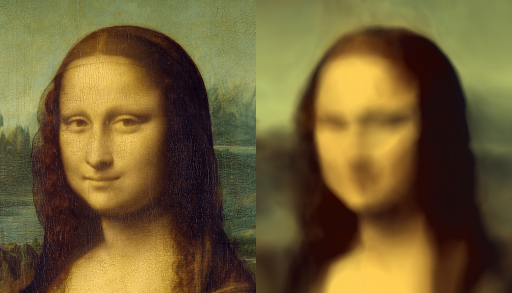
gcd_nn_match_2d_function : skip ${1=40000},${2=0.1},${3=18},${4=5}
  foreach {
     100%,100%,100%,2,"2*([x,y]+0.5)/w-1"
     tic +gcd_nn_train. ..,$1,$2,$3,$4 toc
     tic gcd_nn_output[-2,-1] [1],0,{s#0-1} k[0,-1] toc
  }
gmic sp monalisa,256 gcd_nn_match_2d_function 500000,0.01,64,6 n 0,255 a x
(that took about 200 seconds to train)
2 Likes
Added new command: gcd_nn_output_fast
This is a drop-in replacement for gcd_nn_output except it doesn’t use the nodes image as a buffer, so it’s about 5 times faster (or more). Decided to make it separate as it’s important to see how the forward pass command works for output too.
That’s probably my last update for a while, free time has expired
1 Like
@David_Tschumperle, @garagecoder I have a feature question / idea for G’MIC, maybe through nn_lib or a simple G’MIC-AI workflow.
I’m not talking about LUT matching, color transfer, style transfer, or a large modern AI model. What I have in mind is something much simpler and more local, similar to the Universeller NN-Filter in Fitswork.
Reference page:
https://www.fitswork.de/anleitung/speziell.php
(The description of the NN filters is further down on that page.)
For convenience, here is an English summary/translation of the relevant Fitswork description:
[Fitswork uses a neural network here as a universal filter. It can be used for many different purposes, but it has to be trained first.
The basic workflow is:
- you need the image you want to modify
- you also need an image that represents the desired result
- this target image must match exactly and must have the same value range, so adjustments may be needed beforehand
- you bring the image to be modified to the foreground, start the training function from the menu, and choose a filename for the network
- you can also continue training an existing network file
- if more than two images are open, you must also select the target image
For a new network, you choose the number of neurons. The Fitswork author recommends not starting with more than 37, because training already becomes slow enough at that point. After some time the training changes very little anymore, so you can interrupt it. The network is then automatically saved to the chosen file.
The function has clear limits. Fitswork always feeds 37 pixels into the network, so very low-frequency filters cannot be created. For example, it cannot flatten broad background variations. But it can be used to make filters for sharpening, noise reduction, anti-JPEG artifacts, and similar tasks. You need a separate network for each filter radius or each noise level.
Originally the network is always trained on a grayscale image. If a different function is needed for each color channel, the image has to be split into its three channels and each one trained separately. Then a small .nnf text file can be created that points to the three network files, so the color image can be processed in one pass.
That .nnf text file looks like this:
RGB:
RedFilename.nnf
GreenFilename.nnf
BlueFilename.nnf
So it has 4 lines, with RGB: at the top, and it should be stored in the same folder as the other network files.
From Fitswork version 3.55 onward, direct color functions can also be trained. For example, this can be used to create a camera color profile. The suggested workflow is to convert one raw image in the preferred converter, convert the same raw image in Fitswork, crop both so they match exactly, and adjust the value ranges so min and max are roughly the same. It may help to reduce image size by half in X and Y first. Then the Fitswork image is brought to the foreground, the training function is started, color manipulation is enabled, 3 inputs are selected, and 10 neurons are used. After some training, interrupting creates the NN file, which can then be selected directly from the custom NN filter menu.
From version 3.70 onward, Fitswork also allows changing the functions of the neurons themselves in phases 2 and 3. That can improve things when only a few neurons are used, but it can also be unstable. If you stop in phase 1, the function behaves like in earlier Fitswork versions.]
What I find interesting about Fitswork is that this seems intentionally small and practical:
- it learns from a small local pixel neighborhood
- it can be used for things like sharpening, denoising, anti-JPEG artifact reduction, etc.
- it is not a global or semantic model
- it is more like a small, local, task-specific learned filter
- if you need a different radius or a different noise level, you just train another small network
So my question is:
Could something like this be built in G’MIC, at least as a first simple version?
For example, a workflow like:
- load source image
- load target image
- check that both match exactly in size and range
- train a small network on local patches / neighborhoods
- save that network
- later apply it as a normal filter to other images
What matters most to me is the simple setup:
- small network
- CPU-only is fine
- no huge training pipeline
- no heavy dependencies
- ideally just a practical filter/tool
So I’m mainly wondering:
- would this be technically feasible in G’MIC?
- would G’MIC be fast enough for something like this if it stays as modest as Fitswork?
- and if a simple version works, could it perhaps later be extended into something more advanced?
In other words, I’m not asking “can G’MIC run modern AI models?”
I’m asking whether G’MIC could support a small, local, trainable neural filter built from an exactly aligned before/after image pair, like Fitswork has had for a long time.
I’d be very interested to know whether this fits G’MIC conceptually, and whether a first minimal implementation would be realistic.
One of the most interesting things about Fitswork is that you can actually watch the training process through a preview image showing the current output as the network is being trained. You can see, live, how the original is gradually being pulled toward the target result. That is really fascinating. If G’MIC could also do something like that, it would be fantastic.
Looks like nn_lib could manage that with its current features.
The idea is basically to learn a patch → patch transformation with a “universal”-enough function, which is exactly what neural networks are good for.
I’m a bit tempted to do some experiments about it, but I can’t promise anything.
2 Likes
A quick test turning patches into vectors with these two commands:
gcd_patches2vectors : skip ${1=1}
  K:=$1*2+1;
  foreach {
    nm={0,n}"_patches" 0
    eval[0] "begin(const boundary=1;const K=$K);
        da_push(#-1,crop(#0,x-$1,y-$1,z,c,K,K,1,1));
        end(da_freeze(#-1));"
    nm. $nm k.
  }
and this
gcd_learn_patch_transform :
  sp colorful r 256,256,1,1,2 n -1,1 +gradient_norm
  gcd_patches2vectors 1
  +gcd_nn_train.. .,40000,0.025
  sp monalisa r. 256,256,1,1,2 n. -1,1
  gcd_patches2vectors. 1
  gcd_nn_output_fast[-3,-2] .
  r[-2,-1] 256,256,1,1,-1
Seemed to be able to learn stuff like gradient norm on single channel image at least:
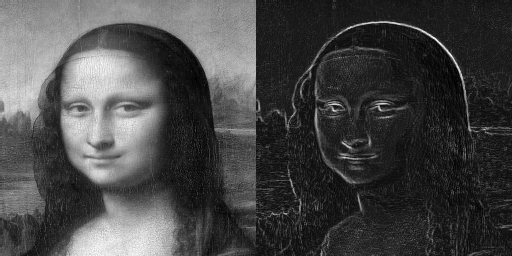
Suspect it will need a better setup using nn_lib though!
2 Likes
I was actually thinking about training a U-Net architecture, which contains convolutional and multi-head attention blocks, as this is a quite classical and performant architecture for learning image to image transformations.
With small enough patches (like 64x64), that would not take too much weights.
So, nn_lib should be able to deal with that, but it’s not that easy to train anyway.
A good occasion for me to dive again into the nn_lib code and improve it if needed.
But I miss time !
You lack time, but we have patience.
Small update for gcd_nn_train:
- Improved initial weights for output layer. This makes convergence a lot quicker and enables more layers/nodes (if you use small learn rate and a lot of patience!).
Clarification on the “quirks”:
- The bias learning is disabled for all but the last/output, not the first.
- The initial input weights are set so that each node in the second layer gets a bias and a weighted single input, spread to as many nodes per input as possible.
- Activation function is:
abs(x)<0.5 ? x : 0.01*x + sign(x) * 0.495
I’ve tested with 30 hidden layers of 64 nodes and 6 layers of 200 nodes. Both now seem to work, so probably able to get to about 1/4 million params. That obviously takes a long time to train - a few minutes on my laptop to even see convergence.
Edit:
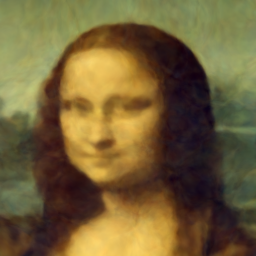
Decided to let my laptop cook for 30 mins and try 210x6 (about 300k params) for 500k iters with rate 0.005. it does converge enough to see an increase in “resolution”
3 Likes