darktable supports OpenCL and rusticl is a driver in mesa for some devices for OpenCL. To the extent that Rusticl works, it is supported in darktable. There are no direct rusticl things in darktable. I can’t comment on the quality because I don’t use it. It is exciting though and I hope that now or in the future it works really well.
2 Likes
What do you mean by environment?
I changed in darktablerc this line:
clplatform_rusticl=radeonsi
which will be changed to false after 1 test.
$ RUSTICL_ENABLE=radeonsi darktable-cltest
darktable 4.6.1
Copyright (C) 2012-2024 Johannes Hanika and other contributors.

Compile options:
  Bit depth              -> 64 bit
  Debug                  -> DISABLED
  SSE2 optimizations     -> ENABLED
  OpenMP                 -> ENABLED
  OpenCL                 -> ENABLED
  Lua                    -> ENABLED  - API version 9.2.0
  Colord                 -> ENABLED
  gPhoto2                -> ENABLED
  GMIC                   -> DISABLED - Compressed LUTs are NOT supported
  GraphicsMagick         -> ENABLED
  ImageMagick            -> DISABLED
  libavif                -> ENABLED
  libheif                -> ENABLED
  libjxl                 -> ENABLED
  OpenJPEG               -> ENABLED
  OpenEXR                -> ENABLED
  WebP                   -> ENABLED

See https://www.darktable.org/resources/ for detailed documentation.
See https://github.com/darktable-org/darktable/issues/new/choose to report bugs.

     0.0153 [dt_get_sysresource_level] switched to 1 as `default'
     0.0153   total mem:       11690MB
     0.0153   mipmap cache:    1461MB
     0.0153   available mem:   5845MB
     0.0153   singlebuff:      91MB
     0.0196 [opencl_init] opencl disabled via darktable preferences
     0.0197 [dt_dlopencl_init] could not find default opencl runtime library 'libOpenCL'
     0.0197 [dt_dlopencl_init] could not find default opencl runtime library 'libOpenCL.so'
     0.0198 [opencl_init] opencl library 'libOpenCL.so.1' found on your system and loaded, preference 'default path'
     0.1033 [opencl_init] found 3 platforms
     0.1034 [check platform] platform 'Clover' with key 'clplatform_clover' is NOT active
     0.1034 [check platform] platform 'rusticl' with key 'clplatform_rusticl' is NOT active
     0.1034 [opencl_init] no devices found for Advanced Micro Devices, Inc. (vendor) - AMD Accelerated Parallel Processing (name)
[opencl_init] found 0 device
     0.1034 [opencl_init] FINALLY: opencl is NOT AVAILABLE and NOT ENABLED.
You might want to check that it is enabled in the preferences of darktable:
0.0196 [opencl_init] opencl disabled via darktable preferences
1 Like
no, environment is done like this:
https://www.reddit.com/r/archlinux/comments/1715juy/is_there_any_way_to_force_programs_to_use_rusticl/
1 Like
 I have set the following in /etc/environment:

RUSTICL_ENABLE=radeonsi
OCL_ICD_VENDORS=/etc/OpenCL/vendors/rusticl.icd
Is this ok?
:~# cat /etc/environment
PATH="/usr/local/sbin:/usr/local/bin:/usr/sbin:/usr/bin:/sbin:/bin:/usr/games:/usr/local/games:/snap/bin"

RUSTICL_ENABLE=radeonsi
OCL_ICD_VENDORS=/etc/OpenCL/vendors/rusticl.icd
So this is systemwide?
Yes. Otherwise it is only active in the terminal you are entering the commands and then you need to start darktable from this terminal for it to work.
1 Like
still not working
$ RUSTICL_ENABLE=radeonsi darktable-cltest
darktable 4.6.1
Copyright (C) 2012-2024 Johannes Hanika and other contributors.

Compile options:
  Bit depth              -> 64 bit
  Debug                  -> DISABLED
  SSE2 optimizations     -> ENABLED
  OpenMP                 -> ENABLED
  OpenCL                 -> ENABLED
  Lua                    -> ENABLED  - API version 9.2.0
  Colord                 -> ENABLED
  gPhoto2                -> ENABLED
  GMIC                   -> DISABLED - Compressed LUTs are NOT supported
  GraphicsMagick         -> ENABLED
  ImageMagick            -> DISABLED
  libavif                -> ENABLED
  libheif                -> ENABLED
  libjxl                 -> ENABLED
  OpenJPEG               -> ENABLED
  OpenEXR                -> ENABLED
  WebP                   -> ENABLED

See https://www.darktable.org/resources/ for detailed documentation.
See https://github.com/darktable-org/darktable/issues/new/choose to report bugs.

     0.0301 [dt_get_sysresource_level] switched to 1 as `default'
     0.0301   total mem:       11690MB
     0.0301   mipmap cache:    1461MB
     0.0301   available mem:   5845MB
     0.0301   singlebuff:      91MB
     0.0474 [opencl_init] opencl disabled via darktable preferences
     0.0476 [dt_dlopencl_init] could not find default opencl runtime library 'libOpenCL'
     0.0476 [dt_dlopencl_init] could not find default opencl runtime library 'libOpenCL.so'
     0.0477 [opencl_init] opencl library 'libOpenCL.so.1' found on your system and loaded, preference 'default path'
     0.4558 [opencl_init] found 1 platform
     0.4558 [check platform] platform 'rusticl' with key 'clplatform_rusticl' is NOT active
[opencl_init] found 0 device
     0.4558 [opencl_init] FINALLY: opencl is NOT AVAILABLE and NOT ENABLED.
You have it disabled. Please read the manual. Also, you are running 4.6.1 instead of 5.0.1.
1 Like
This is an unconfigured Ubuntu 24.04 machine. I switched to dt 5.
It is disabled by default:
opencl=FALSE
opencl_checksum=
opencl_device_priority=*/!0,*/*/*/!0,*
opencl_library=
opencl_mandatory_timeout=400
opencl_scheduling_profile=default
opencl_tune_headroom=false
Changed it to:
opencl=TRUE
Still not enabled:
$ RUSTICL_ENABLE=radeonsi darktable-cltest
darktable 5.0.1
Copyright (C) 2012-2025 Johannes Hanika and other contributors.

Compile options:
  Bit depth              -> 64 bit
  Debug                  -> DISABLED
  SSE2 optimizations     -> ENABLED
  OpenMP                 -> ENABLED
  OpenCL                 -> ENABLED
  Lua                    -> ENABLED  - API version 9.4.0
  Colord                 -> ENABLED
  gPhoto2                -> ENABLED
  GMIC                   -> ENABLED  - Compressed LUTs are supported
  GraphicsMagick         -> ENABLED
  ImageMagick            -> DISABLED
  libavif                -> DISABLED
  libheif                -> ENABLED
  libjxl                 -> ENABLED
  LibRaw                 -> ENABLED  - Version 0.22.0-Devel202403
  OpenJPEG               -> ENABLED
  OpenEXR                -> ENABLED
  WebP                   -> ENABLED

See https://www.darktable.org/resources/ for detailed documentation.
See https://github.com/darktable-org/darktable/issues/new/choose to report bugs.

     0.3213 [dt_get_sysresource_level] switched to 1 as `default'
     0.3214   total mem:       11690MB
     0.3214   mipmap cache:    1461MB
     0.3214   available mem:   5845MB
     0.3214   singlebuff:      91MB
     0.3268 [dt_dlopencl_init] could not find default opencl runtime library 'libOpenCL'
     0.3269 [dt_dlopencl_init] could not find default opencl runtime library 'libOpenCL.so'
     0.3270 [opencl_init] opencl library 'libOpenCL.so.1' found on your system and loaded, preference 'default path'
     0.3826 [opencl_init] found 1 platform
     0.3827 [check platform] platform 'rusticl' with key 'clplatform_rusticl' is NOT active
[opencl_init] found 0 device
     0.3827 [opencl_init] FINALLY: opencl PREFERENCE=ON is NOT AVAILABLE and NOT ENABLED.
There is a long section around turning on opencl
Yes there is, which part do you think is important? Read all multiple times.
and others.
1 Like
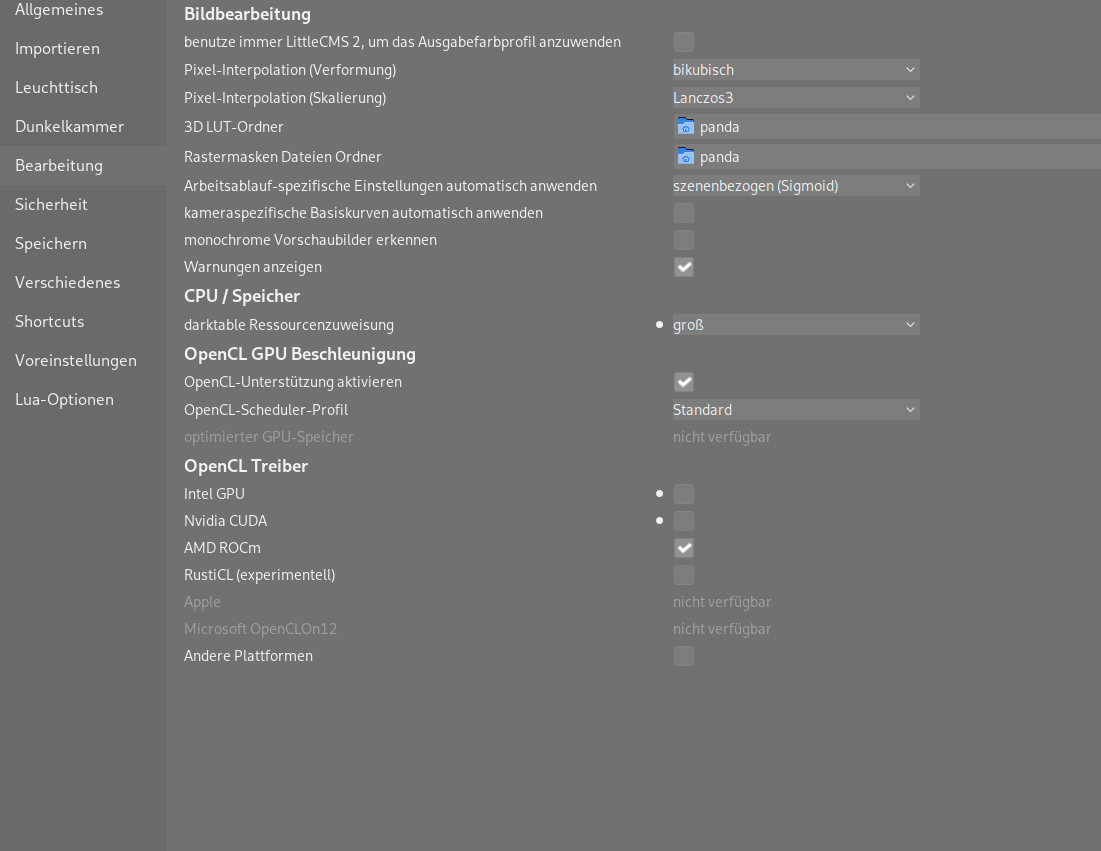
didin’t go on here because something other worked. I did the configuration now with the mouse in darktable-settings and not the text-editor with darktablerc…
$ RUSTICL_ENABLE=radeonsi darktable-cltest
darktable 5.0.1
Copyright (C) 2012-2025 Johannes Hanika and other contributors.

Compile options:
  Bit depth              -> 64 bit
  Debug                  -> DISABLED
  SSE2 optimizations     -> ENABLED
  OpenMP                 -> ENABLED
  OpenCL                 -> ENABLED
  Lua                    -> ENABLED  - API version 9.4.0
  Colord                 -> ENABLED
  gPhoto2                -> ENABLED
  GMIC                   -> ENABLED  - Compressed LUTs are supported
  GraphicsMagick         -> ENABLED
  ImageMagick            -> DISABLED
  libavif                -> DISABLED
  libheif                -> ENABLED
  libjxl                 -> ENABLED
  LibRaw                 -> ENABLED  - Version 0.22.0-Devel202403
  OpenJPEG               -> ENABLED
  OpenEXR                -> ENABLED
  WebP                   -> ENABLED

See https://www.darktable.org/resources/ for detailed documentation.
See https://github.com/darktable-org/darktable/issues/new/choose to report bugs.

     0.3190 [dt_get_sysresource_level] switched to 1 as `default'
     0.3190   total mem:       11690MB
     0.3190   mipmap cache:    1461MB
     0.3190   available mem:   5845MB
     0.3190   singlebuff:      91MB
     0.3249 [dt_dlopencl_init] could not find default opencl runtime library 'libOpenCL'
     0.3249 [dt_dlopencl_init] could not find default opencl runtime library 'libOpenCL.so'
     0.3251 [opencl_init] opencl library 'libOpenCL.so.1' found on your system and loaded, preference 'default path'
     0.3774 [opencl_init] found 1 platform
[opencl_init] found 1 device

[dt_opencl_device_init]
OpenCL Mesa platform `Mesa/X.org' --> `AMD Radeon Graphics'
   DEVICE:                   0: 'AMD Radeon Graphics (radeonsi, rembrandt, LLVM 17.0.6, DRM 3.63, 6.8.0-60-generic)'
   CONF KEY:                 cldevice_v5_rusticlamdradeongraphics
   PLATFORM, VENDOR & ID:    rusticl, Mesa:Mesa/X.org, ID=4098
   CANONICAL NAME:           rusticlamdradeongraphics
   DRIVER VERSION:           24.0.5-1ubuntu1
   DEVICE VERSION:           OpenCL 3.0
   DEVICE_TYPE:              GPU, dedicated mem
   GLOBAL MEM SIZE:          5845 MB
   MAX MEM ALLOC:            1461 MB
   MAX IMAGE SIZE:           16384 x 16384
   MAX WORK GROUP SIZE:      1024
   MAX WORK ITEM DIMENSIONS: 3
   MAX WORK ITEM SIZES:      [ 1024 1024 1024 ]
   ASYNC PIXELPIPE:          NO
   PINNED MEMORY TRANSFER:   NO
   USE HEADROOM:             600Mb
   AVOID ATOMICS:            NO
   MICRO NAP:                250
   ROUNDUP WIDTH & HEIGHT    16x16
   CHECK EVENT HANDLES:      128
   TILING ADVANTAGE:         0.000
   DEFAULT DEVICE:           NO
   KERNEL BUILD DIRECTORY:   /usr/share/darktable/kernels
   KERNEL DIRECTORY:         /home/ab/.cache/darktable/cached_v5_kernels_for_rusticlAMDRadeonGraphics_24051ubuntu1
   CL COMPILER OPTION:
   CL COMPILER COMMAND:      -w  -DAMD=1 -I"/usr/share/darktable/kernels"
   KERNEL LOADING TIME:       0.2747 sec
[opencl_init] OpenCL successfully initialized. internal numbers and names of available devices:
[opencl_init]		0	'rusticl AMD Radeon Graphics'
     0.6528 [opencl_init] FINALLY: opencl PREFERENCE=ON is AVAILABLE and ENABLED.
[opencl_init] opencl_scheduling_profile: 'default'
[opencl_init] opencl_device_priority: '*/!0,*/*/*/!0,*'
[opencl_init] opencl_mandatory_timeout: 400
[opencl_update_priorities] these are your device priorities:
[opencl_update_priorities] 		image	preview	export	thumbs	preview2
[dt_opencl_update_priorities]		0	-1	0	0	-1
[opencl_update_priorities] show if opencl use is mandatory for a given pixelpipe:
[opencl_update_priorities] 		image	preview	export	thumbs	preview2
[opencl_update_priorities]		0	0	0	0	0
[opencl_synchronization_timeout] synchronization timeout set to 200
[opencl_update_priorities] these are your device priorities:
[opencl_update_priorities] 		image	preview	export	thumbs	preview2
[dt_opencl_update_priorities]		0	-1	0	0	-1
[opencl_update_priorities] show if opencl use is mandatory for a given pixelpipe:
[opencl_update_priorities] 		image	preview	export	thumbs	preview2
[opencl_update_priorities]		0	0	0	0	0
[opencl_synchronization_timeout] synchronization timeout set to 200
Do you see problems?
Now it crashed the hard way always (4 times). Probably X crashed and I have to enter the user password.
darktable 5.0.1
Copyright (C) 2012-2025 Johannes Hanika and other contributors.

Compile options:
  Bit depth              -> 64 bit
  Debug                  -> DISABLED
  SSE2 optimizations     -> ENABLED
  OpenMP                 -> ENABLED
  OpenCL                 -> ENABLED
  Lua                    -> ENABLED  - API version 9.4.0
  Colord                 -> ENABLED
  gPhoto2                -> ENABLED
  GMIC                   -> ENABLED  - Compressed LUTs are supported
  GraphicsMagick         -> ENABLED
  ImageMagick            -> DISABLED
  libavif                -> DISABLED
  libheif                -> ENABLED
  libjxl                 -> ENABLED
  LibRaw                 -> ENABLED  - Version 0.22.0-Devel202403
  OpenJPEG               -> ENABLED
  OpenEXR                -> ENABLED
  WebP                   -> ENABLED

See https://www.darktable.org/resources/ for detailed documentation.
See https://github.com/darktable-org/darktable/issues/new/choose to report bugs.

     0.2015 [dt_get_sysresource_level] switched to 1 as `default'
     0.2015   total mem:       11690MB
     0.2015   mipmap cache:    1461MB
     0.2015   available mem:   5845MB
     0.2015   singlebuff:      91MB
     0.2187 [dt_dlopencl_init] could not find default opencl runtime library 'libOpenCL'
     0.2187 [dt_dlopencl_init] could not find default opencl runtime library 'libOpenCL.so'
     0.2189 [opencl_init] opencl library 'libOpenCL.so.1' found on your system and loaded, preference 'default path'
     0.6173 [opencl_init] found 1 platform
[opencl_init] found 1 device

[dt_opencl_device_init]
OpenCL Mesa platform `Mesa/X.org' --> `AMD Radeon Graphics'
   DEVICE:                   0: 'AMD Radeon Graphics (radeonsi, rembrandt, LLVM 17.0.6, DRM 3.63, 6.8.0-60-generic)'
   CONF KEY:                 cldevice_v5_rusticlamdradeongraphics
   PLATFORM, VENDOR & ID:    rusticl, Mesa:Mesa/X.org, ID=4098
   CANONICAL NAME:           rusticlamdradeongraphics
   DRIVER VERSION:           24.0.5-1ubuntu1
   DEVICE VERSION:           OpenCL 3.0
   DEVICE_TYPE:              GPU, dedicated mem
   GLOBAL MEM SIZE:          5845 MB
   MAX MEM ALLOC:            1461 MB
   MAX IMAGE SIZE:           16384 x 16384
   MAX WORK GROUP SIZE:      1024
   MAX WORK ITEM DIMENSIONS: 3
   MAX WORK ITEM SIZES:      [ 1024 1024 1024 ]
   ASYNC PIXELPIPE:          NO
   PINNED MEMORY TRANSFER:   NO
   USE HEADROOM:             600Mb
   AVOID ATOMICS:            NO
   MICRO NAP:                250
   ROUNDUP WIDTH & HEIGHT    16x16
   CHECK EVENT HANDLES:      128
   TILING ADVANTAGE:         0.000
   DEFAULT DEVICE:           NO
   KERNEL BUILD DIRECTORY:   /usr/share/darktable/kernels
   KERNEL DIRECTORY:         /home/ab/.cache/darktable/cached_v5_kernels_for_rusticlAMDRadeonGraphics_24051ubuntu1
   CL COMPILER OPTION:
   CL COMPILER COMMAND:      -w  -DAMD=1 -I"/usr/share/darktable/kernels"
   KERNEL LOADING TIME:       0.3581 sec
[opencl_init] OpenCL successfully initialized. internal numbers and names of available devices:
[opencl_init]		0	'rusticl AMD Radeon Graphics'
     0.9777 [opencl_init] FINALLY: opencl PREFERENCE=ON is AVAILABLE and ENABLED.
[opencl_init] opencl_scheduling_profile: 'default'
[opencl_init] opencl_device_priority: '*/!0,*/*/*/!0,*'
[opencl_init] opencl_mandatory_timeout: 400
[opencl_update_priorities] these are your device priorities:
[opencl_update_priorities] 		image	preview	export	thumbs	preview2
[dt_opencl_update_priorities]		0	-1	0	0	-1
[opencl_update_priorities] show if opencl use is mandatory for a given pixelpipe:
[opencl_update_priorities] 		image	preview	export	thumbs	preview2
[opencl_update_priorities]		0	0	0	0	0
[opencl_synchronization_timeout] synchronization timeout set to 200
[opencl_update_priorities] these are your device priorities:
[opencl_update_priorities] 		image	preview	export	thumbs	preview2
[dt_opencl_update_priorities]		0	-1	0	0	-1
[opencl_update_priorities] show if opencl use is mandatory for a given pixelpipe:
[opencl_update_priorities] 		image	preview	export	thumbs	preview2
[opencl_update_priorities]		0	0	0	0	0
[opencl_synchronization_timeout] synchronization timeout set to 200
darktablerc attached.
darktablerc.txt (27.4 KB)
Even though it might be reported as not being supported for any ML workloads anymore (it never has officially anyway), I’d give ROCm a shot for OpenCL acceleration. Also because the ROCm documentation still lists RDNA2 chips as supported.
I’ve been running darktable on my AMD Ryzen 8845HS laptop with an integrated Radeon 780M iGPU using ROCm (also not officially supported) for OpenCL acceleration successfully.
1 Like
It seems it is not only not supported but disabled if you read the link
The link you posted is about using the HIP interface for ML workloads, the OpenCL interface seems to work differently.
While the HIP interface also doesn’t work on my laptop (no matter how I set the HSA_OVERRIDE_GFX_VERSION env variable), the OpenCL interface works and gives me a considerable speed boost compared to CPU only mode.
That’s why I’d suggest to give ROCm still a try as it might still work.
This is the command I used to install the ROCm based OpenCL & OpenGL acceleration:
sudo amdgpu-install --usecase=graphics,multimedia,opencl --opencl=rocr --no-dkms
1 Like
I stand corrected. I was confusing it with the ROC_ENABLE_PRE_VEGA which I had to use in my Polaris times. Might be worth giving it a shot then indeed.