Yes
I got the same error message when I’ve tested it with GIMP 3.2RC1.
Just like for GIMP 3.0, I will wait for the official release before thinking about a possible fix (maybe this issue will be fixed with the stable 3.2 release).
2025/12/29: Release of G’MIC v.3.6.6
(St David’s day, here in France  ).
).
2 Likes
replace_color ,,0,0,0,255,255,255
returns
*** Error *** Command 'replace_color': Undefined argument '$1', in expression '$1' (for 8 arguments specified).
Easy to see why. There is no default values in the code itself. Would be a good idea.
I’ve started the work on the next version, which will be 3.7.0. I’ve already pushed a pre-released on the G’MIC website. Filter updates are now stopped for older versions.
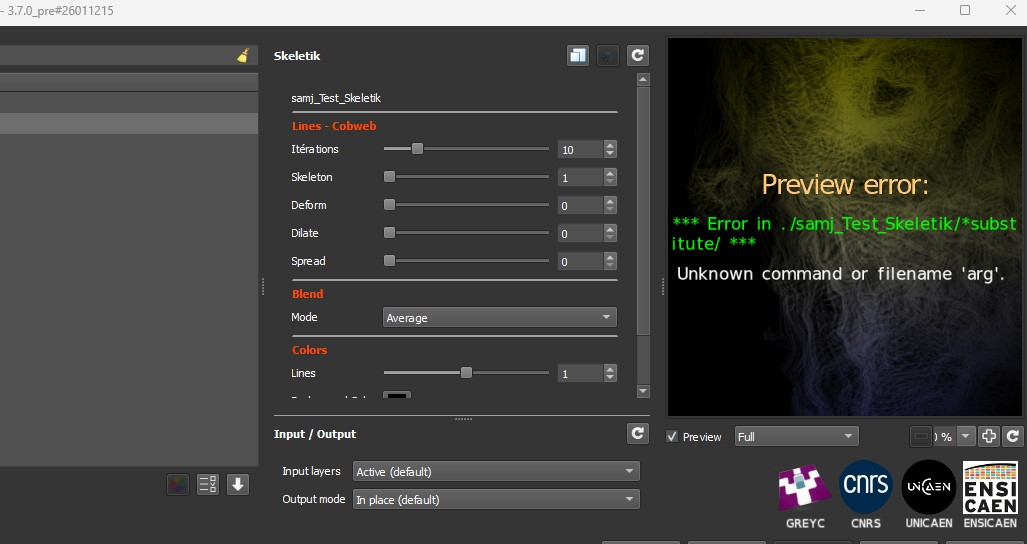
The release notes said that arg doesn’t exist anymore… so i’m not surprised some filters are now broken.
[stdlib-367] Command arg renamed as arg1. Do not use arg and arg() anymore. Use one of arg0, arg0(), arg1 and arg1().
edit: Looks like blur_x, blur_y and is_percent are gone too?
2 Likes
Hmm… Has there been changes to arg0/1() itself? I always wanted this to be something to switch, where not all arguments are calculated at once.
A few thoughts about the next release:
As it will be a somehow “major” version, I’ve decided it was time to make some cleaning, because one can see that the executable sizes of the gmic interfaces are growing and growing.
This change has been done mainly for clarity. I’ve tried to modify all the stdlib and community files to make them use arg0() and arg1() but it may happen I’ve forgotten some. That will be easy to fix.
These command were already deprecated and have been removed in 3.7.0. They all have better alternatives in stdlib , for instance blur x,30 or math function ispercent(). So it should be also quite easy to manage.
Work on version 3.7.0 has just started so I expect some things to be broken at the beginning!
Thanks for reporting anything strange you get!
1 Like
Fixed.
Yes i understand, and i also didn’t mean it in a bad way. Just an observation. arg0 and arg1 are indeed clearer, so it’s cool!
Noted! Will update my scripts soon i hope. Still have to add descriptions too though, duh.
Should be already done BTW.
Ah, thanks. But there are still 2 in my testing folder that use arg and is_percent.
And there are still descriptions to add, though. Have to look how to do it.
I decided to use git diff. Wouldn’t this cause issues?
- const add_ang=arg(mode+1,8,15,30,180);
+ const add_ang=arg1(mode+1,8,15,30,180);
Should it be arg0(mode,8,15,30,180)?
I’ll have a look at everything friday. I see more of these.
EDIT: I checked, no issues. But, I will change it a little bit now.
EDIT 2: All good on my end.
Looks like Morphology painting and Dreamy waterocolor are broken too.
- Morphology painting is using the command
fx_morphowhich is a very old version of the code of the filterContours / Morphological Filter. - It’s actually a quite bad practice to call a command starting with
fx_*in the code of a G’MIC-Qt filter : thefx_*commands are used to define filters, which are by definition, objects subject to evolutions/upgrades. When a G’MIC-Qt filtersomethingis updated/upgraded (for instance with new controls added), all filters relying on the previous version of thefx_somethingcommand become broken. - This has already happened by the past. Of course, one could say we can keep all the codes of all previous versions of filters (e.g. by renaming the command each time a filter upgrade is done), but clearly this would quickly make the G’MIC update file bloated.
- So please, when you develop a filter for G’MIC-Qt, do not call a
fx_*command in your filter code, or this problem will happen one day or another. Or if you do that, make sure you will be able to maintain your filter code when the change will occur. - I know it’s really tempting to do so because pipelining filters like this is really easy in G’MIC. But this practice actually makes your filter very fragile and dependent on further filter updates.
Because of this, I’ve been forced to remove the “Morphology Painting” filter from the main tree (I’m not the author of this filter, so it’s not particularly easy for me to fix that).
For Dreamy Watercolor, this was just a typo (ispercentage() should have been used), so I’ve already fixed it.
I am using win11 and Gimp 3.0.6 and Gmic 3.6.6 and I I can not anymore use “Color Grading” in the color section for Gmic! When I try to use contrast as soon as I change to +1 or -1 the picture will be completely black or white. In the past everything worked very well.
Should be fixed now. Could you try updating your filters with the Update button ?
What a responce!!! Fixed! For me Color Grading is perfect for adjusting. Thanks a lot
Goran
1 Like