Yes, but these minimum requirements are a build of Windows 10 from, as far as I remember, 2019 (version 1903(?) or something like that). All previous versions reached end of service a long time ago, so as far as I understand, Windows will simply force the user to update them. So, if the user is on Windows 10, there shouldn’t be any problems with this.
1 Like
Well, Windows 10 1607 LTSC and 1809 LTSC are still alive in theory, but I don’t think anyone should be running them for general purpose compute and vkdt.
No matter how hard I try, it appears that I can’t connect the nodes in the graph. If I try to grab and pull on a handle the viewport moves, but I cannot draw connectors between nodes. What can be causing this?
Also, is there a way to reset the graph to the default?
is that an older macintosh build? there was a bug that would count clicks as left and middle at the same time.
reset to default: in lighttable mode, select the image, then in the right panel selected images → reset history stack. in darkroom mode: ctrl-h to open history in the left panel (or find the history button in the tweak all tab), at the top are some buttons with various reset semantics (see tooltip).
1 Like
Thanks, pulling from head and rebuilding fixed it.
I just downloaded the nightly zip…It seems to run fine.
I have a basic NVIDIA card 3060Ti and Intel 12th gen cpu running win11.
I thought I would download it and revisit where the project had gone…I have been watching and checking in on it from time to time…
I opened and image and was able to do a basic edit…it was one fo the playraw files and it very quickly looked really nice…
Thanks for sharing all your hours of hard work with us here…
I had one query though. I tried to scan the documentation to see what I might be doing wrong and couldnt find it…
I could not seem to add a module beyond what was offered by default
I tried to add an instance of usm…
I could filter the list and it came up but selecting the add module button seemed to do nothing…
I guess I expected it to appear in the node editor ready to be inserted into the current set but maybe I am missing something …
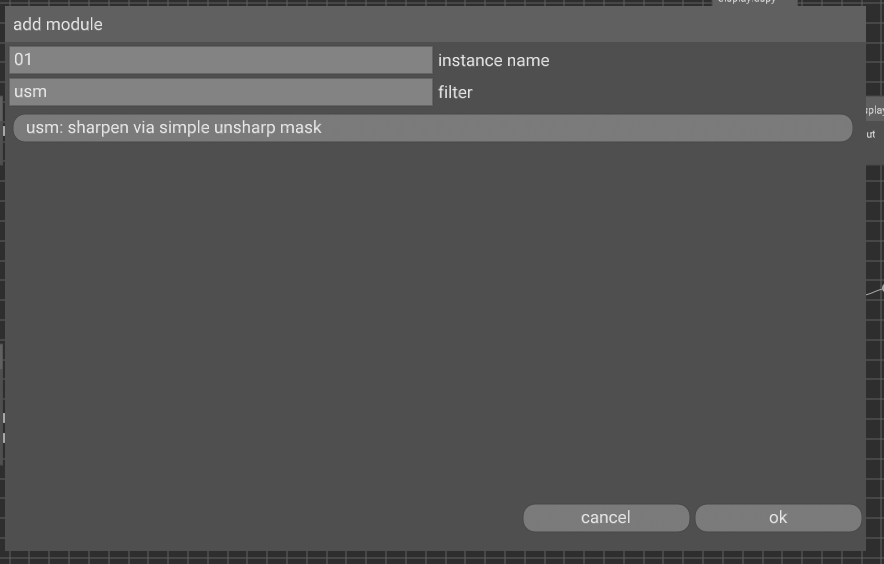
So assuming this is my stupidity then it seems like at least with my hardware the win version works fine…
My system has been automatically updated until October 14, 2025. Since then only security updates for one more year.
Current version is version 22H2 (OS build 19045), that is also Windows 10 final version.
3060Ti sounds good!
uhm, add a module to the graph, maybe like so:
My stupidity I think…I though it would appear on the node canvas and require me to insert it so I missed it (ie it was auto inserted) but never the less I see it now…it didn’t immediately turn up in the tweak all which I think is what confused me… but it looks like it works… so my stupidity… as expected 
EDIT:
I just tried on a fresh image and it works as you showed and as I originally expected… I was doing a lot of back and forth on the first one so who knows what silly sequence landed me on the issue…so its all good and things seem to work fine…
One thing that seems consistent is that the tool tips could use a y offset as at least on my hardware and OS they partially to completely obstruct the view of the option the second the mouse pointer arrives or maybe there is a hover delay that can be tweaked??
fair. pushed a version with +1 font height offset.
1 Like
Thanks I wasn’t sure if it was just me/Win OS or if it was something everyone would see so I just thought I would mention it… I’ll check that out… Cheers
I was using it in scene referred. You’re right putting it display referred is better, though I still find it allows much finer adjustments to the midtones and highlights than to the shadows (yes Im using all the controls including gamma to set the mask).
Do you have plans to release a lens correction module based on embedded metadata?
i have no plans for this. this would be “easy” to do, but i don’t have a personal use case. i wouldn’t be opposed to such a module though. there’s a draft pr based on dng opcode/metadata.
btw thanks for all your input so far everybody! since i posted above, there are almost thirty commits on master, and almost as many issues fixed
i have some remaining issues with the neural denoising. in particular i trained with the rawnind dataset for a week now, and there are still some zippering/halo artifacts in the renders. on the other hand i trained with OIDN for ten minutes (!) and got comparable results (less artifacts, though less noise reduction… might be my training dataset which is different there). i’d like to have some good weights before release.
3 Likes
Im curious about your training!
Would you mind sharing some more details?
Are you following any pappers or cooking something custom made?
oh, i don’t want to touch neural networks or python… so i’m just using stock solutions. unfortunately enough i don’t want to implement much of it as glsl shaders, so i just have a convolution, no transpose convolution or other fancy stuff. that’s why i have to retrain the rawnind weights to match my simplified unet. the training i attempted using the original rawnind code from here. it’s slightly hard to setup locally, and then a tad on the slow side to train. i also used the much more optimised training loop from oidn and i’m very impressed with the improvement in training speed (both algorithmically/lr scheduling as well as implementation wise/parallel data loading).
do you have any experience wrangling these monsters? i feel like i’m not really talented for this and am wasting much time doing stupid things. i’d appreciate some deliberations here
2 Likes
Didn’t know Intel Open Image Denoise was fully open including the training code, that’s pretty nice! I will definitely try to learn some from that. I’m experimenting as well but relying heavily on Pytorch to get anything done. Maybe its time to make peace with Python for this particular usecase 
I guess you are using the clean-noisy pairs from the RawNIND, have you tried just generating noise using the gaussian+poisson model used in the profiling today? Any difference between the two in that case? I see two advantages from generating noise, half as much data to load (only clean) and infinite amount of noisy examples (even a small amount of clean examples would be enough to train the model). I have opted for the later but I can see some potential weakness in not capturing all noise types (mainly worried about hotish pixels at low signal levels). I would say there is plenty of reason to improve the noise model over training on directly on the pairs.
I have noted two things, mainly from the upscaling examples I have seen:
- Residual training is much more efficient than full signal training. Just removing the mean and then adding it back again? I’m experimenting with denosing the residuals of each local laplacian pyramid level, other methods?
- Normalization, I see a recurring comment in help threads - “have you normalized you data”? Could we turn that around and instead normalize the noise? I.e. use the profiling model and perform a Variance-Stabilizing Transform before NN denoising. Would also open up the door for a implicit method of strength scaling. Say the NN is trained on noise normalized as sigma=1 and I want to reduce the effect, then i could scale the input data such that the actual noise distribution is a bit higher meaning some of the noise would be interpretation as signal instead of noise, thus reducing the strength. Same goes the other way.
1 Like
in fact maybe this was key here too. benoit indicated that for the rawnind dataset using linear/gamma/something on the data didn’t make much of a difference. for the oidn setting, using the PU transfer function (on the input data before the network) actually improved the results i get so much that i’d be willing to ship this now. it’s kinda variance stabilising in a sense that it will tone down highlights before processing (which have highest shot noise).
1 Like
I just started diving into vkdt and it is an amazing piece of software. darktable and lightroom seem to struggle with performance on my system but this software absolutly flys. I am not a developer, just a mechanical engineer, but the code is very clean and I find the build scripts, seperation of ui and algorithms, and modular approach very nice to work with. I look forward to using it more.
What is your take on community created or artistic modules? Would you like for them to be included in the master vkdt? I am working on implementing Björn Ottosson’s Gamut Clipping. I understand there colour does gamut mapping but I wanted to play with this one and see how it performs next to it.
1 Like
oh, what system is that? which GPU?
haven’t thought about this much, but i think i’m open to this. as opposed to darktable, new modules don’t really add any weight to the system, you can simply ignore them if you don’t need them, and never add them to the graphs. on the other hand these enable quick experimentation/new workflows/more power to the user.
vkdt has a concept of core and beta modules, only core modules guarantee backward compatibility after a release. that means that it is easy to add and remove beta modules without impacting people’s work much.
2 Likes