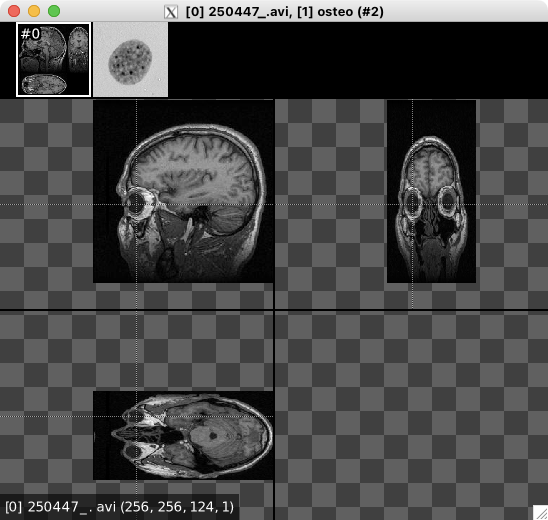
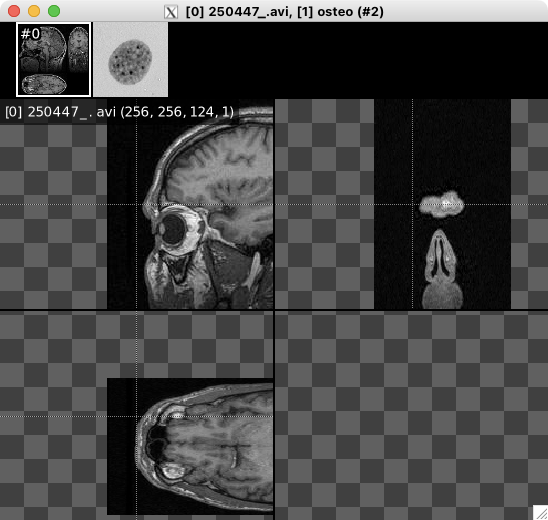
WIP: Unified Image VIewer for G'MIC

Some minor error:

gmic osteo .x10 a[0-9] z

Click in the secont thumbnail crashes

[gmic]-0./ Start G’MIC interpreter (v.3.2.7).
[gmic]-0./ Load osteoblast nucleus example image
[gmic]-1./ Input 10 copies of image [0] at position 1 (10 images [0] = 128x128x1x1, (…),[9] = 128x128x1x1).
[gmic]-11./ Append images [0,1,2,(…),7,8,9] along the ‘z’-axis, with alignment 0.
[gmic]-3./ Display images [0,1] = ‘osteo, osteo_c10’.
[0] = ‘osteo’:
size = (128,128,10,1) [640 Kio of float32].
data = (213,219,217,214,213,213,213,210,214,211,217,212,(…),208,212,217,211,213,211,216,212,208,213,217,216).
min = 70, max = 249, mean = 197.159, std = 28.0114, coords_min = (64,85,0,0), coords_max = (112,97,0,0).
[1] = ‘osteo_c10’:
size = (128,128,1,1) [64 Kio of float32].
data = (213,219,217,214,213,213,213,210,214,211,217,212,(…),208,212,217,211,213,211,216,212,208,213,217,216).
min = 70, max = 249, mean = 197.159, std = 28.0122, coords_min = (64,85,0,0), coords_max = (112,97,0,0).

[gmic] *** Error in ./display/_display/*for#1892/*if#2400/ (file ‘/Users/karo/sw/gmic/src/gmic_stdlib.gmic’, line #2421) *** Item substitution ‘{1,max(w/,h/)*max(,)/8}’: Unrecognized item ‘w/’ in expression ‘max(w/,h/)’.

Version 3.2.7 (pre-release #23081312)

Seemingly the 3d image first is the problem.
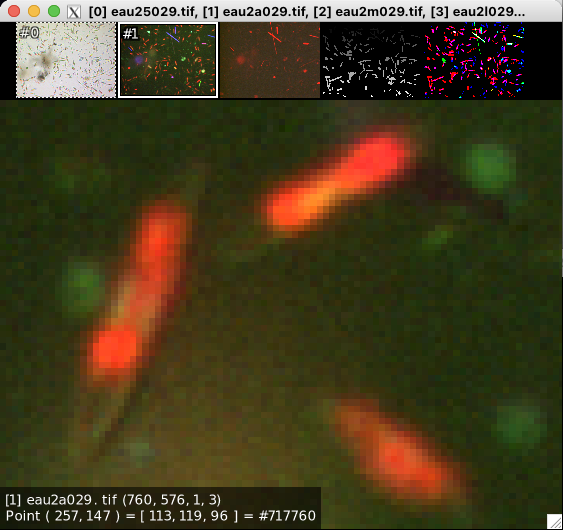
1 Like

Fixed with

Really a helpful improvement, especially the application of subwindows for other images in the list!
Thank you
Bildschirmfoto 2023-08-13 um 17.45.19
In this image set it is helpful to select a subwindow in one image and look into the other! Please don’t change that!

Don’t worry, that’s indeed a very interesting feature for local image comparison (in conjunction with keys SPACE and BACKSPACE to switch from one image of the list to another!).

Hi,

for some reason the arrow controls are inverted.
Pressing left shifts images to the right, and vice-versa. Same for up and down.
Is this intended? I’m just curious.

The idea is that the arrows key shift the view, not the image.
So if the view is shifted to the right, the image appears to go to the left.

i’d say that it looks weird in full size, but when zoomed in, the opposite behavior looks also weird (as you don’t see the whole image).

How can the volumetric image viewer be activated besides the new display?

1 Like

You can’t for the moment.
I’ve completely discarded the “old” display (implemented in C++, in CImg).
So, I need to improve the new viewer to deal with 3D volumetric images, before releasing new version 3.2.7.

Work-around: Use split z before viewing :slight_smile:

OK, luckily I have still the 3.2.6 version too!

I’m late to this party. Only updated binaries today; been running on July 15 binaries since — well, July 15.

Looking forward to retiring Cheat #3: The -display Command Lies. Of course, the old display tutorial has been in need of an upgrade for some time; reason now to visit that sooner, rather than later.

I especially like the image list thumbnails. Gives a rapid heads-up, upon entering a new scope, that your selection decorator is not selecting what you think it is selecting. And switching between alpha mode (CTRL+A) or among normalization mode (CTRL+N), I think, will clear up a lot of display confusion that newcomers suffer. I will be further playing with this today. May even get some writing done. Outside of posts here, I’ve done little of that.

1 Like

Also, I’ve not told it already, but command display0 (a.k.a d0) runs display with no normalization and alpha mode activated, so that’s good as a default for viewing RGB[A] images.

Disclaimer: I have not used this viewer yet.
But I have used a lot of other image viewing tools.

From what I see you are going for ultimate image viewer - lots of technical functionality instead of mere prettiness.

So just some generic remarks or questions on usability.
I’ll drop all the “imho” and “maybe” from the remarks, please don’t be offended.

I see a lot of CTRL-this and CTRL-that – what are the “naked” keys on the keyboard used for? There is no typing text in this, right? Ditching the key-combos makes working so much simpler in my experience. Reserve the combos for destructive actions and/or rarely used meta functions (prefs, printing, etc).

On the topic, make the keyboard shortcuts customizable. All of them.
And then give everything the option to assign a shortcut.

Thumb row should be able to show on either side of the image panel. Top, bottom, left, right.

If the info box (coords etc) can be set to NOT overlay the image but be put into a status bar, that would be awesome. Making the content fully customizable would be a bonus for such a functional tool.

I really need to go and try this, because the promise is great.

Progress report #5:

  • Still a lot of minor tuning to avoid “strange” behaviors (e.g. mouse drag when the mouse pointer leaves the window).
  • Thumbnails are now rendered “on-the-fly”, only when necessary. This avoids to wait for a few seconds when the list contains lot of images (typically +1000), as now, a thumbnail is rendered only when it is required to display it.
  • I’ve started thinking about how to extend the 2D viewer for 3D volumetric images. Not crystal clear yet in my poor old brain, but I’m planing to work on this on Friday.
  • I’ve defined a new command default_display which is actually the command that is called by default when running G’MIC. For now, it just call display, but it can be overriden to change the default display. For instance, add :
  m "default_display: d0"

to your cli_start command, to make the default display be display0 (so, without normalization enabled, and alpha channel mode enabled too).

2 Likes

I’ve noticed that CTRL+ARROW keys actions (switch image) are constrained between 1st and last image (cannot go from 0 to -1 to the left, and vice versa), but SPACE and BACKSPACE can do it (which is nice!). Is the difference in behavior intended?

Yes. As there are two ways to do almost the same thing, I thought it would be nice if that is not exactly the same thing.

Now that I have a bit more experience with the new display viewer, I have to say I like it a lot more than the earlier version given that it is now easier to have a overview of what’s going on. I still would like old viewer for the purpose of viewing weirdly sized image though as I don’t find it reasonable to use new viewer for that. legacy_display/ld/ld0 for legacy display?

To explain my issue:

  1. I have to zoom in.
  2. There’s no quick way of getting value at n point for cases of dynamic array.

This means I would need to resort to printing value to check as it dodges those issues.

Feature Request:
Overview of image information when hovering over thumbnails.

Limitation Spotted:
Grid won’t be visible in case of black images. Grid color should be negate-able or re-adjustable.

Some keys that help in that case:

  • Key Z : Set the zoom factor to “close enough”, so that’s easy to check the value of each image pixel indepently.
  • Key HOME, C and END: go respectively to the beginning (upper-left corner), center and end (lower-right corner) of the image.

So, if you have a dynamic array, basically the sequence of keys Z - HOME is useful to start exploring the array values.

That’s a good idea, I keep it in mind for later.

Also good suggestion.

Also, please keep in mind that you can still use the old d2d command to use the “old” image display.

Interesting variant of 3d volumetric images display! Looks good
Might it be a possibility to relocate the section position in the canvas images? And/Or to fix the section locations under zoom?
Bildschirmfoto 2023-08-18 um 15.55.25
Bildschirmfoto 2023-08-18 um 15.55.52

A friendly reminder that not all keyboards have the same number of keys and mapping. Likewise, with mice. I am sure you placed that into consideration…

Yeah. In my case, I need to use two buttons because I opted for a smaller keyboard for ergonomic reason. So, I need to use two buttons to use Home/End. So, Z/Enter combination works better. But, Z doesn’t get the nearest position to cursor to zoom.