Especially for Windows users this should be a blessing as the terminal-window-lightshow and focus stealing have been fixed.
On slightly older windows versions there will be a persistent terminal window; a side-effect of fixing the terminal-window-lightshow. A workaround can be found in the FAQ.
Sadly, my most anticipated fix (the scrolling bug of sliders, as described in #22038) didn’t make it to 5.6.2
At least it’s been fixed in the nightly build, so waiting for 5.8 it is.
Lovely, big thanks to everyone who works on darktable. It feels like a really good time to be using it, as the project is having a bit of a moment. Agx, AI masks, spektrafilm, mask revamp, contrast & texture, mouse scroll interface for color EQ… So many cool toys. And, naturally, this wonderful community who patiently answers extremely basic questions that have been asked 100 times before.
A small question: how can I learn which version a particular new feature is targeting? E.g. will the Flexi masks arrive likely in 5.7? Will spektrafilm?
Right. Thank you. I suspect as much since Flexi is still being tweaked. But in general is there a place where I can find this information in the future?
You can keep an eye on the open PRs on github. They get tagged with the milestone they are intended for. Generally: everything merged into master will go into the next major release.
Spektrafilm is in 5.7 already, Flexi is still in the drafting phase.
(and in case you didn’t know: 5.7 is the current development release; 5.8 will be the next major version).
To be even more precise: it’s not a release per se at all, and there is no such thing as a single “5.7” version. It’s just a rolling state of the development branch between actual releases (5.6 and future 5.8), each build at a given point in time identified by how many commits there were since diverging from 5.6 and what is the exact commit hash used for the build, e.g. 5.7.0+1175.g05918a7c78.
Also, how does using darktable-dev work on Windows (or in general)? I know making edits will most likely make them impossible to open later as the modules change, but is there anything else to watch for that could be messed up by running these dev rolling releases?
I often run 3-4 different Windows builds concurrently, and I’ve learned the hard way that it’s best to keep everything completely separate. That means a different installation directory, a different config directory, and different photos folder. The first two are now handled automatically by the Windows exe installation process as long as you choose the right options (separate installation directory and separate config directory).
For the photos I want to use to test development builds, I usually have a “test photos” folder and just copy it for each build. I give it a new name to match the build version. So, for example, the below would be an example setup with my usual process (bold text shows the logic):
Technically, you can use the same test photos folder between builds, but you should then turn off XMP creation. But using a separate folder entirely solves this issue and keep things neat.
I may have left the config folder to the default (same as my main), but I didn’t open the settings window or do much in 5.7.0+, really, so hopefully I didn’t mess up anything.
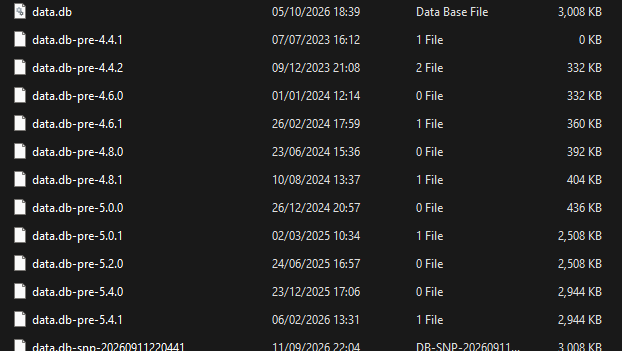
This is a common mistake and one I’ve done myself! There is a chance that your database got upgraded, which can cause issues.
To fix it, you usually just need to roll back to the previous database backup. Each time your database is upgraded, a backup is created of your old one. You just need to rename the backup to be the current one, like this:
But first check to see if this is an issue or not. You will see a back up of your db in the config directory if it has been upgraded. The examples above would not be a problem, but if you see “data.db-pre-5.7.x” or something like that, your db has been upgraded.
Is this a problem? I’ve never checked the database files actually, might be a good idea to at least be aware.
Also, funny how Windows treats everything after the last dot as the extension, so it’s full of 0, 1 and 2 files
You mean is it a problem to delete old backups? No, not at all, assuming you don’t want to roll back to them. I can’t imagine needing to keep backups from more than two versions ago.

 !


 . Sorry about that!
 5.8 should also have extra stuff like the masking overhaul and contrast & texture
 I’ve never checked the database files actually, might be a good idea to at least be aware.