a CMYK converter -- I know it doesn't have to do with raw images, but...

hi,

I’m aware that pre-print image processing is a whole different (not just category, but) field…

BUT… in the MONEY-CAPITALIST (old) world, it is handled by ADOBE ™…
the (old) photo-software-giant

In any case…
here, in the OPENSOURCE world, it could be done (a converter) by the Scribus team…
BUT… I can understand that the digital photo processing could be far deep a sea for them to just plunge… as their software is a different level, it is organizing text and “image blocks”…

ANYWAY, the reason why I bring it up here, the RGB → CMYK processing functionality, is the dedication to freedom, which rawtherapee (and darktable) are so GREAT at… and LINUX…

CAUSE a converter already exist!
It was created and developed by a German guy, who sadly enough, died…

It worked… used to work with Linux Mint 17… (as far as I remember, cause I downloaded it a few years ago, although I have no idea where it could be, but hopefully the website exists at this moment… still… )

So, there is a working software…
it “only” needs to be “adopted” :slight_smile:

Right now, when I have to convert a digital photo top CMYK, I’ll install Wine (the Windows-software-connecting software), and install Photoshop 6 …
Which many people used to use around 2000…
With Photoshop, it was natural that it could convert images to CMYK color profile

I’m “sure” (hopeful) that Rawtherapee and Darktable could do this together… somehow…

Peter

★ ★ ★ Thank you for developing Rawtherapee,
and for having created it, in the first place!! :slight_smile: ★ ★ ★

Apologies, not RT or DT (or even Gimp) Stand-alone with source code.

Working with kubuntu 24.04

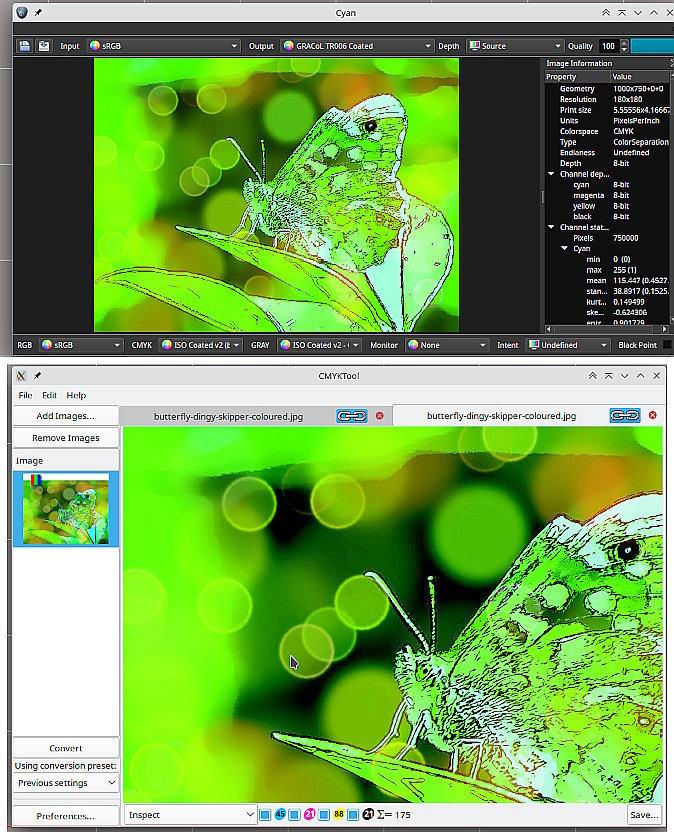
Cyan - https://cyan.fxarena.net/
and
CMYKtool - https://www.blackfiveimaging.co.uk/index.php?article=02Software%2F05CMYKTool
…although this is old (for those who remember the Gimp 2.8 plugin) but if you dig out the old dependencies it works ok. Useful for checking color percentages under the cursor.

Edit: Truthfully, If you need to work in CMYK mode, the best way is using Krita. I know what you mean by PS in WINE (I have a PS7 there) but really not needed for a long time.

1 Like

depending on the use, for a print pdf you could simply use Scribus and place your rgb image(s) then convert to CMYK with a CMYK pdf profile.
if you just want a raster i thought krita did this?

1 Like

I forgot about Krita…
I remember I checked it… a few years ago, but something went astray… I concluded it wasn’t a good solution… but as I glance at the duckduckgo results, it appears to be promising, indeed…
so I’ll recheck it again…

. . .
as to Cyan… I’m sure I’ve never heard of it…
(it was about 2 years ago that I was doing an extensive search and trial in this matter)

looks promising!
I’m already in it…
wow!!!
THANK YOU!!
It looks very professional, I mean, it sure is!

Thank you very much, big time!

hi, David,
I firmly believe that Scribus can’t do that.
But what you say sounds logical :slight_smile:
I know it can replace colors… and from here, it takes just one more step to a whole CMYK profile…
So, I’ll check again!
Thanks very much. Also for suggesting Krita. (I remember I thought it was a complex program which could do CMYK conversion too, but didn’t trust it quality-wise / professional use-wise… That is, I was only taking a superficial glance at it…

I remember keeping bumping into info stating that GIMP could do CMYK conversion through a plugin, also remember searching for it, but it was a dead-end…
Sending stuff to the print house is a fairly responsible task…
and dependencies end up requiring rebuilding an old machine and being prone to new and newer problems crop up… so I dumped this idea…

It’s beyond my scope :slight_smile: Or out of it… all dates are before 2012…

That German developer’s converted would have worked with Linux Mint 17… But I dumped that line too…

Anyway, Cyan appears to be perfect!!
and I’ll check Krita as well! :slight_smile:

as to Krita…

I find this forum thread at krita-artists.org very informative…
LINK <<-- this is the link to the conclusive comment

IN short: larrycross (Larry) ends up asking help from the guy at the print house…
and he uses some Adobe thing… and says he can do that favor for Larry anytime again in the future as well…

I hope that Cyan will turn out to be as good (>=) as that Adobe thing :slight_smile:

I’m only worried because Cyan’s the git page was last updated 3 years ago…
and they don’t have a website… I mean, with a forum and info…

I did say I use kubuntu 24.04 which is not ancient.

However, Cyan is standalone and also a Gimp 2.10 plugin. Updates not really a problem since it works.

Gimp 3 will export to a cmyk jpeg or tiff , but it is still a RGB editor and you can run into issues with out-of-gamut colours.

Possibily for your use Krita, will import an RGB image and convert to CMYK That also means any editing is in CMYK much safer than a “final” rgb to cmyk conversion.

1 Like

Sorry, I didn’t mean to say that. I just saw 2011 everywhere and in my world (with my computer knowledge, which can be called advanced in several respect) it means out of reach :slight_smile:

BUT, hey, I didn’t know about GIMP 3 !!! great news!!! thanks!!!

Imagemagick…
Additionally, Imagemagick needs a honorable mention, too…
as it can do it… with a single line of code…

convert image.jpg  -colorspace CMYK -profile USWebCoatedSWOP.icc image_CMYK_cspace_profile.jpg

link to stackoverflow where this code line is being mentioned

now I go to download GIMP 3 :slight_smile: