In darkroom, under “My Modules” I have the list of modules defined in a Style. At near the top (i.e, end) of list is sigmoid. Above “sigmoid” I have “local contrast.” For context I’m processing the image in scene-referred mode.
Post processing and exporting the processed image and on second thought, while in darkroom, I hit the icon to the left of the icon for My Modules to show “the list of active modules”. Several modules show up that are not in My Modules. E.g., orientation, white balance, highlight reconstruction. Those I can understand are necessary for any and all processing.
One module is shown as active that I’m having trouble understanding: filmic rgb.
My understanding was that it’s folly to use both filmic and sigmoid and we are to choose one or the other. The manual (page 171) reinforces that stating: “only use one display transform
Never use sigmoid together with another display transform module (i.e. filmic rgb or base curve ).”
I chose sigmoid, it is active and present in My Modules, I didn’t choose or know filmic was also active, yet it appears to be active (undercovers) per the list of active modules. Turning on/off filmic has a material effect on the processed image.
Isn’t the presence of filmic (atop sigmoid) problematic? or are the two fine and compatible, with the output from sigmoid flowing into filmic and not a problem?
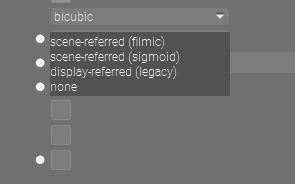
What do you have set in preferences… if you want to be flexible and use styles to apply this set it to none…otherwise you pick sigmoid or filmic and they are applied by default…
EDIT : You should go through all the preferences tabs and confirm the settings are a match for what you want. For those you don’t understand…check the manual… Lots of configuration options in there
Hmmm, in my settings/preferences for processing I don’t see what you list, Todd.
I have “scene-referred, display-referred, none”. I’ve chosen “scene-referred.”
I don’t see “scene-referred (filmic), scene-referred (sigmoid), scene-referred (legacy), none”.
I’m running DT 4.2.0.
EDIT: I take it, in vers 4.2.0 I should set my processing preference to be “none” and activate sigmoid as I do in my Style. Choosing “scene-referred” introduces filmic automatically and even if I add sigmoid on my own, filmic would still apply even after sigmoid has been activated.
EDIT to EDIT: Filmic still appears as active module even if processing preference “auto-apply pixel workflow default” is set to “none”. It did so even under “scene-referred”.
Old edits might keep it…after the change compress the history stack from the original or create a new copy via the duplicate function and it should not add filmic…my bad I am on 4.3 _255 or something like that and they have tweaked that setting.
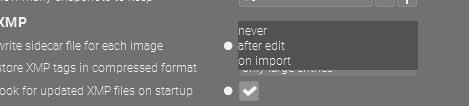
Edit and this could be as I have the option set not to write the xmp for any file until edited but the default is I believe to create one on import so any files imported before you make the change might still show filmic unless you discard the history stack, or compress from the original position…
The manual suggests filmic would be invoked and activated automatically whether auto-apply pixel workflow default is set to scene-referred or none.
“…Choose which modules and module order to apply to new images by default:
scene-referred workflow (default) assumes that most processing will be performed in a linear RGB color space. Selecting this option will automatically enable the filmic rgb and exposure modules and will set the pixelpipe order to v3.0 which is the (scene-referred) order defined for darktable 3.0 and later…none will not enable any modules by default and will set the pixelpipe to the v3.0 (scene-referred) order defined for darktable 3.0 and later.”
So, in DT 4.2.0 if I choose scene-referred or none I’m locked into filmic. I cannot use sigmoid since the use of the two together is a bad idea. And of course, sigmoid can’t be used in display-referred. So, in essence, sigmoid is moot in 4.2.0. Could I be wrong?
“scene-referred workflow (default) assumes that most processing will be performed in a linear RGB color space. Selecting this option will automatically enable the filmic rgb and exposure modules and will set the pixelpipe order to v3.0 which is the (scene-referred) order defined for darktable 3.0 and later.” Page 238 of tthe manual for 4.2.0.
I’ve tried it with a brand new image in a new folder. Said image and folder never processed by DT before. Filmic still shows up when processing preference set to “none”.
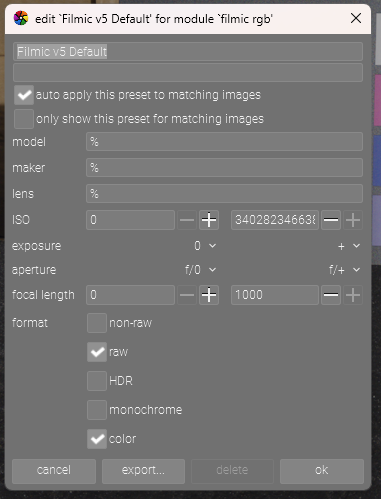
Did you monkey with auto presets…if you did then you will get filmic… None will clearly not add filmic so I imagine what you have is an autopreset that you made with filmic and its being applied…check presets under filmic and see what you have…
Edit… I am set to none and I like and use filmic v5 but I don’t want to see it on the image until I look at it so I have an auto preset that looks like this…it adds filmic v5 deactivated and I activate it if I want to apply it or use it…
I wonder if there could be crossed lines here… there are two spots you can select “scene referred”
One in preferences, this is the important one, and one in the module manager in darkroom.
Not sure if this helps!
No, I didn’t monkey with presets etc.
What I just learned is I was errant in using a processed image (which carried over the filmic legacy).
With a brand new untouched image, and “auto-pixel default set to none” there’s no filmic in the activated modules. Once I apply my Style filmic shows up in the activated modules (but it’s not there in my Style). I suspect this is owing to the fact I created the Style while processing under “scene-referred” (and thus an active filmic).
I shall recreate my Style under “auto-pixel default set to none” and that should eliminate the presence of filmic and leave just sigmoid in the pixel pipe.
With that I shall close this thread (attributing it to “operator error fixed since”)
The only place I selected “scene-referred” was in preferences/settings.
That clarified, I believe this might be an issue that’s overhanging from creating a Style while in “scene-referred” which activated filmic (per 4.2.0 manual).
Glad you sorted it that is why I suggested checking by resetting the history from the original position in the list or creating an original using the duplicate option…this would for sure use the new settings and confirm that you were getting what you intended… The tweak now in the master has a sigmoid option in preferences…although it has gone to a single setting for the workflow and white balance option and some people don’t like it… but its workable…
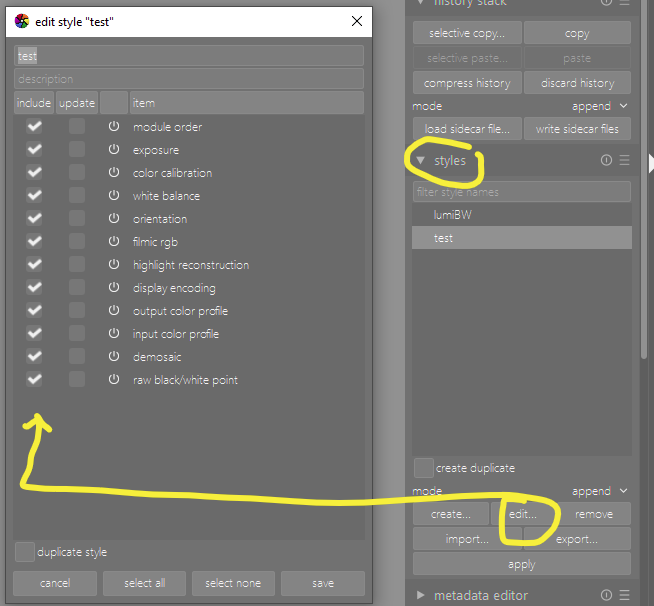
That sounds strange. Can you share your style here? (It can be exported to a .dtstyle file and shared on the forum.) Or you could check whether there really is no filmic in the style here:
If it is there, uncheck include for filmic, and click save.
Istvan, my apologies, I deleted my “bad” Styles (scene-referred mode, with filmic automatically added, and sigmoid manually added in them). The only Style I have left is the “clean” one (“none” mode, no filmic, only sigmoid).
On reflection and reliance on the manual I believe I have a better understanding and a likely problem with vers 4.2 (that was, from what Todd’s response suggests, fixed in 4.3).
In 4.0 I set as preference scene-referred.
This automatically activates filmic (per the manual). I wasn’t aware of this activation.
In my processing I add filmic (already activated) and manipulate it.
All fine and good.
I get 4.2. Preference still maintained as scene-referred (and filmic automatically activated, unknown to me)
I activate sigmoid.
I do not activate filmic as the Release Notes, manual/etc. say you can’t have sigmoid and filmic together.
The system happily complies, I manipulate the image with sigmoid, export, etc.
When I create a Style of the activated modules I find filmic and sigmoid there.
That is a problem, a bug. The system could have warned me on activation of sigmoid that filmic was already in play. This bug seems apparently fixed in 4.3 where you activate scene-referred in either filmic or sigmoid mode.
Should you need I can reset preference to scene-referred, recreate the Style with sigmoid in it, export it etc. to show the presence of filmic in it. This may be moot now as 4.3 apparently fixed the issue…and in 4.2 I reverted to “none” for auto-pixel…
I think you are confusing ‘my modules’ and ‘active modules’. One is more like favorites.
So you don’t see filmic in ‘my modules’ because it’s not in your starred modules list. But it is active (and I’d you go to all active modules, you would see it ).
Personally , i always use the ‘active modules’ tab and use the search box above it to find others…but i know what modules there are. For someone nee you might want to see a list to try what they do.
You might have misunderstood me. The two workflow preference delivery dropdowns have been combined and simplified but this does not really introduce any fix.
Also while it doesn’t really make sense to use both filmic and sigmoid its not something that will likely ever have a warning as you might see if you do a double white balance for example…
After that then its just about keeping track of what is going on… For sure for a long time if the settings were set to none for workflow then you would not have any application of filmic or of default exposure. So there is not bug there. However if you have the setting to write an xmp on import which is the default and you did also have it set to scene referred …then even if you have not yet edited the images I believe they will have an instance of filmic. This wont be changed by changing the settings it will only impact new imports
So in this case adding a style with sigmoid is going to give you both.
I think maybe this is what you had going on. I have it set for my use not to write an xmp until I do an edit so importing will not create an xmp or apply any settings. And I set the workflow to none as I want to see the image in an unbiased way first
Beyond 4.2 and it could always change…but currently in the master there are now only 4 settings Sigmoid, Filmic, Basecurve, and None. None applies no tonemapper and gives you legacy wb currently. I haven’t tried basecurve but Sigmoid and filmic will use color calibration wb with camera reference , exposure and either filmic or sigmoid…
So you can select what you want from that list for your base and then decide do you want xmp on import or only if you edit the image and finally then just track your styles to make sure that they include what you need to be added to that base
The history stack can always be compressed from any position in the list or going to the first line and selecting compress will apply the default workflow you setup in those preferences…so if you want to see what is being applied and or confirm it compress the file like that or make a duplicate in the duplicate manager with the original option…again this will be default processing… If you have any modules set to auto apply and it is appropriate you will also see these added.
Instead of a style many people will just create autopresets with the preferred starting settings and then apply them active of inactive. For example you might have a nice preset that you use for LC but not every image so you just auto apply it inactive and then its there ready to activate if the image suits it…
In the end I don’t think there is any “bug” at play here…