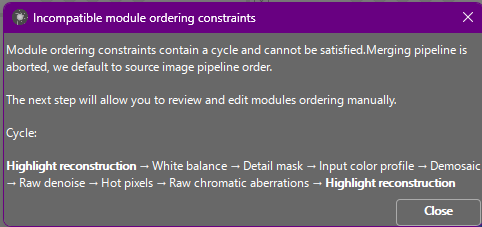
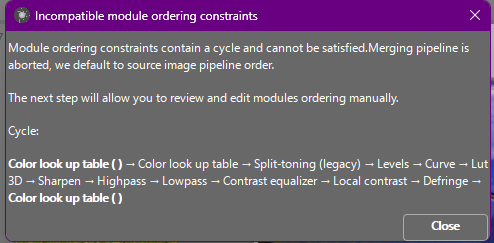
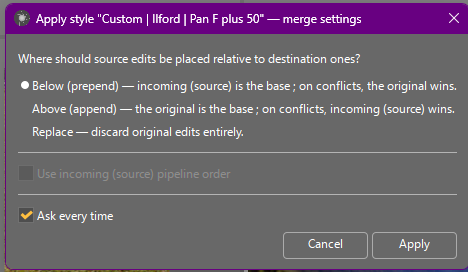
I’ve been trying to apply a style (Film Emulation - Ilford Delta 100) to a mass of images that I’ve already processed and exported to jpeg. From that folder, I tried to produce a second exported folder of Black & White images from the aforementioned style. But Ansel hates the order. See attachments
The only way I can get a copy of one image actions is to go to “History Pasting Mode” and choose “replace”. I can never get Before or After to work properly. I just find it weird because if I can cause these modules to be applied to the image when editing it singularly, why not as an “copy and paste” action??
Or, if there was a specific order in which I need to apply any number of modules, then I would have Ansel “hold my hand” and take me step by step through the modules in proper order so I don’t mess up my images. I might be asking too much from a free program that is as awesome as Ansel.
where is your style from…could there be darktable roots and newer than supported by Ansel…and do you mean style just to be sure you don’t mean a lut or something??
Hi, and welcome to pixls! Ansel is free software, so no problem with asking about it here, but you may have more luck at the official Ansel community (aurelienpierreeng/ansel · Discussions · GitHub). That said, a few people here also use Ansel, just not as many as on its own forums.
Please note that applying a style to non-raw images is currently unsupported due to a bug we are actively working to resolve.
Additionally, if the style originates from darktable, there is a bug that prevents the correct creation of new instances. Some modules may also not exist in Ansel or may have different versions.
We recommend creating an Ansel-compatible version of the style by applying the darktable style to a fresh image using the replace pasting mode. Afterward, check if everything appears correct or if adjustments are needed. Once satisfied, you can save the Ansel version of this history as a new style from that image.
Can I ask you what does this style ?
Isn’t it possible to apply this style on a clone of your raw files ?
I believe it was from t3mujinpack but I got them along with another group of downloads. If they make them free, I’d like to see what they do. But, when I opened the file (the actual .style) and the file indicated that it was made for Blender. So, maybe I can see the problem.
I believe those styles had two versions…a tone curve and clut table or some set of modules and there was a lut version. That you should be able to use in Ansel and the style if for some reason you need to check you could do in dark table to see the look which would likely be that same as on Ansel and then you could purse an Ansel specific option of you find anything of value… But I think the styles have a tone curve with LAB as part of the style and Ansel has renamed the rgb curve to just curve and has no LAB curve so I don’t think you will get them working in Ansel other than using the lut versions…