Recently, accidentally I applied a style to my collection and could not undo it. The only way after many tries painfully reset by applying initial state to my whole collections.
I know, it was drastic measure. As a result lost all my edits.
I by default do not keep any sidefiles (xmp).
I was wondering what would be a best way for backup.
Does it make sense to regularly backup the data.db and library.db?
I am satisfied with my backup method for my raw files and are done in multiple locations. As matter facts, as I am writing this I remembered that I have a backup of my data.db and library.db just before this latest incident and could restore them again.
Any tip or advise most appreciated.
- turn on xmp
- dt already creates backups of the database. configure the frequency and how many to keep. Backup the backups to an off-site location.
1 Like
What If I do not want to have xmp files?
Could I just do #2 only?
XMP files are small and they provide security in case something goes wrong. Of course they are optional and you can just do #2 but they have saved my bacon on a few occasions when my DB goes #2 because of something stupid I have done.
I only have xmp files written after I start editing. They are just a small sidecar file sitting in the same folder. They make my DB redundant if something goes wrong. I just reimport all the photos and all my edits are rebuilt from the xmp file. What a truly brilliant system.
If I understood you correctly, you do keep your original raw file separate from where you do your edits?
xmp have a bunch of benefits. You can search on the forum because we discussed this multiple times.
The main one is that raw and xmp are together and you likely (i do) focus my backups on the raws. If things go south on the database, the xmp are there for every edit. If another software wants to, it could use the xmp to get tags.
I keep my raw files and the tiff files I export after editing in the same source folder. That is a personal decision by me. The xmp is meant to be kept with the raw file regardless. I personally see no good reason to not have an xmp file but many good reasons to have an xmp file for safety in case of DB corruption or even sharing the xmp file as we do in this forum a lot.
I keep my raw files in git ammex and check the xmp files into git.
If I did what you did, I’d quit darktable, do git reset --hard and pull a backup of the library.db.
I just thought of another great reason that I use xmp files. I travel a lot and take lots of pictures that remain on my laptop until that days folder is processed. I then copy and paste that folder to an external hard drive for archival storage. The xmp file takes all the editing information across. I don’t need the DB to know about the external hard drive. If you depend on the DB it can get very tricky when you have multiple storage locations.
After the transfer to external drives I then delete the folder on my laptop because there is limited space on there. But DT works faster if the images are on the laptop for editing and not on an external drive or cloud storage.
That’s my perspective anyway.
one of the reason that I did not wanted to keep xmp files is that I run multiple versions of dt. When I use to have xmp files it made lots problem.
BTW, while I was waiting for advise, I did restore data.db and library.db from my backup storage and I am back to prior to the mishap.
I just searched for it. It is very interesting service. I liked the idea that can be done offline.
Thanks.
1 Like
I did not know that.
As others have mentioned, XMP sidecar files are nice. And they should probably also be backed up.
As you learned, making a backup of those two databases is helpful, and should be part of your regular backup routine.
For your exact scenario that you described , the most helpful backup would have been a database snapshot because it would have had the edits and preferences for the last time you closed darktable.
In preferences, go to storage:
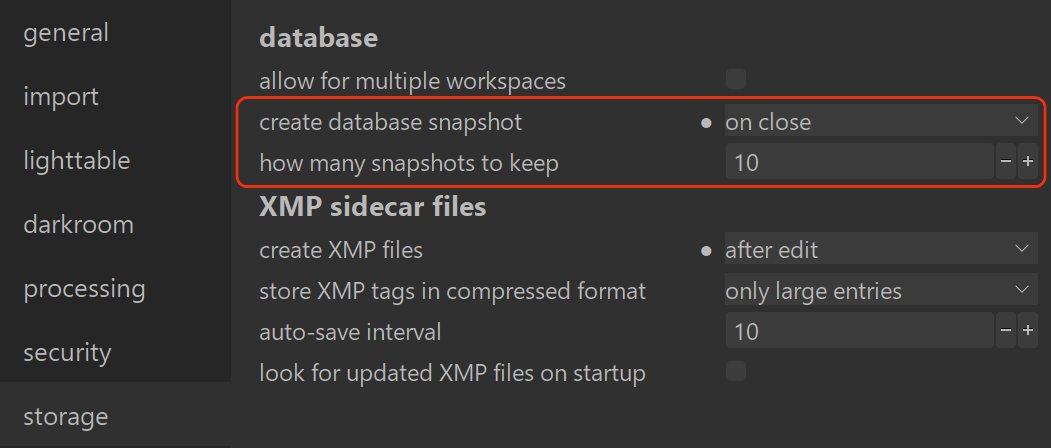
The snapshots have saved me a few times. The snapshots are stored with a timestamp:
- data.db-snp-20260101104413
- library.db-snp-20260101104413
1 Like
Thank you. I erroneously thought that it has to do with xmp files.
Fortunately I regularly backup my system and I had the data.db and library.db just before the mishap. As I mentioned earlier I ran multiple dt for testing and having xmp was problematic. Yes now that I know snapshot is not related to xmp, I turned on.
I wish dt had a feature to undo a batch as it does on the individual image. Yes I clicked on a style not noticing that I selected the whole collection. I notice it immediately but could not stop it. There is no cancel/abort key.
Listen learned, when is too late in the night stop and go to bed. 
Also learned it would be good idea for every style I make, I also make undo style for it.
Final point: manual briefly mentions about it, but never discuss how to restore it. Most computer users with limited knowledge may not know where to find and restore the snapshots. In my case (osx), I knew it would be in a hidden folder and needs to be renamed without snp-xxxx.
1 Like
@EmerS I just noticed you have set backup to “on close” instead of the default weekly. This seems logical so have just done the same. I wonder if there is a downside to this?
Your backups turn over much more quickly.
1 Like
As Mica says, they do turn over more quickly. If the total is set to 10 snapshots and you open and close darktable 10 times today, and you realize that you actually made a huge mistake two days ago that you’d like to recover, you can’t because all ten snapshots were made today.
[edit in italics] The user manual says you can set the number of snapshots to -1 and it keeps all snapshots but the function seems to be broken as dt will not accept ‘-1’ in that field, so you would then want to have a system in place to delete after a certain amount of time or they will start eating a lot of space if you have a big library.
[edit to add] You could always set it to some number much higher than 10.
I can not set it to -1. minimum accepts is 0
Thanks for replies to my question. I have reset to the default of weekly. I update DT weekly to the insiders program and over about three years have had to recover my DB about twice. It is a rare problem, but I set myself up for risk of issues by frequent updating of unstable beta version.
What I have done to mitigate that I have created isolated folders for each versions of dt.
The only data that could be in a potential risk is the actual raw image files but they also as I said earlier backed up to multiple locations on external drives.
Recently I made a gui for the Rsync command that made the task much easier.
In the last episode, it was that backup system that came to rescue.
The most essential step in protecting data that often overlooked is the vigorous backup regime.
Almost 20 years ago I lost everything, photos, music, documents.
total loss due to drive failure, Luckily manage to recover most not all using a outsourced program. Recovery was slow and time consuming. It was then that I became a hard believer in a good backup system.
1 Like