Hi everyone and I apologize for my English. I use a translator to write this message.
To the author of the program - Thank you very much. Thank you so much.
I’m not sure if in the settings of the program I specify output profile as srgb icc v4, tag with this profile must be sewn into the exported file itself (jpg as an example).
In any case, if you look at the exported file, it will have an “untagged” tag. Viewing is done through programs: windows explorer (properties>detail). Photoshop - there will be a message at the bottom of the panel that the profile was not assigned).
The gist of the problem is that I’m not sure how well my photos are seen by other people, besides that I calibrated my display through i1Display pro devices - it’s colorimeter and displaycal software where the color temperature I set by the observer (in daylight), brightness at 97 candles and gamma 2.2.
Settings of the ART program I sent a screenshot in this message.
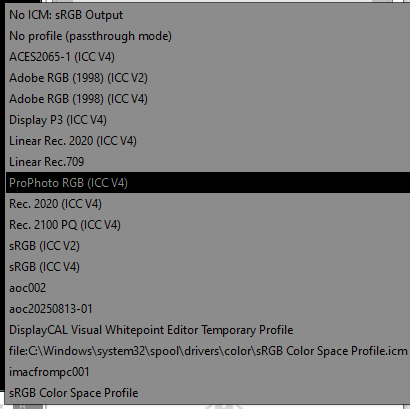
The second screenshot showed all available profiles that can be selected for the output file.
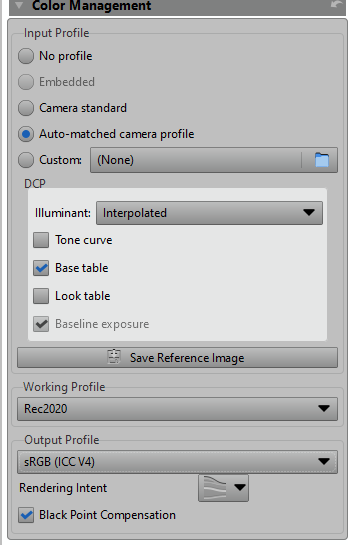
Also, the program closes itself for some reason. At the same time, even when it is not loaded. If you work in it, then you can work for years (conditionally), but if you switch to the window of any other program and then return back, switching on this program, then case of three, it will simply disappear.
By debugging method I realized that the problem is not in the program, but in its shell - GTK. I work under windows 10. There is probably some bug, but I do not know how to break down such topics. Actually - this is a secondary point. I bypass it by switching from one photo in this program to another. So I keep what I did. Although, maybe the program itself saves all actions. The same problem exists in RawTherapee, but rt does not interpose me (rt fans - please excuse me. This is my predisposition to art). It is like a soap in the man can get better pictures than on Fiju, or on full-frame Nikon D850).
In any case, I like this program more than any other program, however it falls out. I do it on it! to take beautiful pictures that I like.
Long before I was under rpp, rt, acr, dxo etc.
Specifically on the issue.
Should the srgb profile be inserted into a jpg file if we export such a file and, if so, how to do it in ART?