Hi! first time here, love the gmic plugin from some time. I have found myself using a chain of filters to improve some kind of gray images. Results are great. Im wondering myself if there is a way to automate this, i mean to apply the chain of filters, instead of applying one by one.
No replies …
You mention plugin so assuming the gimp_gmic_qt plugin. A bit of a skeleton but it goes like this:
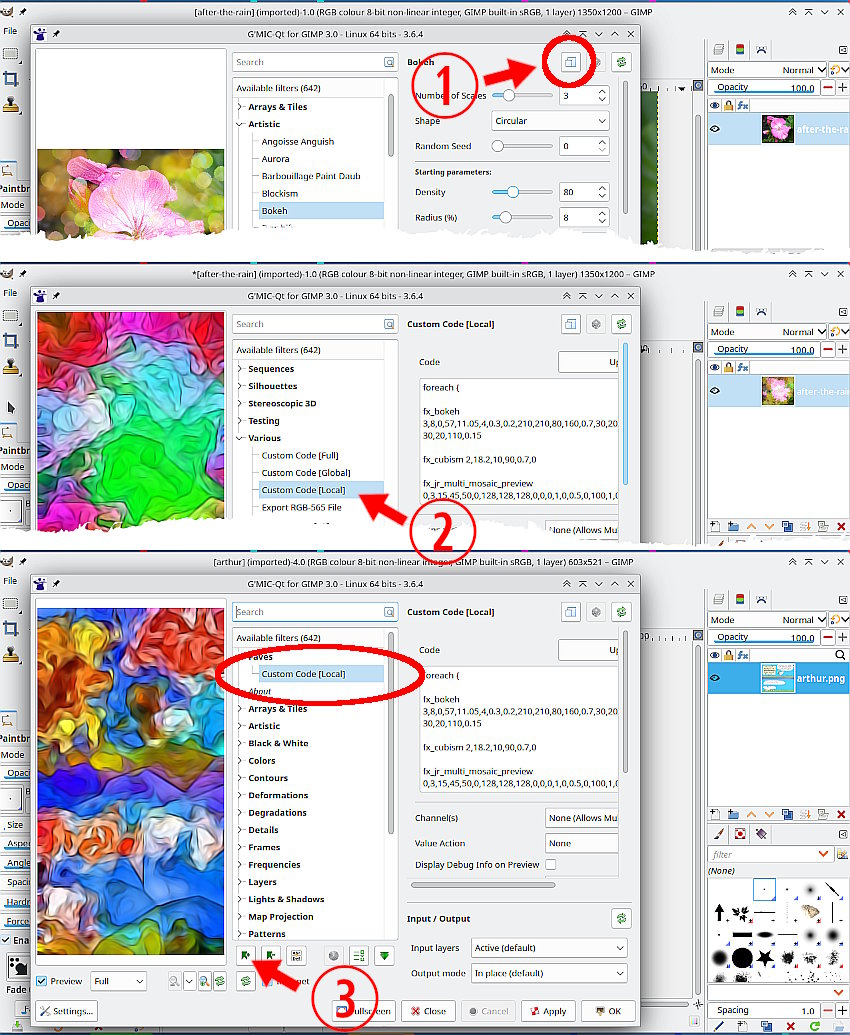
(1) For any filter you can copy the gmic command string to your clipboard.
(2) As a custom code entry, you can paste a sequence of commands into a Custom Code entry.
(3) That custom code is saved as a “Fave” and you can have more than one of those. It is re-usable and applied to any image.
3 Likes
Thanks! So simple, but effective. Thanks again, i applied and is useful.
@Marcelo_Colina you may want to create your own custom filters for G’MIC-Qt. This is possible and quite easy to do : How to create a custom filter in the G’mic plug in · GreycLab/gmic-community Wiki · GitHub