Hello everyone,
First of all, I’d like to thank all the developers who have put so much time and know-how into Darktable. Unfortunately, I am not a programmer, nor do I have any expertise in color theory, etc. But since Darktable is an open-source project, I wanted to share an idea that has been on my mind for a while, and based on my research, it doesn’t seem to exist yet.
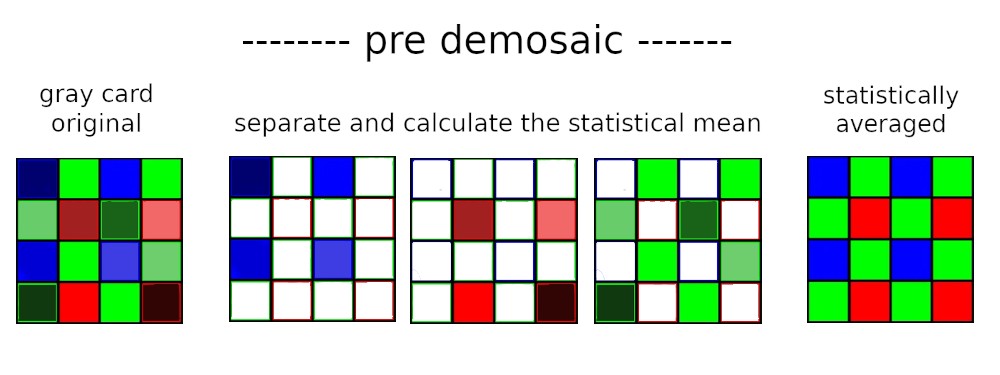
The main idea is to average the individual R+G+B pixels separately, before the demosaic process, statistically across the respective ISO ranges, in order to achieve significantly better color consistency and reduce color noise. The module should also be designed so that users can apply it to their own camera in Darktable.
My (naive) idea:
You photograph (ideally without a lens) a gray card or gradient card multiple times for a given ISO range (e.g., ISO 800).
Since the resolution and the distribution of the RGB pixels on the sensor and the “exposure” via the gray card are known (RAW), you can now statistically average each “color channel” separately on a pixel level. Due to the gray card, the structure of the image is also not altered.
This means, for example, in the red channel, you would only average the red pixels, while all non-red pixels (G+B) in the array are deleted. This should theoretically give you a statistically clean red channel on the pixel level. The same would be done for blue and green. Only after averaging would the demosaic process take place.
In my view, this would effectively prevent color channel cross-talk and result in significantly improved color consistency (no color spots in the blue sky). Theoretically, this should even have the effect of improved luminance noise. I also think that many older cameras could benefit greatly from this. It could also be used to perfectly profile the vignetting of lenses…
As I mentioned… I’m not the right person for technical discussions, but maybe you can make something of this idea. 
I don’t speak English…Translate using ChatGPT
Hallo leute.
Ersteinmal vielen dank an die ganzen Programmierer welche hier soviel zeit und know-how in Darktable einfließen lassen. Ich bin leider kein Programmierer und habe auch kein Wissen in Farblehre etc…
Aber da Darktable ein offenes Projekt ist wollte ich mal eine Idee einbringen, welche ich schon länger in meinem Kopf habe und nach meiner Recherche so noch nicht zu existieren scheint.
Mein Grundgedanke ist dabei, dass man die Pixel R+G+B jeweils getrennt, vor dem demosaic, statistisch über die jeweiligen isobereiche mittelt, um eine deutlich bessere Farbkonsistenz und weniger Farbrauschen zu erzeugen. Auch sollte das Modul so angelegt sein dass man es in darktable für seine eigene Kamera anwenden kann.
Mine naive Idee:
man fotografiert (ideal ohne objektiv) mehrfach eine Graukarte / Grauverlaufskarte für einen isobereich (z.B iso 800).
Da die Auflösung und die Verteilung der RGB-pixel des Sensors und die „Belichtung“ durch die Graukarte bekannt sind (RAW), kann man jetzt jeweils die „Farbkanäle“ einzeln, auf Pixelebene, statistisch farblich mitteln. Aufrund der Graukarte greift man auch nicht in die Struktur des Bildes ein.
Das heißt, man mittelt statistisch im Rotkanal nur die roten Pixel und alle nicht dazugehörigen Pixel (G+B) im Array werden gelöscht. Dadurch erhält man theoretisch auf Pixelebene ein statistisch sauberen Rotkanal. Das gleiche würde mit Blau und Grün gemacht. Erst jetzt nach der Mittelung würde das demosaic stattfinden.
Dadurch würde, nach meiner Vorstellung, das Kanalübersprechen effektiv verhindert und eine deutlich verbesserte Farbkonsistenz erreicht (keine Farbflecken im blauen Himmel). Theoretisch müsste sogar der Effekt eines verbesserten Luminazrauschen auftreten. Ich denke auch das viele ältere kameras davon sehr profitieren könnten. Auch könnte man damit die Vignetierung von objektiven perfekt profilieren……
wie gesagt…ich bin technisch nicht der richtige Gesprächspartner aber vielleicht könnt mit der idee etwas anfangen