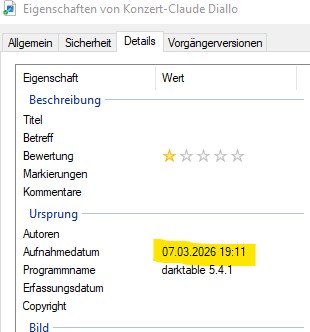
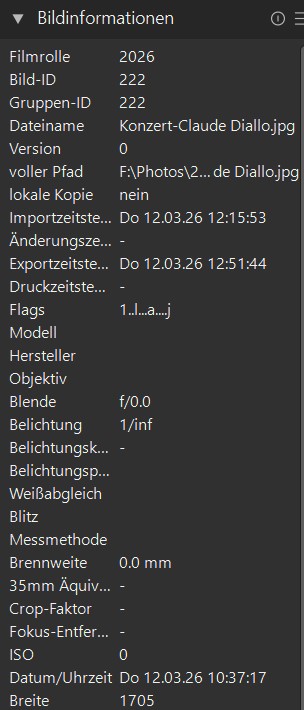
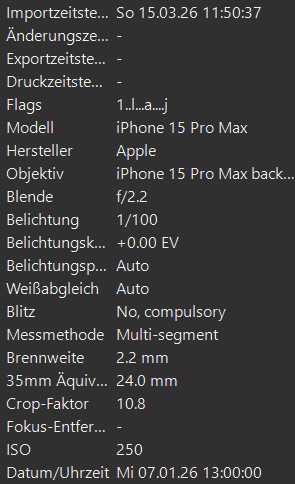
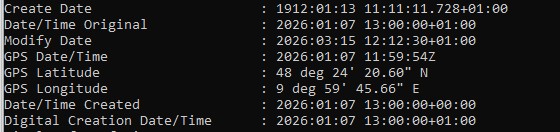
I often use XnView-MP to adjust EXIF data. Now I notice that those images display the original EXIF data after importing them into Darktable, even though Windows Explorer shows the data from XnView.
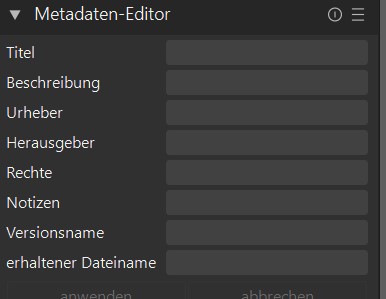
I am also unable to adjust the EXIF data in the Darktable metadata editor; I only see lines for entering general text in the menu. How can the editor be expanded or configured?
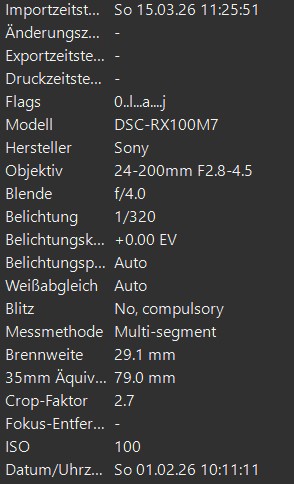
Which metadata did you change with XnView? If I look at one of my raw files with exiftool, I can see eight items concerning date/time, three of which concern the physical file, not the image.
And indeed, darktable does not allow changing the timestamps in the metadata. You should not need to do that by hand, unless your camera is set to the wrong date/time. And if ever you need to change one or more of the timestamps, you’ll need to know which one to change.
As for the metadata editor: that will change the accessible metadata in the database and sidecar, never in the original file (darktable does not write to the files you import into it).
I sometimes use scanned images in my photo database, and to ensure that these match the images taken with the camera in terms of time, it is helpful to adjust the EXIF recording date.
In the above attached example, I have set all data to March 7., 2026:
File - Created on
Date - Modified on
EXIF - Taken on
EXIF - Digitized on
EXIF - Modified on
…and as you can see also MS-Explorer shows March 7., 2026 for all those Data - only the “last accessed” date is March 12. on MS-Explorer.
Actually any Image-Editor SW I’m using e.g. also Photoshop shows March 7., 2026 as acquired data and not the original scanned data.
So I’m wondering why Darktable shows in the Metadata still this old data - see attachement above.
Really annoying is that Darktable overwrites the EXIF Taken-on-date with the old scanned date when you activate “Metadata Export” in the menu before export!
From my point of view Darktable does not correctly manage the different EXIF-Data-entries.
If the image is already imported in darktable before you changed the exif data then you need to refresh the exif data in the action on selection module → metadata tab → refresh EXIF
Thanks a lot Zisoft & Pehar for your tips, which solved my problems with the EXIF Data.
However, I still think that Darktable, which I really love for image editing, has room for improvement when it comes to managing EXIF data.
You can change the EXIF data in the database after an image is imported, so your export will have the “correct” data.
If you have the Lua scripts installed, you can use the image_time script to modify the date/time of the exposure. You also use it to adjust the time if it is off (you forgot to set your camera time ahead or back when daylight savings time happens). You can also synchronize image times if you are shooting with 2 different cameras.
As I saw in the info from WPFERGUSON, there is the LUA-script that allows editing EXIF-data in Darktable. I haven’t installed it and don’t plan to. This means the following comments refer to the standard Darktable installation without this LUA-script:
The date and time displayed under “Image Information” I suppose is the EXIF “Original Capture Time”—it should be noted as such
In general, it would be helpful if the EXIF metadata were listed or even could be edited.
What’s really annoying is that Darktable apparently overwrites the original EXIF “capture time” with the “original capture time” during export when “Tags + Metadata” is selected for export. Since all other software tools I use display the manually entered EXIF “capture time”, it seems that Darktable doesn’t distinguish between these EXIF data.
According to description from ZISOFT, the “refresh EXIF” button should overwrite the date with the manually entered capture time. For me, however, this only worked partially—I couldn’t figure out when it worked and when it didn’t.
Personally, I’ll only use Darktable without using or exporting metadata—there are definitely better tools for that—but I’m thrilled with its great image editing features!
dt will read the metadata from the file only during import. Once it is read, the metadata is transferred to the database/sidecar. From that point forward, dt will only use the database/sidecar for exports. If you change the metadata on the source after import, dt will not know about it unless you trigger a refresh.
I quick check in the code, it looks like we read this tag:
Since images where the EXIF date had been changed sometimes displayed the correct and sometimes the old EXIF-CapturedTime in DT, I conducted further tests and found that the EXIF data in the database can no longer be updated in the following cases:
1.) For JPEG images that I previously imported into Adobe Photoshop as RAW files, edited, and then saved as JPEGs.
2.) For JPEG images I received from a friend—taken with an iPhone 15, originally likely saved as HEIC; according to the data details, the images were edited in Adobe Lightroom 9.1.
For these JPEG images, the old original EXIF CapturedTime is always displayed in DT and cannot be updated there either.
I know this sounds pretty odd, but I was able to reproduce the issue with various images. In doing so, just as in cases where an update worked in DT, I deliberately changed only the EXIF CapturedTime.
Since the new EXIF CapturedTime is always displayed correctly in various software tools, I suspect there is an issue with DT here.
Please find below the extract of EXIF-Date/Time using “exiftool”:
Original RAW-File from the camera w/ Original CaptureTime:
RAW-File w/ Original CaptureTime changed to 2026.02.01:
JPEG-File after edited with and exported from Adobe Photoshop. As you can see Photoshop added new “Date/Time Created” identical with “Date/Time Original” = 2026.02.01
I changed “Date/Time Original” of JPEG File to 2026.03.01 - as you see “Date/Time Created” generated from Photoshop remain on 2026.02.01
Data extracted from Darktable after import - DT does not take “Date/Time Original” but “Date/Time created” - this remains also after “EXIF-Refresh” on 2026.02.01
dt is likely using Xmp.photoshop.DateCreated" on your import per the code I shared. Once that value is read at import, it is being used for the export. Check with exiftool if that tag is the actual tag description.
yes “Xmp.photoshop.DateCreated” is same as the “old” “Date/Time Created”. So yes the “Date/Time Original” is during export overwritten by this date/time stamp.
Not sure what this means at the end, in my opinion this should not happen.
I for myself - as long as DT processes Date/Time information as it does today - will avoid using export of EXIF and Metadata with DT.
As said I’m using XnView and Photoshop since years and never was facing any issue with Date/Time-stamps. BTW also GIMP is processing the Date/Time stamps as expected meaning same way as XnView and Photoshop - Date/Time Original will stay unchanged during export.