Beginner looking for tips on touching up/editing some of these shots.

Hello everyone,

So I am brand new to photography, shooting with a Canon T7/2000D. I’m such a noob that on my first couple trips with the camera I didn’t even realize I had default settings on for format and did not save anything in RAW format.

I’d like to learn the basics of touching up/editing but honestly I’m clueless as to where to start. I thought it would be best to post some of my favorite shots from my recent travels and get some suggestions on what I should tinker with on each one and that way slowly get a better grasp on concepts like exposure, saturation etc… To be honest I am still even learning my way around the my camera itself and all of these were taken on Scene Intelligent (auto) mode. I am tinkering around now with creative auto and hopefully someday soon I will step up to fully manual mode. I am open to any suggestions you guys may have on the best ways to learn the basics of editing. I am using ART Raw since its free and supposedly a decent choice for beginners just looking make small touch ups.

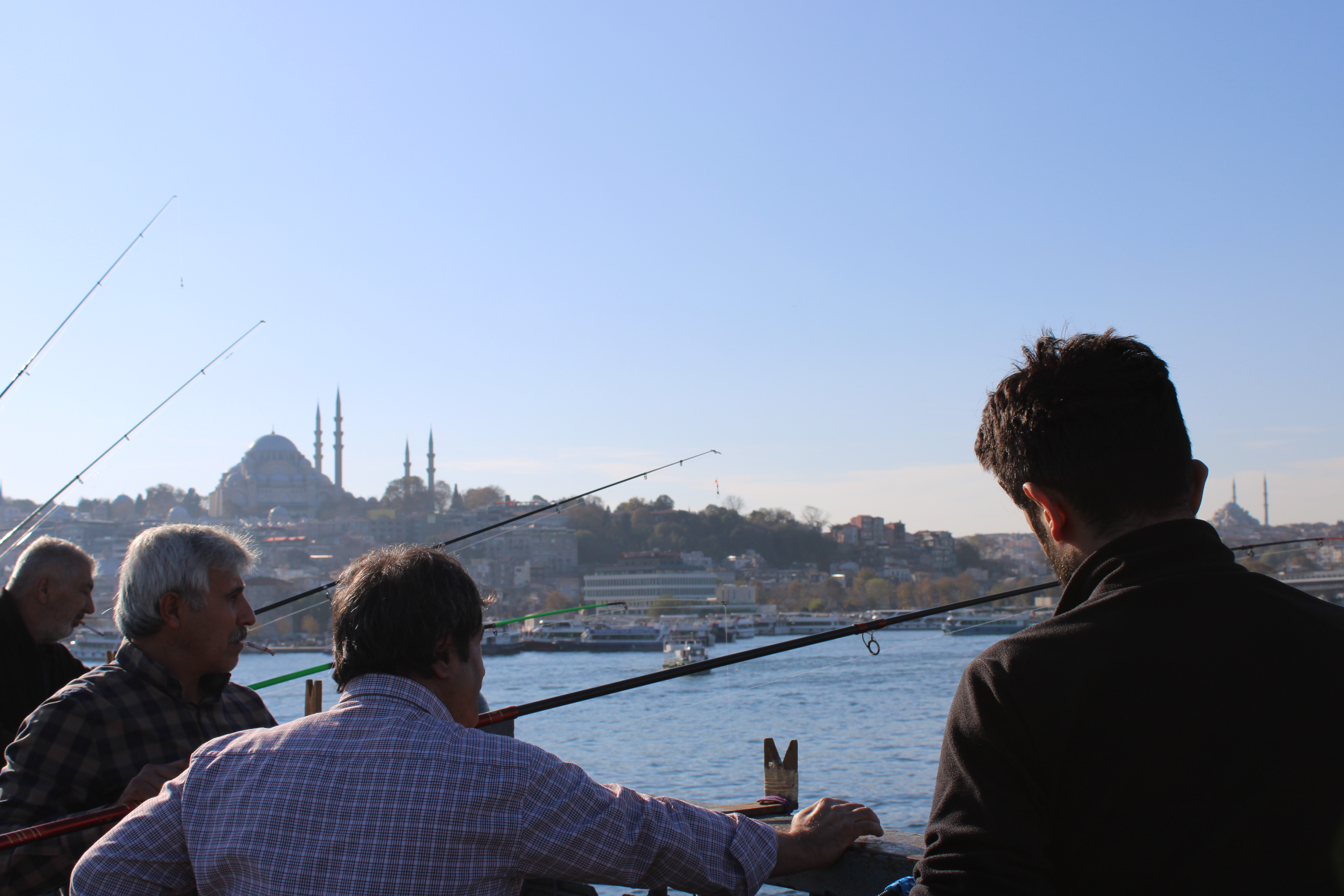
Shots 1 - Istanbul Fishermen: I was trying to get a good shot of these guys in action in the foreground with the Old Town and one of the grand mosques of city in the background. This I think this was taken sometime around afternoon while the sun was setting.
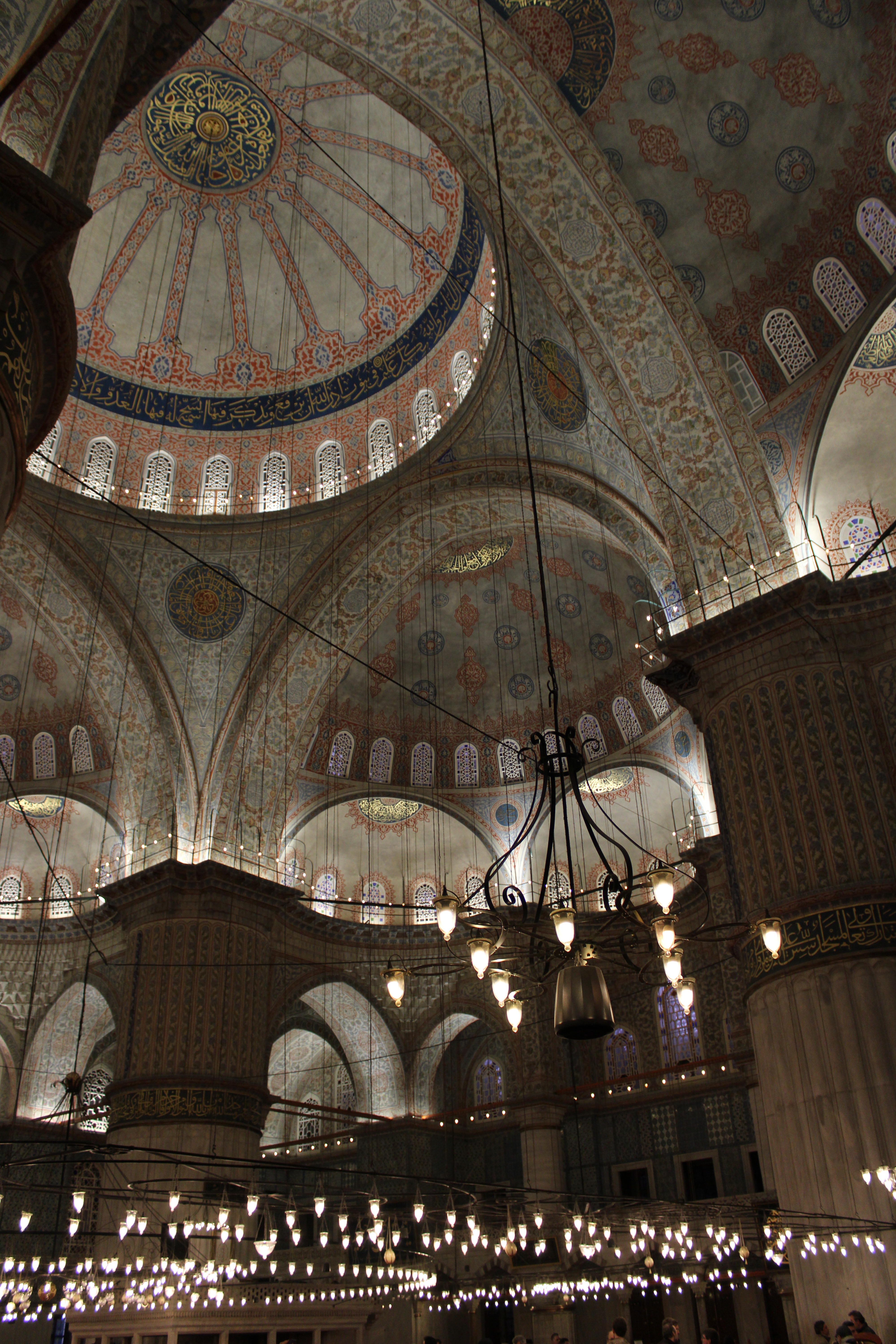
Shots 2 - Blue Mosque: The ceiling was so high that there was no way I could capture both the ground and the very tops of the ornate domes, this was the closest I could get to capturing the scale of the mosque and just how large it is. This shot doesn’t do justice to how vibrant the colours were, I would really like to fix that.
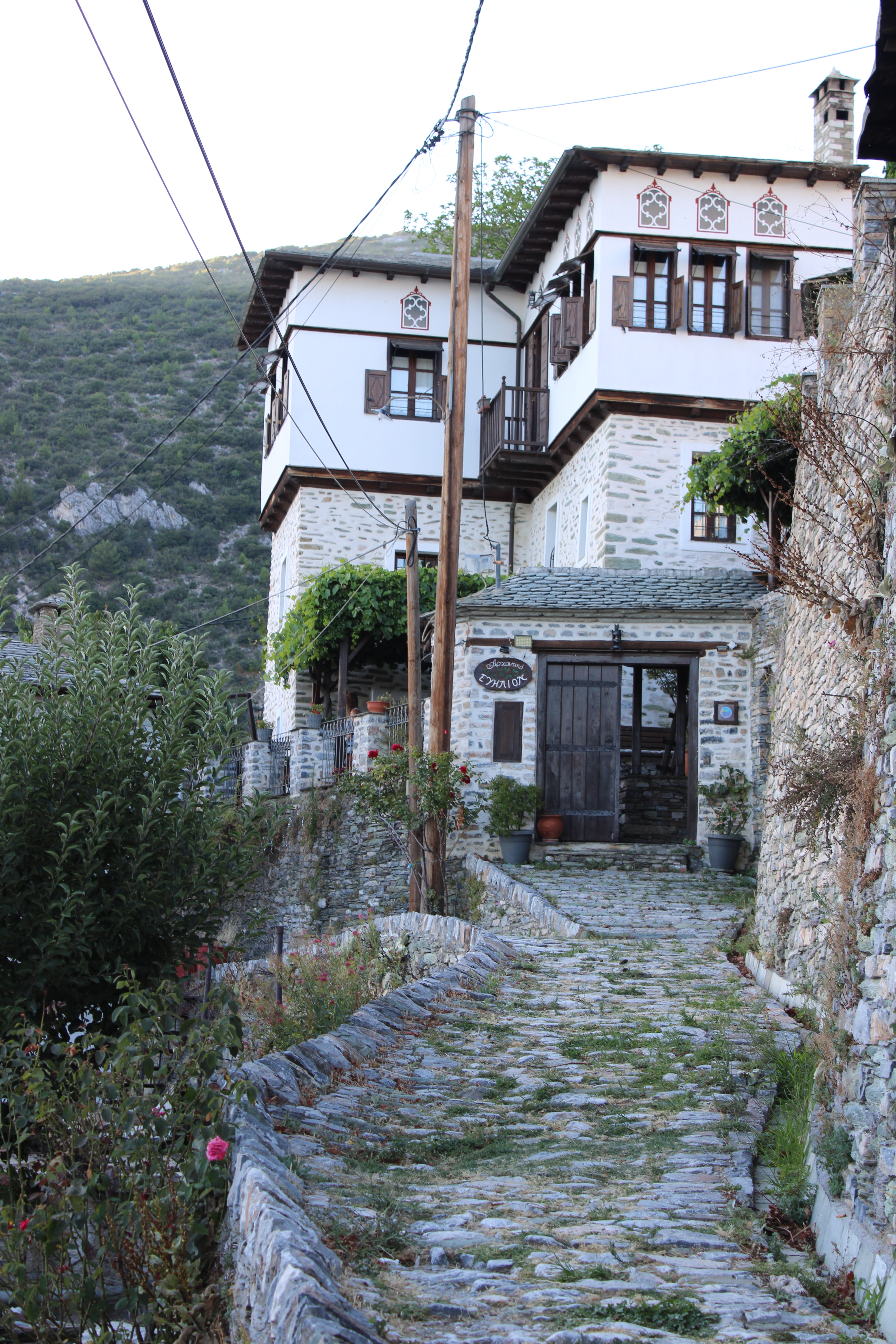
Shot 3 - Makrinitsa, Greece: I took this in a mountainside village about 2 hours South of Thessaloniki. I didn’t do a good job of capturing just how steep this village is and how high it is but I tried my best. I’d like to do something about the glare in the background.
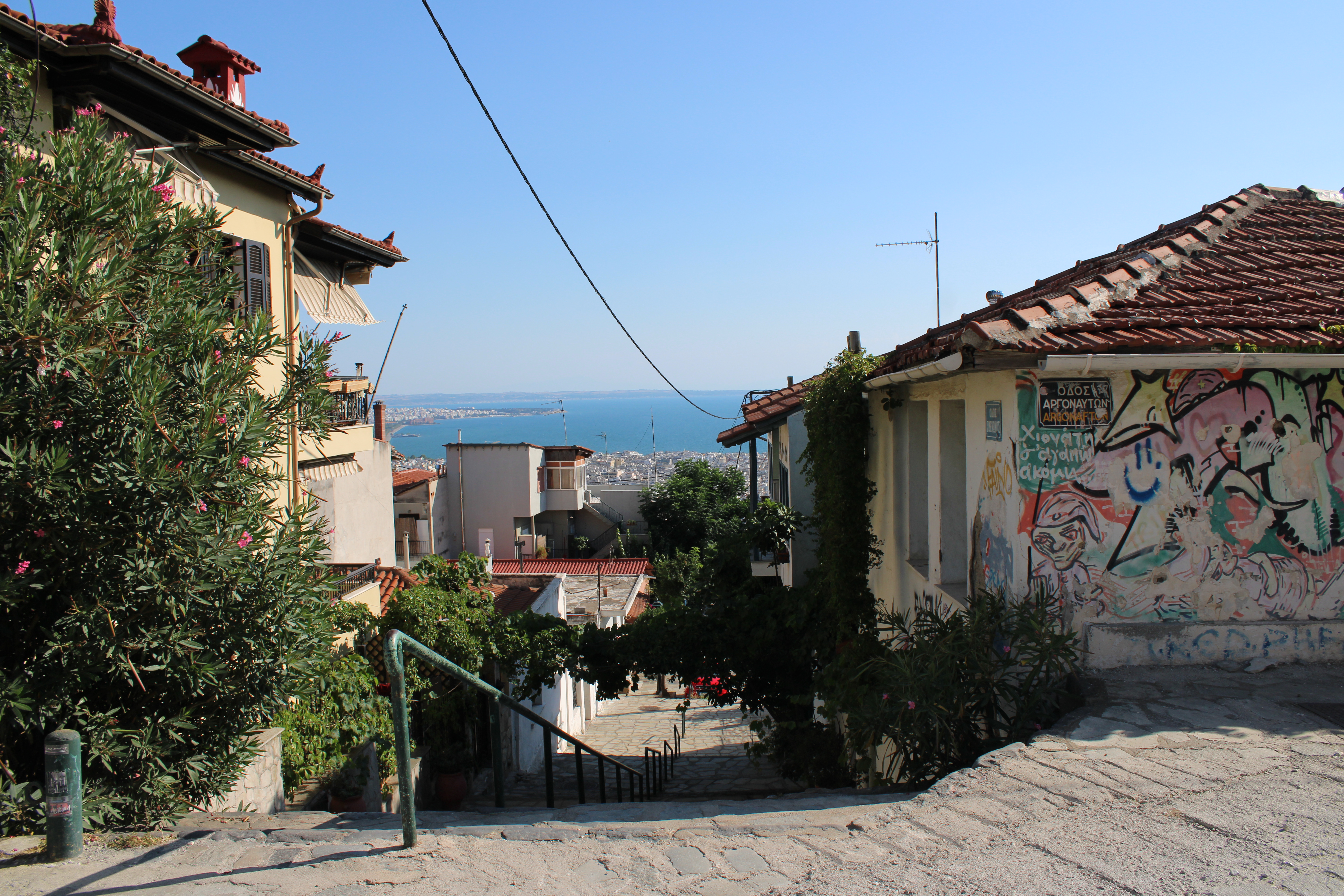
Shot 4 - Thessaloniki, Greece: Taken from from the very top of the city in the fortress district/old town. I was trying to capture the steepness of the city with the stairs in the foreground, downtown in the middleground and sea/horizon in the background. Also that neighborhood had tons of cool graffiti and I wanted to get some it in the shot.
Honestly I am a bit embarrassed to say that this the best I have for now since I don’t think any of these are particularly that good but hopefully I’ll get better. Any tips for minor touch ups I can do on these to make them better would be greatly appreciated.

Thank you!

4 Likes

honestly something that’s good to learn so better to have it early than after something really important, also jpegs can be pushed way more than a lot of people would be willing to admit.

that’s how learning works so sounds like it’s going great

about editing them i think that it’ll be a fun challange for some here to edit some jpegs but before we can do that can you assign a license to the files so we can edit them

i highly recommend going here to pick a license you agree with Chooser - Creative Commons

2 Likes

Welcome to pixls @BgdYogi !

For a beginner, I think your framing and composition are very good. A great start!

For editing, first, have you selected your photo editor? There are some good choices here, including darktable, RawTherapee, ART (Another RawTherapee - a fork), vkdt, and several very new editors. If you don’t know yet, check online, maybe even try YouTube for tutorials. All are free to download and try.

For PlayRaw, here is a nice guideline for posts: where is the play raw guide? - #2 by EspE1

FYI for jpeg exports we prefer to have smaller, compressed files to save space on the server. But full raws are allowed for PlayRaw.

In terms of what I personally would choose to edit, I might tweak colors a little but these are quite nice already. I might address the sky on the Makrinitsa shot, but that is more a matter of personal preference and not something that necessarily requires adjustment.

Cheers!

2 Likes

That’s where jpegs really fall short. You’re unlikely to change the white balance in post-production on a jpeg file and have it look decent. You can shift it a little bit, but it will fall apart quite quickly.
A good option for a WB corrected image, like yours, is to actually re-paint it. Introduce orange tint into the highlights and it will kinda start looking like sunset. But then again, you’re quite limited in how far you can push it without making it look fake.

Here the white balance is quite neutral, so all of the colours will be interpreted correctly. I would just raise the saturation and introduce a little bit of an orange tint into the highlights. This kind of manipulation should be easy to do on a jpeg.

The data about the sky doesn’t exist on a jpeg like this. It’s really “what you see is what you get”. If this were to be a raw file, it’s likely there’d be information in that part of the scene, and if you selectively brought down the exposure in that area, you’d see clouds and other textures of the sky. Additionally, this also clips the foreground objects quite harshly, and they also cannot be restored without manual drawing. This is another shortcoming of jpeg files - you commit to its limited dynamic range at the time of the capture, as you won’t be able to expand it much (or sometimes at all) later in post.

I’d say pick an editor that feels the easiest to use for you, and preferably that which is actively maintained. I’d also suggest switching to a full manual mode right away and practicing things outdoors, seeing how the settings affect the exposure, and then also seeing what can and can not be done in post with those files. If you’re going somewhere important and can’t afford to get bad shots, keeping it on auto (P or similar) or on shutter priority (A mode) is preferred until you figure things out for yourself.

The first 5000 shots will come out pretty poor, both technically and on the editing side. The next 15000 shots will come out decent~great technically and likely still poor~tolerable on the editing part. From your 20000-30000th shot you can start expecting something good every now and again. These are just my guidelines that I thought of myself and only had a few other photographers agree to them. Some name figures like 50000 shots before something good starts to come out, while others would say less than 10000. Anyway, everyone would agree it’s something you actively practice and improvement only comes from participating in the activity

1 Like

Somebody may have told you that pros only use manual mode. But that’s not true.
I can recommend this advise from a pro:

EDIT:

Yes, I think everybody can agree on this – and this is part of the joy of photography, but

is much too general and, imm, pessimistic.
I know of several people who have produced great images within short time of picking up a camera. It depends mostly on having" a good eye", being able to identify a good image, rather than on technique.

3 Likes

I see, so in the future when I make a post I need to add a license to every image I post even if its free for public use? Like this?
Istanbul Fishermen by Yogi Subotic is marked CC0 1.0 Universal

Thanks for the FYI, I will be more mindful of post format in the future.

As for an editor, I did some research and apparently ART is a good choice for beginners and and people looking to do only minor touch ups? If you have a better recommendation that’s free I’m all ears.

I meant to point this out as well, I am not a fan of how the sky turned out and I would like to do something about it. What would you suggest can improve it?

I personally am a devoted Darktable user but many people may say it is too hard for a beginner to master easily. Art and Rawtherapee are very popular. I settled on DT as my raw editor because of its masking capabilities.

In a recent thread some options for editors were shared. @bminney created a nice list that might interest you.

Hi @BgdYogi

I think ART is great. If you have a basic workflow with ART then you have a good start.

The sky in the photo in question is a bit yellow and not very uniform. I would suggest maybe tweaking the color either toward orange/red or blue. And maybe increasing brightness with some tone curve modifications.

But if it were me I’d just wait and collect raw and jpeg on your next photo outline. JPEG gives you a nice reference and is convenient for quick sharing. And raw gives you much more control over editing.

ART is good not only for minor touch ups but for serious edits too. It has full masking capabilities if needed. What I like about it is its relative simplicity and good defaults. With just a few steps you can easily get great colors and tones.

For playraw yes, although just saying “this file is licensed [license]” Is enough.

The only reason why I recommend the license picker was because it also makes people aware what they’re picking like it happens here that people just recommend a licence (usually a really good one) and the user just copies that potentially without understanding what it means.

For what editing software to use I think that you should just try them (that’s easier with raw files) I highly recommend to just try

  1. Darktable
  2. Art
  3. Raw therapee

And any other that interests you they are all very different so I do recommend starting with a tutorial for that editing program

1 Like