I’m playing with camera profiles and I generated some for fully supported cameras in DT and I’m pretty happy with the results.
Using the same procedure, I tried also to create a profile for R5m2, which is not supported, but I still can edit CR3 files from this camera using the patch from (see this post)
Anyway, the colors are pretty strange for R5m2. If I set adaption to none in color calibration and custom white balance (using only white balance control) I get much better colors, but still not very happy.
What am I missing here? I mean, what else needs a camera to be fully supported in DT? Is that the reason for my strange colors?
I’ll be very happy to know your thoughts about this. Thanks. 
Hello @leonidas111,
I am using the same patches as you (How to add camera support to libraw/darktable? - #6 by piratenpanda) with Canon R5m2 and I am quite happy with the colors I get from darktable default, when I import (color calibration:scene referred default + white balance: as shot to reference), as a starting point for subsequent editing.
What is better colors is a bit subjective and part of the creative process. So far I am able to render the final tiff or jpg the way I want, when it comes to colors.
From my point of view the camera is fully supported with the patch and the rest is creative processing to get desired result.
I usually add modules on top of default after import to modify saturation and contrast (color balance rgb, local contrast etc). I sometimes also modify color calibration, but I usually leave EDIT: white balance module unchanged.
With default input color profile the colors are pretty ok. As I said, I’m playing with color profiles and testing what I get, to see the difference and compare.
Yes, I also do usually that: white balance module stays unchanged in all my edits. But, in this case it gives me very strange colors, far away from reality (R5m2 + custom camera profile). And I tried to experiment a little bit…
What type of profile are you making and what software are you using??
ICC profile using Lumariver Profile Designer in combination with a ColorChecker Passport.
Profile is loaded in input color profile control.
I assume then you make lut based profiles?? Are you using that neutral tone operator … I know there are several options in that process that can impact the results…
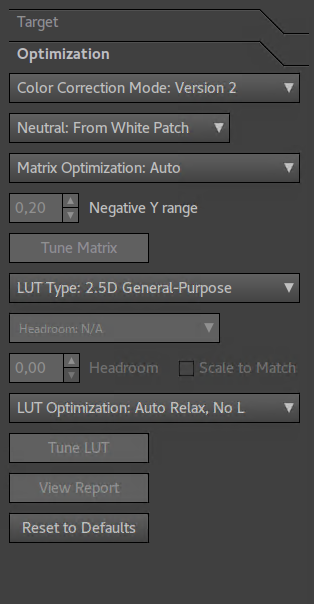
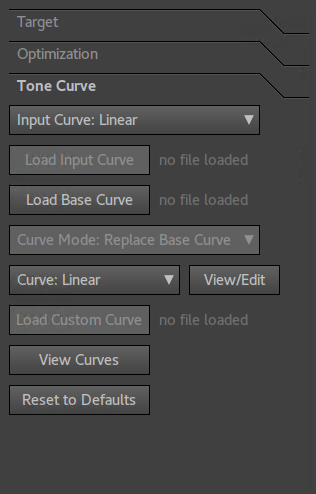
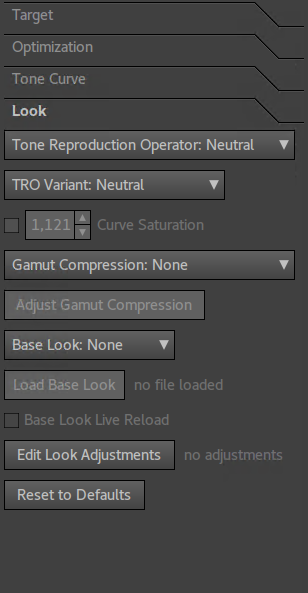
Color Calibration always uses the standard matrix, no matter what input color profile is set to, so that’s probably why.
1 Like
Thx… I created some at one time but I abandoned them as I felt they came out a bit cold and dull. I really didn’t seem to get much of an improvement over the default matrix profile. I think I found the best ones that I did like when I used reproduction mode or whatever it was called… Also I was wondering if some of the options around controlling luminance scaling or whatever it was could be fighting the DT pipeline so I just stuck with defaults… All this could, no it does reflect my lack of mastery of dcam/lumariver 
1 Like
That makes sense, thanks.
But, if I understand well, CC is using standard matrix for generating the default params of CC. What if we change the defaults (i.e. change illuminant)? Is CC using the matrix from ICC file?
As I understand it, the default matrix is always used.
2 Likes
Yes, you mean reproduction mode. This mode should be used for reproduction works, only if the exposure in camera is the same as the exposure of the ColorChecker … if I understood well.
I’m using right now only the “General Purpose” mode. I will keep playing with settings, to see what I get.
Yes I think that is what it said but I always got the best looking results if I recall using that workflow. Good luck hitting on the right recipe 
1 Like
Just to make sure it’s comprehended, in ICC-world the transform from the camera profile to any other working, display, or export profile is a two-step process, through the Profile Connection Space, or PCS. This can be either XYZ or LAB; my experience is all with XYZ. So the color transform goes 1) input profile → XYZ, then 2) XYZ → output profile. This keeps from having to store a matrix for every possible output profile for a given input profile.
1 Like