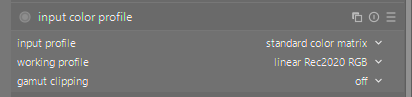
First things first: this was AI-coded. I don’t have any understanding of the color science behind these DCP conversions (the README says as much). And, please, let’s not turn this thread into another AI debate.
Second: I made this to scratch my own itch. I know a lot of people here prefer editing without the camera’s rendering as a starting point. If that’s you, you can stop reading here
For everyone else: GitHub - rafaelcgs10/camicc: camicc is a set of scripts for converting dcp camera profiles into icc for darktable · GitHub is a bunch of Python scripts that get Adobe’s camera profiles into darktable. It downloads the official DNG Converter from Adobe, extracts the camera profiles from the installer (no Wine, nothing actually gets installed), converts them to ICC and drops them into darktable’s profile folder. A few commands and you’re done. Works natively, with nix, or with docker.
Each DCP becomes two profiles, one with the tone curve baked in and one colors-only for the scene-referred workflow.
I also had the AI build a testing setup that renders raws through darktable with these profiles and compares them against Lightroom exports and out-of-camera JPEGs. Against Lightroom, the differences are minimal.
Feedback very welcome, especially from people who understand this domain better than I do.
My itch is scratched now, but I still plan to give this some more attention.
Forgive my ignorance of what you have achieved, but am I understanding it correctly that you have created an input profile that replaces the ‘standard color matrix’ and this gives an out of camera JPG look? Or is it more involved than that. Could you share an example?
I did not create “an” input profile. I made something that generates input profiles for all supported cameras by Adobe. Those profiles are good approximations of what cameras produce as their SooC photos.
So it is not only for my camera. It is for every camera supported by Adobe.
You just set the input color profile to the one for your camera and change the white balance to the correct setting, and that is it (check the instructions in the README).
I don’t quite understand what the itch was. Wouldn’t it be better to calibrate against a colorchart in darktable? (also, are there colorchart shots in the repo?)
(Speaking of this sort of stuff, this is all a mystery to me. How does Adobe have this information? Did they license it from Canon? Surely, Canon’s own processing application should be the benchmark. How does darktable(libraw?) have it? Is it somewhat reverse engineered/user supplied like the lensfun data?)
I should have googled this myself. Darktable’s on github states that they “depend on samples and data provided by users, and reverse engineering by developers.”
The itch is that the SooC jpegs are hard to replicate in darktable.
This steals the work made by Adobe in order to approximate the SooC better than I could with the means I have.
I am not redistributing anything copy righted procted material. The script just downloads the free (not as in FOSS) Adobe software, and extracts the data from it. It is FOSS because the bundle of scripts is under a FOSS license.
I think I get it. You must be on linux, so you can’t run Canon Digital Photo Professional or Adobe’s DNG Converter, and you’re not happy with how darktable handles colors in CR3.
(I don’t know whether Adobe’s DNG Converter’s license allows using their files like this.)
To be sure, you’d have to consult a lawyer: you may be producing a “derived work” from data to which Adobe has the rights.
That the scripts you use are FOSS is nice to know, but irrelevant.
The above is to the best of my knowledge, but I’m not a lawyer.
I am not a lawyer. And I’m not familiar with copyright rules in all countries.
I think that the script it self is not illegal. The script is not a derivative work in itself. From what I saw, the script read a file from Adobe and converts it. So useless the conversion method is patented, the script itself is not a violation of copyright.
Also the script doesn’t distribute any copyrighted material.
But anything the scripts outputs is a violation of copyright. In the copyright law in my country I would be in violation the moment I distribute that. I am allowed to make a copy of a book purely for my own use, by own archive. Even a digital copy.
But the moment I distribute it (including to my own family member) it is a violation.
As a comparison: it is in principal not illegal to provide an explanation how to pick a lock. It is not illegal to practice at home how to pick a lock. It is even not allowed your own lock. But of course it is illegal to pick someone else’s lock without permission.
The only hard question left. If I use the extracted ICC profile just for myself and don’t distribute it. But if I then distribute an image that is processed with the assistance of that profile… is that image then a derived work, and thus a violation of copyright… I don’t think so, but not sure…
Rawtherapee has a tutorial on how to download the adobe dcp files and usem them: How to get LCP and DCP profiles - RawPedia . I imagine that Rawtherapee does some similar parsing and conversion of the DCP files, but in run time.
There are other similar things like ttf-mscorefonts-installer that download and install microsoft fonts on Linux.
All open source raw editors (and probably some commercial ones) already use the Adobe D65 matrix which is extracted from DNG Converter. So far Adobe doesn’t seem to care. And as long as the resulting profiles aren’t distributed, they probably don’t care about this either.
It looks like they could do a lot more with this next standard past v4 but maybe its dead in the water or still getting sorted…looks like it has a lot of cool features esp a spectral PCS…