I want to change all fonts in darktable to Inter. In CSS tweaks I have:
* { font-family: Inter; }
The font inside the modules is changed to Inter, but module titles are still the default darktable font though.
In the screenshot below both “lut 3D” and “filmic rgb” are not Inter. I’m using KDE. See here:
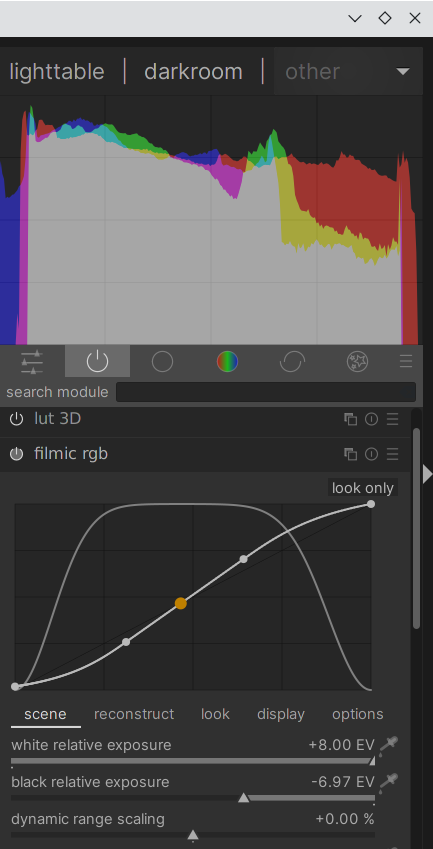
That’s due to the fact that the ‘*’ selector is the most generic possible, and there are other, more specific selectors where the font family is set in darktable.css and darktable-elegant-darker.css. And in css, the most specific selector applicable to an element is the one used.
I thought you could try changing your tweak to
* { font-family: Inter !important ; }
But the effect wasn’t what I expected 
Looking into that a bit more…
Thanks, of course! However, it had some adverse effects… Could that be because it overwrote other properties for an already existing universal selector? See, nasty borders and generally messed up UI:
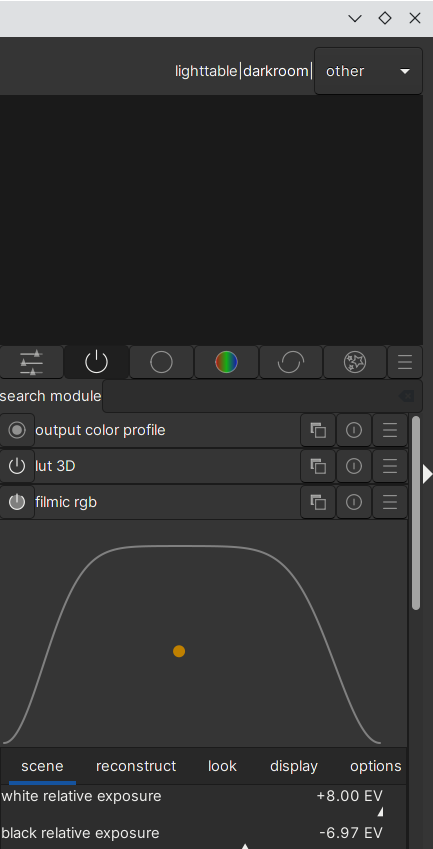
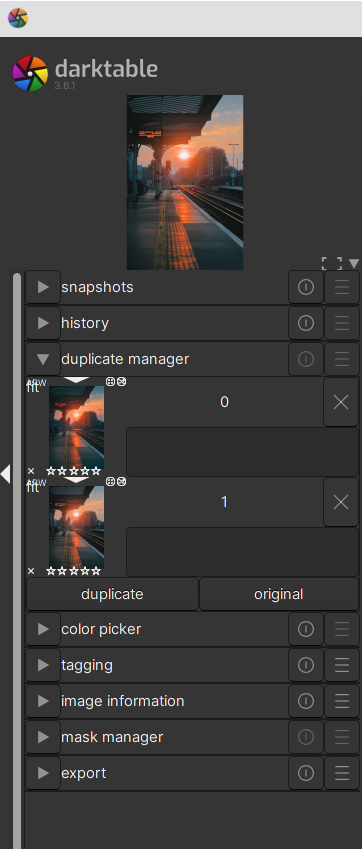
Yep, I noticed that, and to be honest, I’m a bit baffled by that. Might be something in the CSS engine used…
I learned CSS for web pages, and as I understood it, the “!important” flag should only affect the property to which it was applied. That’s obviously not the case here.
Morning, @mikae1,
I am by no means any CSS-wizard, but since font-family
is set in 9 places in the .css-file, I suspect that you changed
the wrong one?
Have fun!
Claes in Lund, Sweden
That, and those 9 places all have a whole list of selectors (class names, id’s, etc.), so changing those font settings in the “tweaks” section is not really going to be fun.
What happens is: the “*” selector changes the font for anything that is not covered by one of the more specific selectors, so as soon as there’s a class name, or anything like that, it will not be affected by the tweak on “*”.
Thanks. So what would be the best way to change all fonts in darktable to Inter? Should I duplicate darktable.css (the theme I’m using) from /usr/share/darktable/themes/ and use that as a base for new theme where I only edit all instances of font-family to be Inter?
The downside of this method, I guess, is that if the darktable.css is updated when I update darktable I will have to copy the contents of darktable.css to my theme file and change the values for font-family again.
That’s what I did now, and it works. Changing only the font without duplicating the whole theme would be preferred though. If anybody can think of a solution to that, I’m here. 
Also, if anybody knows where I can find the darktable logo in the upper left corner in the CSS, please give me a shout. I’d like to do visibility: hidden
Gtk Inspector is useful for working out how the various UI elements are tagged.
1 Like
What I tried was creating a new file in ~/.config/darktable/themes, where I @import the base theme file I wanted to use (@import url("/usr/share/darktable/themes/darktable-elegant-dark.css");),
and copied over the font definitions I wanted changed.
That seems to work, and should make the font changes independant of the rest of the theme. Changes there should be taken into account, since you import them from the base files
Excellent solution! Thanks.
For anybody that runs into the same issue, here’s the working darktable-inter.css that I placed in ~./config/darktable/themes/. This is based on darktable.css from 3.6.1.
@import url("/usr/share/darktable/themes/darktable.css");

/* Reset GTK defaults - Otherwise dt inherits Adwaita default theme dark */
*
{
  font-family: Inter;
}

/* Default gtk buttons */
button,
#add-color-button
{
  font-family: Inter;
}

/* Default text fields and text boxes */
entry,
textview
{
  font-family: Inter;
}

#history-number
{
  font-family: Inconsolata;
}

/* Labels in modules */
#iop-panel-label,
#lib-panel-label
{
  font-family: Inter;
}

/* Labels of controls sections in modules */
#section_label,
#section_label *
{
  font-family: Inter;
}

/*----------------------
  - GTK Notebooks tabs -
  ----------------------*/

notebook tabs,
#modules-tabs,
#blending-tabs
{
  font-family: Inter;
}

#history-tooltip,
#colorpicker-tooltip
{
  font-family: Inconsolata;
}

/* Set some specific fonts */
#live-sample-data,
#usercss_box textview
{
  font-family: Inconsolata;
}Be aware that the support of CSS 3 instructions to theme GTK is only partial. Don’t expect all the valid CSS3 web instructions to work in GTK3.
1 Like
@mikae1 and other, if you just want to set a specific font, there’s only one css file to start from: darktable-elegant-darker.css
Themes are done this way:
- darktable.css is the main CSS file to set all UI elements and is based on OS default font
- darktable-elegant-darker.css inherit from all darktable.css file and just change font to use Roboto fonts and for all elegant themes (grey, dark and icons related ones)
- darktable-elegant-dark.css just inherit from 2) to make a less darker theme
- darktable-elegant-grey.css just inherit from 2) to make the UI grey related
- icons css themes just add icons on modules (in darkroom view) to related themes above
So easiest way is to copy/paste content of darktable-elegant-darker.css and ajust needed lines to font wanted (it’s also possible to inherit from wanted color scheme!
I’m quite sure (not checked completely) that your css file proposed here is not complete.
1 Like
Gotcha, thanks!
Oh, thanks! Didn’t bother looking at the contents of anything but darktable.css! darktable-elegant-darker.css doesn’t contain declarations for changing the monospace font though.
Indeed, and just because we keep monospace font for elegant themes; So no need to repeat it. So, as you it, it’s indeed to add if the choice is to change that font too.
Thanks, I’ll use the Inconsolata parts from my snippet above.