Please provide the output of darktable-cmstest. I cannot help you further without that info.
As I mentioned earlier, I have no knowledge of computer science.
I don’t know how to use the terminal because I’m switching from Windows. Unfortunately, I don’t know where to find the darktable-cmstest tool or how to run it.
I think we will close this thread because the issues are too complicated for me.
I believe this is a bug in Darktable because Rawtherappee and other graphics programs display colors correctly.
I will simply choose the Mint Xfce environment instead of Cinnamon.
Thank you for your commitment and time.
Hi @Damian_J no worries, I think we will manage to guide you there…
Regarding launching a terminal
- click the “Start” button with the Linux Mint “Lm” icon in the taskbar.
- as you know it from Windows, there is a text field to search a program.
- type “terminal” in that text field and you will get a black icon with the title “terminal” in the search results right below the field. Click the icon.
Now you have opened a terminal. Therein you copy / paste the command that @kofa told you: flatpak run command=darktable-cmstest org.darktable.Darktable. Mark its output with the mouse, copy it and paste it here between as @kofa told you:
paste the output here
Repeat the steps above also for the other environment.
Regarding the image itself:
- upload the RAW file you are using for the test here
- also provide the XMP file here, that is stored side by side to the RAW file that you are referring to
Have a nice day, Lars.
2 Likes
You said that you have no knowledge in computer science, but you “believe” ! We tried to help, but… well, sad, really sad !
And you’re choosing possibly an environment that is not properly color managed. At this stage we have no evidence about the bug despite you believing that it is darktable fault.
This is a bug in Darktable in the Cinnamon environment.
How do I know? Well, only in this system do the flowers have the wrong color.
In Windows 10, in DT, RT, or Lr programs, the flowers are blue. Also, in the XFCE environment, the flowers are blue, only in Cinnamon they look purple. That’s how I see it, but I don’t know much about colors. Like most guys 
I’ll be at my computer tomorrow, so I’ll try to follow these instructions. Thank you.
What you don’t understand is that darktable relies on configuration information that each desktop environment sets differently. If in your Cinnamon setup it’s not done right, darktable will produce wrong colours.
This is less of an issue on Mac and Windows, because their everyone uses the same desktop.
Applications that are not colour managed (ignore the configuration) will simply treat your display as sRGB, which is a decent approximation for many screens. Other colour managed applications, that use a different subset of colour management settings, max also work.
The way to solve it is by diagnosing the problem, which is what darktable-cmstest would do.
Even if it were a bug in darktable, simply saying ‘it’s not working’ does not help fixing the issue, we’d still need details.
You basically make it impossible to help you. If you continue doing that, you will frustrate everyone and will be ignored. I’m sorry. I know Linux can be difficult when you start out, but several people tried to tell you what to do, and you didn’t even try to follow the instructions. Please try. If you fail, let us know about error messages, and we’ll help further. This is a very helpful community, but we can only help if you cooperate.
4 Likes
@Damian_J
As a workaround, you can force darktable to treat your display as sRGB.
Look for display profile on this page, and set it to sRGB.
Before you do that, you may try altering the preference method to use for getting the display profile. See darktable user manual - miscellaneous
1 Like
damian@damian-Satellite-A350:~$ run command flatpak=darktable-cmstest org.darktable.Darktable…
error: Invalid identifier command=darktable-cmstest: Name cannot contain the character =

damian@damian-Satellite-A350:~$ flatpak run command darktable-cmstest org.darktable.Darktable…
error: Invalid command identifier: Names must contain at least two dots

Thank you all for your good intentions, but I’m closing this thread. This is all too complicated. I’ll choose a different distribution and the problem will be solved 
Many people use Darktable with Linux Mint and Cinnamon without an issue. What happens if in your next distro you run into the same problem?
Your command is wrong. It should have been:
flatpak run command=darktable-cmstest org.darktable.Darktable
(no extra .. at the end, and there must be an = sign after command). Just copy and paste it from above.
No, it won’t. It may seem to be solved, but sooner or later it’ll pop up again (perhaps in a different form, though)…
1 Like
damian@damian-Satellite-A350:~ flatpak run command=darktable-cmstest org.darktable.Darktabl błąd: Nieprawidłowy identyfikator command=darktable-cmstest: Nazwa nie może zawierać = damian@damian-Satellite-A350:~

I’m currently testing the MATE version as well, and everything is fine. However, this command doesn’t work.
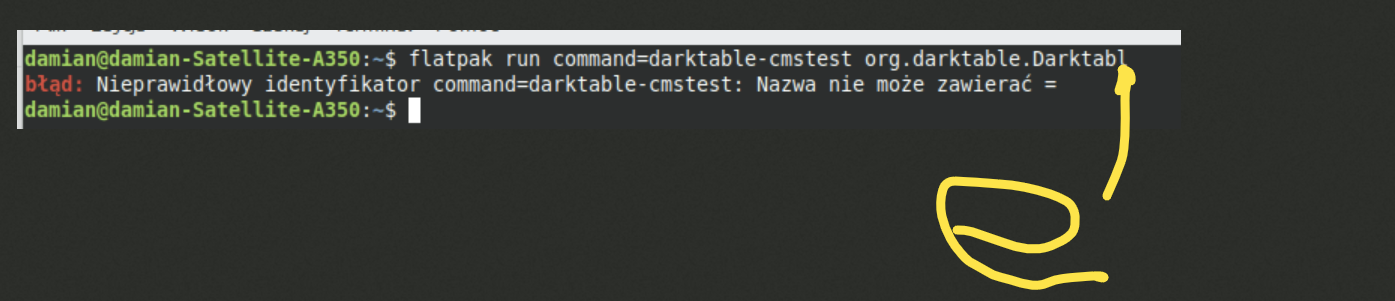
That’s what happens when you do several things at once.
Lunch, dog, then off to work
error: Invalid identifier command=darktable-cmstest: Name cannot contain =

Sorry, as I don’t use flatpak, I took the command from another post, and it was indeed broken. The correct command is:
flatpak run --command=darktable-cmstest org.darktable.Darktable
(so not command=darktable-cmstest, but --command=darktable-cmstest).
Simply copy and past it.
My output:
$ flatpak run --command=darktable-cmstest org.darktable.Darktable
darktable-cmstest version 5.2.1
this executable was built with colord support enabled
darktable itself was built with colord support enabled

primary CRTC is at CRTC 0
CRTC for screen 0 CRTC 1 has no mode or no output, skipping
CRTC for screen 0 CRTC 2 has no mode or no output, skipping
CRTC for screen 0 CRTC 3 has no mode or no output, skipping

DP-2    the X atom and colord returned different profiles
        X atom: _ICC_PROFILE (969640 bytes)
                description: U2720Q #1 2024-07-13 10-06 D6500 S XYZLUT+MTX
        colord: "(none)"
                description: (file not found)

Better check your system setup
 - some monitors reported different profiles
You may experience inconsistent color rendition between color managed applications
It seems the FlatPak (which is a restricted environment) cannot see the profile set in colord (it cannot access the file). My native (non-FlatPak) output is different (no warning, X atom and colord are set consistently):
$ bin/darktable-cmstest
darktable-cmstest version 5.3.0+468~gf552cf75c6
this executable was built with colord support enabled
darktable itself was built with colord support enabled

primary CRTC is at CRTC 0
CRTC for screen 0 CRTC 1 has no mode or no output, skipping
CRTC for screen 0 CRTC 2 has no mode or no output, skipping
CRTC for screen 0 CRTC 3 has no mode or no output, skipping

DP-2    the X atom and colord returned the same profile
        X atom: _ICC_PROFILE (969640 bytes)
                description: U2720Q #1 2024-07-13 10-06 D6500 S XYZLUT+MTX
        colord: "/var/lib/colord/icc/U2720Q #1 2024-07-13 10-06 D6500 S XYZLUT+MTX.icc"
                description: U2720Q #1 2024-07-13 10-06 D6500 S XYZLUT+MTX

Your system seems to be correctly configured
I cannot help you with the FlatPak, I’m afraid. There’s a tool called FlatSeal to edit its isolation (sandbox) from the main system, but if you are a beginner at Linux, I would not recommend messing with it. You could try the official AppImage, published directly by the development team, there the profiles are found:
darktable-cmstest version 5.3.0+476~g95327b15ea
this executable was built with colord support enabled
darktable itself was built with colord support enabled

primary CRTC is at CRTC 0
CRTC for screen 0 CRTC 1 has no mode or no output, skipping
CRTC for screen 0 CRTC 2 has no mode or no output, skipping
CRTC for screen 0 CRTC 3 has no mode or no output, skipping
/usr/lib/x86_64-linux-gnu/libproxy/libpxbackend-1.0.so: undefined symbol: g_once_init_leave_pointer
Failed to load module: /tmp/.mount_darktabgkcGb/usr/lib/gio/modules/libgiolibproxy.so
/usr/lib/x86_64-linux-gnu/gvfs/libgvfscommon.so: undefined symbol: g_task_set_static_name
Failed to load module: /usr/lib/x86_64-linux-gnu/gio/modules/libgvfsdbus.so

DP-2    the X atom and colord returned the same profile
        X atom: _ICC_PROFILE (969640 bytes)
                description: U2720Q #1 2024-07-13 10-06 D6500 S XYZLUT+MTX
        colord: "/var/lib/colord/icc/U2720Q #1 2024-07-13 10-06 D6500 S XYZLUT+MTX.icc"
                description: U2720Q #1 2024-07-13 10-06 D6500 S XYZLUT+MTX

Your system seems to be correctly configured
You can simply download the AppImage, make it executable from your file manager (search this forum or the web, the way to do that is documented), and run it.
The AppImage: https://github.com/darktable-org/darktable/releases/download/release-5.2.1/Darktable-5.2.1-x86_64.AppImage
Running it: https://askubuntu.com/a/835051 or https://linuxconfig.org/ubuntu-24-04-how-to-install-appimage (or search)
1 Like
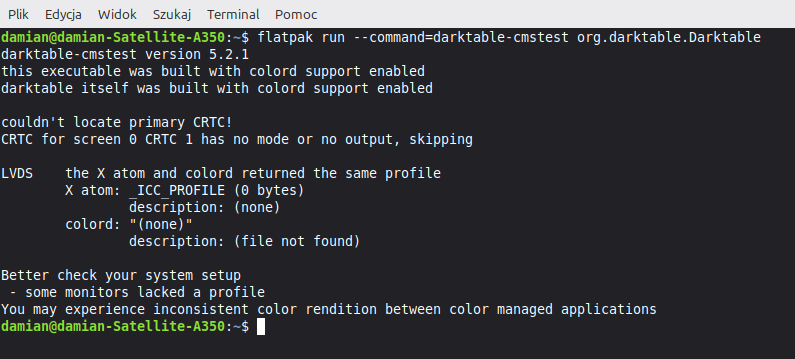
No display profile installed → display is treated as sRGB.
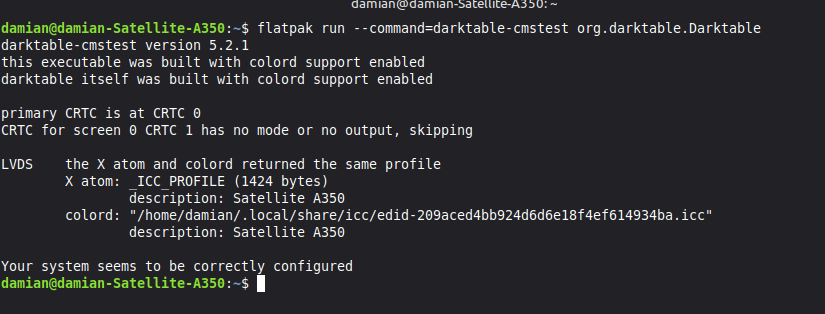
Mate - displays blue correctly