I have some 40 year old Agfa 2 1/4 that is faded. I’m new to processing. What is the best place to start? What tool is best for this (automatic or manual)? All the photos seem to bee faded in the same way so if I could come up with a formula I assume I could make a preset. Perhaps this has already been done by someone and all I need is their settings.
It is not RawTherapee command, however equalize command in GIMP is very effective for restoration of faded film images.
There are some restoration sample images in following thread.
I do a lot of my photo restoration work in GIMP. Auto levels can sometimes work miracles on faded colors. The equalize command works in a similar fashion. Maybe you could put an image in the PlayRaw category and people could try different softwares and techniques to get the result you like.
I suggest you give it a try:
It also works properly in Windows 11
Readme
STANDALONE WINDOWS APP FOR RESTORING FADED SLIDES AND PRINTS
NOTE - This is an experimental (alpha) release that has been tested only on Windows 7, so far.
Your experience may vary. Please report issues.
The instructions for running the program are:
- Make a new working folder anywhere on your computer.
- Copy (not move) into it some of the faded pictures you want to restore.
- In the working folder, make a subfolder named ’restored’ (without the ’ ’ quotes) to contain the results.
- Download the file restore4.0A.exe from GitHub.
- Copy it into the working directory.
- Double click on the program restore4.0A.exe.
- Put the kettle on - the calculation is very slow but the results should appear in the ’restored’ directory.
It has been tested on Windows 7; I have no idea if it will work in Windows 10.
When viewing the resulting images using the default Windows image viewer, they appear dark and saturated. This appears to be caused by the Windows image viewer not the restoration software. They images look all right with other viewing software.
I tried his restoration programs and they are not bad. Also he made GIMP plugin version of his programs and their algorithm are different each other.
However, for restoration of very faded film images, I believe equalize command of GIMP is most powerful tool.
I recommended it because he wrote:
“I’m new to processing.”
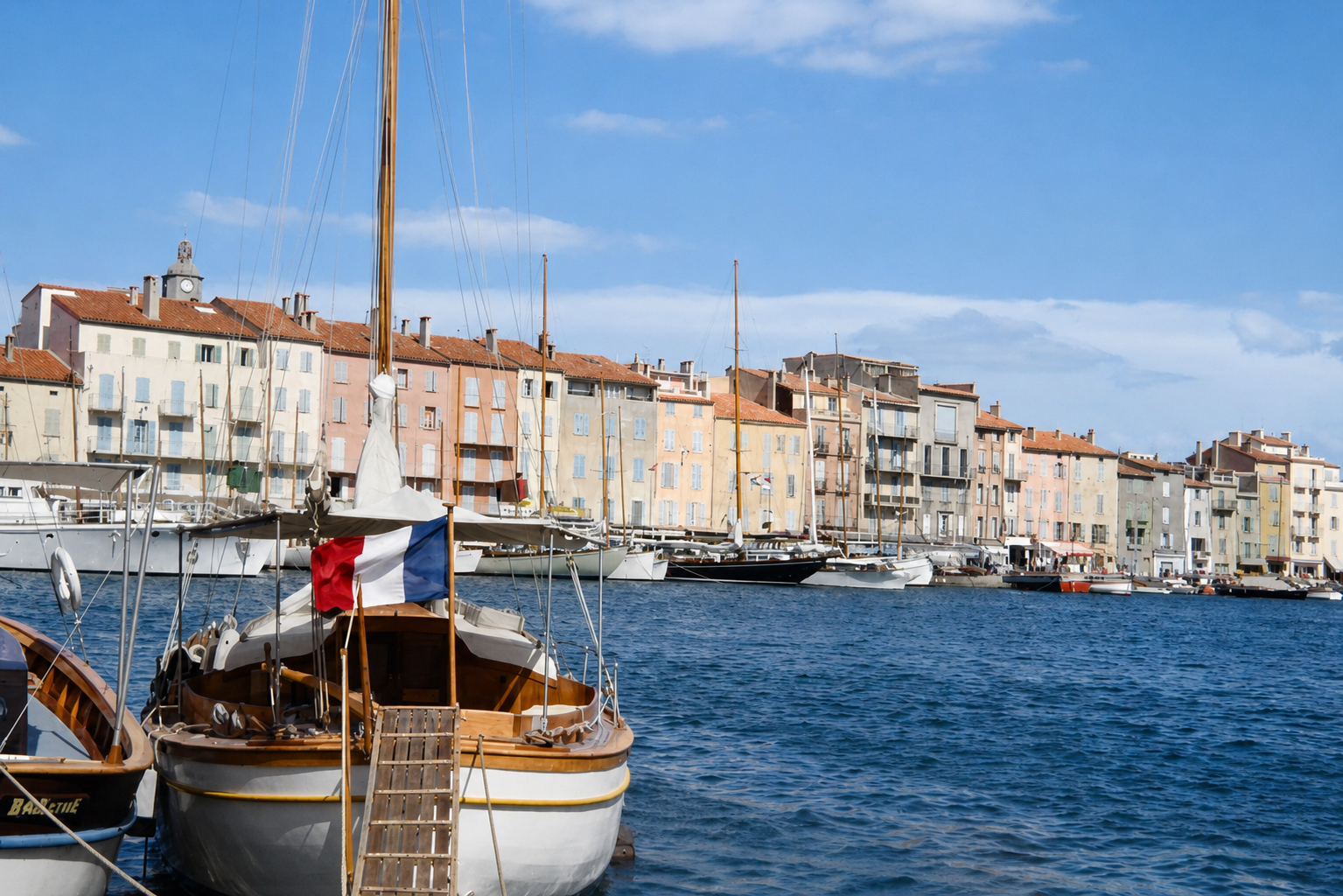
Over the years I have tried many ways of restoring old transparencies - never 100% successful. Recently I have been using ChatGPT to do this and the results are quite amazing. Here is an example of its correction of the St Tropez image. Far superior to any of the other techniques.
The beauty of ChatGPT is it “knows” what it is looking at and cvan make intelligent decisions about how to adjust, remove defects etc.
It does however have a couple of limitations:
- You can only do one image at a time
- You must have a paid subscription (minimum that allows you to do this is around $US 12/month (mine is $A32/month)
- The best results are when you tell it how to perform its operation. For example (“the boat in the foreground is flying the French flag” - it actually determined this on its own.
- Output resolution is currently restricted to approx. 1500x1000 pixels.
If anyone is interested I can show you other examples of its ability to correct defects and colorize.
Below is what it came back with when I said “Tell me what you see”
Looking closely at the image, it appears to be a photograph of a picturesque French Mediterranean harbor, probably dating from the 1960s or early 1970s based on the film characteristics and boats.
Here are the main features I can see:
- Foreground
- A traditional wooden sailboat moored at the quay occupies the centre foreground.
- The boat is flying the French tricolour (blue, white and red), which is an important colour reference for correcting the faded film.
- The hull appears to be painted white with varnished timber trim and interior.
- A gangplank leads down from the quay onto the boat.
- Part of another small wooden boat is visible at the left edge.
- Water
- A sheltered marina with small waves, suggesting a moderate breeze.
- The original scan has turned the water a reddish-purple because of the severe colour cast. It should be a medium to deep blue.
- Boats
- Numerous sailing yachts are moored along the opposite quay.
- Most masts are vertical, which is useful when checking whether the image needs any straightening.
- Buildings
- A continuous row of 4–5 storey waterfront buildings.
- Terracotta tiled roofs.
- Pale rendered façades with shutters typical of southern France.
- On the far left is a building with a small clock tower.
- Sky
- Light cloud with otherwise fair weather.
- The sky has also been overwhelmed by the red/magenta cast and should be a much more natural blue.
Condition of the original transparency
The image exhibits:
- Very strong overall red/magenta colour cast, typical of severely faded colour reversal film.
- Slight loss of contrast.
- Minor dust spots and small scratches in the sky.
- Slight softness consistent with vintage transparency film.
- Highlights are largely preserved, so there is good detail available to recover.
Good reference colours
This image is actually quite helpful to restore because it contains several objects whose colours are well known:
 French flag:
- Blue = deep ultramarine
- White = neutral white
- Red = bright crimson
- Boat hull = white
- Roofs = warm terracotta
- Sea = medium/deep blue
- Sky = pale to medium blue
These known colours provide excellent anchors for reconstructing a natural white balance and colour palette.
Overall, I think this is an excellent restoration candidate. The scan has retained plenty of detail despite the heavy colour shift, and using the French flag as a colour reference should allow a very faithful reconstruction of the original scene.
Hi @Ian_G welcome! These are the kind of edits we are 100℅ not interested in, sorry. Not only is it not free software, but also doesn’t require any skill, nor are the results really repeatable.
2 Likes
welcome??? I came across this forum having been plagued for 30 years with discoloured transparencies Agfa, Perutz, Fuji, Ansco. I just typed in to Google “Colour cast, AGFA, 1960s” just to see what others were doing in this field these days. I came across the example of St. Tropex harbour and itr was deja vu for me as all the variations that people had submitted were similar results to what I had achieved over the last 25 years. So I thought I was doing people a favour by showing what can be achieved these days.
It was only when I posed your response to Claude and asked why you would respond like that I realised that this forum is, as Claude said, built around free/open source photography tools, repeatable skill based editing, learning and critique.
Clearly I came to the wrong place to offer my 2 cents worth.
Having said that, you could have responded politely by saying something like “Ian, welcome and thanks for your input. Here we focus on free/open tools so our community as a whole can learn. Unfortunately our mandate doesn’t extend to AI assisted work or the use of paid tools”.
2 Likes
Hello and welcome to the forum,
As you said yourself, this is a reconstruction, not a restoration. It’s true that AI can work wonders.
To learn what open-source software is capable of, I suggest you post a photo in the “playraw” section; the members of this forum will be happy to retouch your photo.
Greetings from the Luberon,
Christian