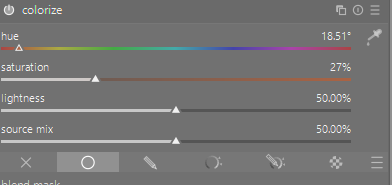
I am trying to select the angle on the colour wheel for sepia (#704214 or 116, 66, 20). I can’t find anything on the net that allows me to do this.
Does anyone have a method or even a value?
I am trying to select the angle on the colour wheel for sepia (#704214 or 116, 66, 20). I can’t find anything on the net that allows me to do this.
Does anyone have a method or even a value?
https://www.colorhexa.com/704214
It has a hue angle of 30 degrees, a saturation of 69.7% and a lightness of 25.9%.
You can do this with ImageMagick. Create an image with one pixel of the required colour. Convert the image from an implied sRGB to HSL, and write the image as “txt:”, which writes the pixel values.
magick xc:#704214 -colorspace HSL txt:
# ImageMagick pixel enumeration: 1,1,0,65535,hsl
0,0: (5461,45676,16962)  #1555B26C4242  hsl(30,69.697%,25.8824%)
Hue is 30 in degrees (0 to 360), Saturation is 69.697% and Lightness is 25.8824%.
I come from old school film days for doing sepia. Sepia is not a definite correct color. The chemicals used by Kodak produced a different result to the chemicals used by Agfa. I feel you have determine the hue that you like for sepia and don’t oversaturate it.
Here are numbers similar to what I would use. Probably not perfect yet but close to the colors I want for sepia.
Your screenshot nicely illustrates that brown is just dark orange. Relevant video: https://youtu.be/wh4aWZRtTwU?is=4ytUVfE6pVjGXggb t
some sepia has more yellow and some more red. I don’t like it too saturated. Even when developing photos I had a technique to only half apply sepia and half retain the BW look. It worked nicely. All do do with time in bleach step and subsequent development steps.
“Official” Sepia:
HEX: #704214
RGB Decimal: rgb(112, 66, 20)
RGB Percentages: rgb(43.9%, 25.9%, 7.8%)
HSL: hsl(30, 69.7%, 25.9%)