This is a slightly edited and expanded version of what I have posted on Reddit.
agx provides more control over the tone curve than filmic rgb and sigmoid do, and provides more control over the colour adjustments (primaries) than sigmoid does. So you get filmic-like explicit exposure white and black points (sigmoid uses a curve that is never guaranteed to reach black and white), nice, gradually desaturated colours (you can disable it if you want, and just use the module as a parametric tone curve, but that’s disabling the ‘AgX’ part, which is not about the curve but the colours). In addition to the filmic-like pickers (white and black point + for both), there’s one to select the area where you want most contrast (the ‘pivot’ – by default, 18% mid-grey). You can also adjust the output for the selected pivot.
In filmic, among the advanced settings, you can enable use custom mid-gray values, and then you get a slider on the scene tab that allows you to move the pivot point that gets mapped to mid-grey (in the output) lower or higher on the (input) exposure scale.
In agx, you can also adjust to what value that point is mapped (so the associated output value is not necessarily mid-grey). You have complete freedom is selecting the point of highest contrast, and can make brightness adjustments without modifying the black and white points.
agx does not provide anything that would be similar to filmic’s reconstruct tab.
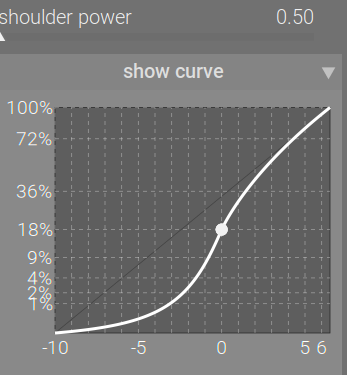
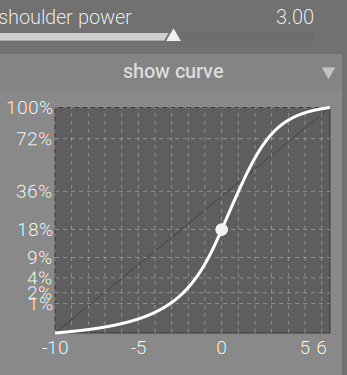
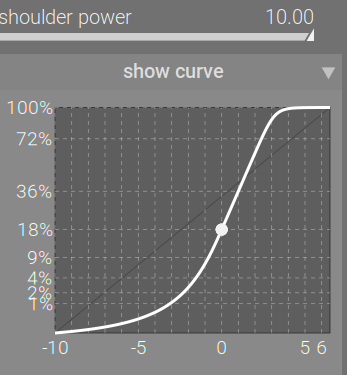
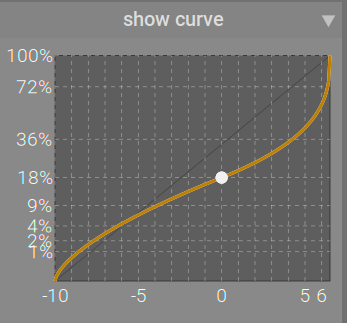
It provides explicit control over toe and shoulder behaviour (shadow and highlight contrast):
The curve in agx will never over- or undershoot like filmic’s:
However, it may resort to a toe that bends downwards and/or a shoulder that bends upwards:
Different maths, different curves, different compromises.
However, AgX is not about the curve. It’s about the colour, achieved via the manipulation of primaries of a custom processing colour space.
filmic rgb has various processing modes (see the color science setting). agx does not try to match what those do: it tries to match what the original AgX in Blender does, but with almost all parameters configurable, instead of baked-in (it is my understanding that will change in Blender, as @Eary_Chow is working on a parameterised tool). You can use it without the core feature (disabling the primaries), and setting preserve hue to 100%, to get something more like filmic – but if you want to get what filmic provides, just use filmic.  I often used filmic with highlights saturation mix set to low values, which lead to desaturated, to me at least, more natural-looking highlights.
The colour processing in agx is similar to (but more flexible) and based on (as in: uses the same code as) sigmoid’s colour tweaks with the primaries. The code comes from the work @flannelhead did for the rgb primaries and sigmoid modules.
In particular, filmic rgb tries to preserve hue. However, in human perception, hues shift with brightness. This causes the pink sunsets and fires for which filmic rgb has often been critised. Aurélien, the module’s author, wrote (he’s replaced ‘darktable’ with ‘Ansel’, the name of his fork, but the same holds for darktable, too):
Note that the Bezold-Brücke shift affects human perception but not sensor measurements, therefore the digital rendition from Ansel 2023 honours the chromaticity coordinates of the spectral colors (red) and will look less yellow than expected by an human observer. This can be selectively fixed by color balancing highlights. (Engineering | Filmic, darktable and the quest of the HDR tone mapping – or, if unavailable, Engineering | Filmic, darktable and the quest of the HDR tone mapping)
AgX tries to produce desaturation and colour shifts that look natural, without having to adjust them in other tools. You can reduce/prevent colour shifts using preserve hue (as in sigmoid).
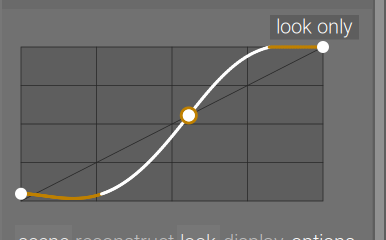
Finally, agx provides a few display-referred controls (the look tools) for small, quick post-processing adjustments.