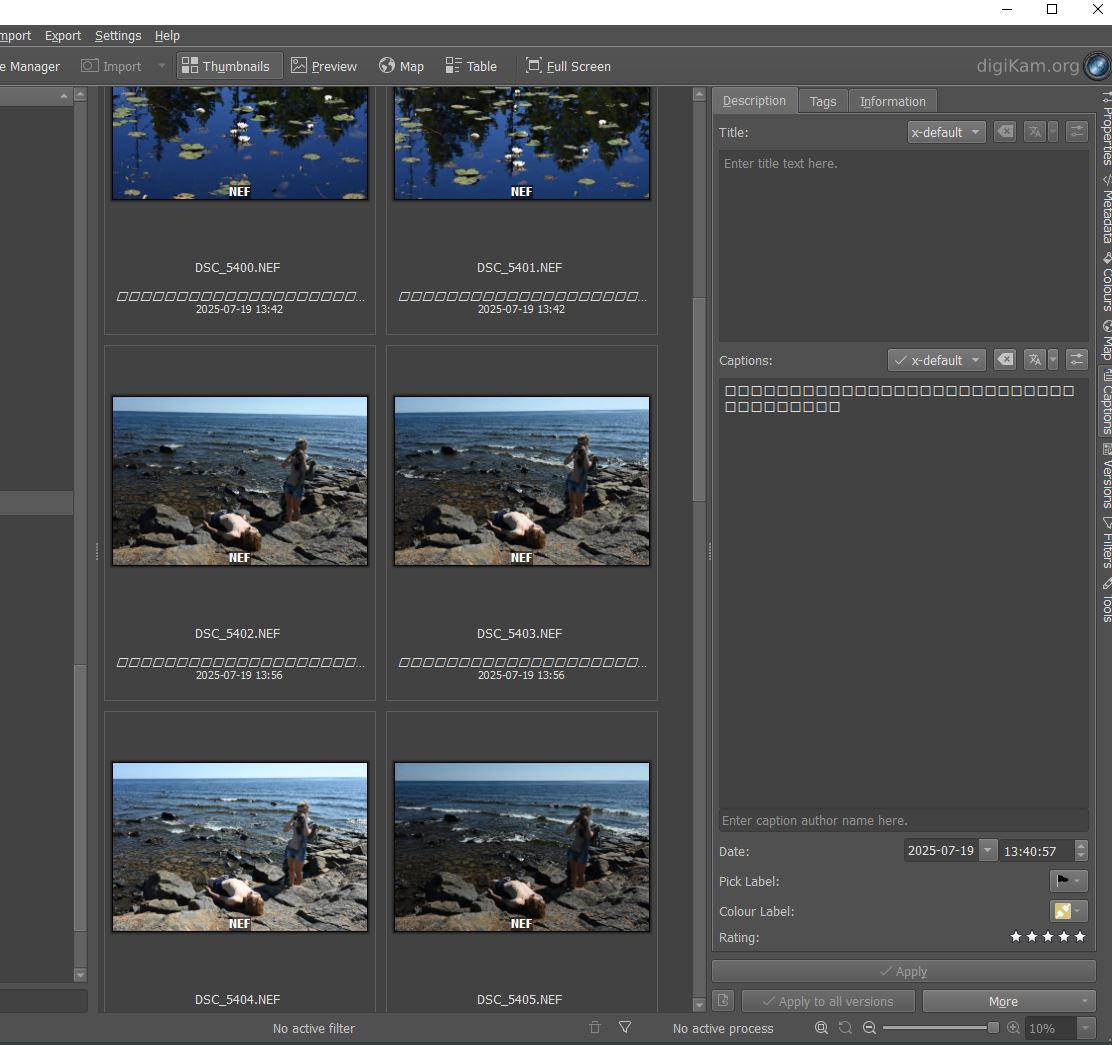
After updating digikam to 8.7.0 qt6 from 8.5.0 on windows there is strange text (squares) on the thumbnails of newly imported images. Images previously imported with older versions do not have the row of squares. Any ideas why they are there and how I can get rid of them?
Just guessing, but those squares look like the symbols used for missing characters. And they are in the location used for the caption (which is also shown in the right sidebar for the selected image).
That makes me think of a character set problem, or missing fonts for e.g. japanese characters. So not a corrupted text, just not displayable on your system. Any idea where the captions on those images come from?
I’d expect an added title to show up normally. Also if you overwrite the captions, they should show up normally.
I see, thank you. As far as I know the images shouldn’t have any captions. They were imported straight from camera with darktable. I’m not sure where digiKam would pick up captions from. Perhaps something is wrong with the xmp sidecar files darktable generates? I’ll try to delete the sidecars to see if the unprintable captions disappear.
Or you could post one of the affected files or sidecars here for others to check (if it’s something in the file, that should be visible for others). Just deleting the sidecars won’t help all that much, as both digikam and darktable read them on import (and when explicitly asked), after import the respective databases are used, and the sidecars are only updated in most cases (darktable can check for modified sidecars on startup)
For what it’s worth, I’ve not seen any problems with sidecars from darktable, and certainly not spontanuously added captions.
Right, it’s not the sidecars. When metadata is read from an image on import or with “Reread Metadata From File” a seemingly empty comment record is created in the ImageComments db table that causes the incorrect caption. 8.6.0 doesn’t do this.
There is a fix in the development version that sounds similar:
031 ==> 507576 - digiKam User Comment Exif displaying incorrect characters for Nikon images.
This issue has been resolved in the pre-release digiKam-8.8.0 version. The string is interpreted from the Exif comment, which is empty. Due to Exiv2 bugs, we now decode the Exif comment ourselves; this was unfortunately a bug in our functionality. You can disable reading of the Exif comment in the advanced metadata or use the pre-release version; in this case, rereading the metadata will be necessary.