i´m looking for a way to create a ICC or DCP Profile which contains a costum linear Matrix.
I want to match two different Cameras (Sony A1 and Arri Alexa) and therefore shot a Color Checker under the same conditions with both of them. Now i want to match the Sony A1 to the Arri Alexa.
As i want my whole Sony A1 Stills workflow to happen in Lightroom or Darktable i want to create an ICC or DCP Profile. All the tools i found so far (for example Lumariver) are able to calibrate an Image of a Color Checker but not with a costum Target (the Image of a Color Checker of another Camera) but rather of stored Values of how the Color Checker is supposed to look. That means that two Cameras meet “in the middle” rather than one camera looks like the other.
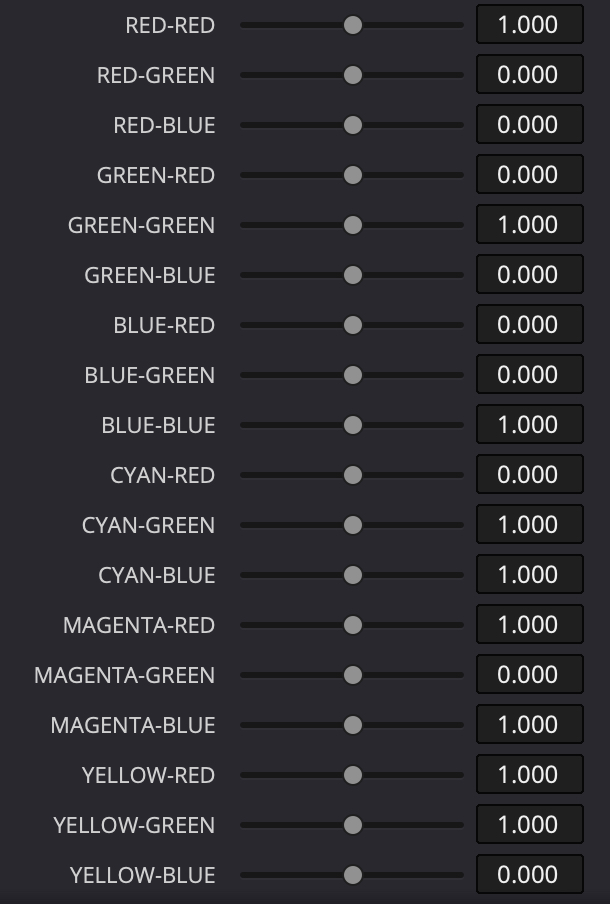
So ideally there would be tool that allows me to import both images, and while the Arri Alexa Image lies underneath as a Reference the Sony A1 Image will be adjusted manually until both images match. To do that i would need to adjust the RGB Values, something like this:
Has anybody an idea how to create a Profile like that?
I don’t know if such a tool exists, but it seems to me that it should be possible to implement in darktable using the existing colour calibration features. UI-wise it might be a bit cumbersome, but algorithmically-speaking most of the required bits are already there.
Edit:
Got an idea for how it could work.
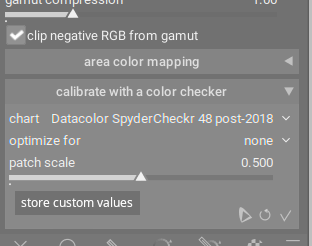
By selecting store custom values, the values for the colours currently “selected” get saved and can then be chosen in the chart drop-down as custom values.
Scroll down to the " -p , -f , -e , -m " switches. I haven’t tested it so YMMV.
But, I think the crux of your problem is defining the matrices to go into such an operation. I’ve viewed YouTube videos showing how to make LUTs with 3DLUTCreator to shift other cameras of a a collection to one of the cameras as a reference, but I haven’t seen any work to use simple matrices to do the same. It may be that you’ll find matrices dissatisfying for this application, as they may not contain enough information to handle the corner cases…
@Donatzsky
Your idea is how it could work not how it works right? Looked some time for the “store custom values” button before i realised that this is a suggestion of a new tool.
But like you said, theoretically Color Calibration Tab has the features it needs. In the manual it is stated that: “Users are currently not permitted to use custom targets”
I wonder why that is…
@ggbutcher
Thank you for your suggestion i will look into dccamprof. As i successfully matched the Sony A1 to the Arri Alexa in Davinci Resolve (CST to linear Space, then 3 x 3 Matrix, then back to Log) i´m pretty convinced a simple linear Matrix will do the trick but how to create it and put it into a profile is what i´m struggling with…
I tried it with lumariver which is a commercial version of dccamprof but unfortunately it doesn´t allow costum targets for color checker images… It´s also not possible to enter manual matrix values.
Ah well, Lumariver doesn’t expose all of dcamprof. At that, I’m not sure dcamprof’s parameters work, not even sure of the syntax. Need to read the code, may do that after I’ve milked my smallish brain of all I can muster on lens correction…
For anyone wondering, you can create custom color target references for Lumariver Profile Designer using PatchTool. You load an image of a ColorChecker, read the patches, and save the reference file. It’s easy. But copying the look of another camera this way doesn’t work. For one, you need to match the contrast curve of the reference image, since that has a huge effect. And then a ColorChecker doesn’t have enough patches to copy a look this way. It just doesn’t work. I’ve tried with a ColorChecker SG, a QPcard, and an IT8 target, and something always ends up being off no matter how much I play with the settings. I’ve had better luck with a neutral profile and then training a color LUT to match the look I want to copy.