You might need to delete shortcutsrc in your darktable config directory so it is created with valid defaults at next start.
It worked, thanks!
With this build the crop tools lacks guides and guides flip. Do you find them between aspect and margins?
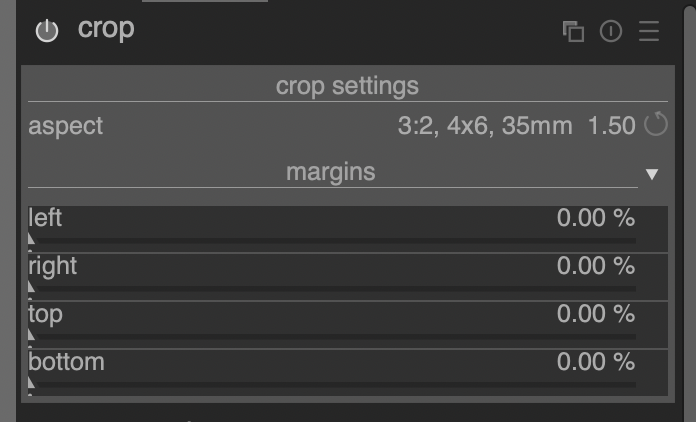
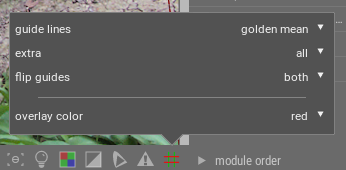
Guides styles are accessible by right-clicking on the guide lines button on the right of the bottom toolbar. You can either choose to enable guides globally (by left-clicking the same button to toggle it) or on a per-module basis (from the presets menu of some modules). We’re working on improving the UI for this at the moment (see here).
HI !
Thanks for the update. With the option to display guides in the bottom of the interface, I guess this will be a global option for any tools or independant of any using them ? Or how do you plan to make them specific for each tool, from that menu ?
The guide settings will be global (so you won’t be able to have different guides for each module) and it will be possible to either enable guide lines globally or only when a specific module has focus. It’s only possible to auto-enable guides for a small set of modules – namely those that crop or distort the image.
That is a good news  I just tested it (Didn’t know it was moved atthe bottom toolbar).
current master + exiv2 0.27.4 + preliminary Canon CR3 support
darktable-3.7.0+498~g3ccd1f881.dmg
new physical accurate blur included see add module : scene-referred blurs by aurelienpierre · Pull Request #9521 · darktable-org/darktable · GitHub
for a list of changes see Pulse · darktable-org/darktable · GitHub
don’t forget to backup …
1 Like
just would like to know if an optimise build of DT for MacBook Pro 8 core would it be faster
My build is made on a 2019 mbp pro 16“ i9 8core, latest Xcode, sdk, macports and target os 10.15.
You might try to build the whole stuff including macports dependencies with target of your osx version to check if you can squeeze out a little bit more speed.
But I’m sure, tweaking the opencl setting might be a quite more effective
thanks for the info
current master + exiv2 0.27.4 + preliminary Canon CR3 support (+added some missing cr3 cameras from pr #9641)
darktable-3.7.0+634~gb47351ba7.dmg
for a list of changes see Pulse · darktable-org/darktable · GitHub
don’t forget to backup …
3 Likes
Martin I’m about to download one of your development builds for the first time.
Which files/folders do you suggest making a backup of before install?
Edit: reading through thread I backed up config.
However, attempting to open the application following download of the latest .dmg in this thread yielded an error ‘cannot be opened’. Attached is the report. How to solve?
darktable cannot be opened.txt (52.6 KB)
backup should include your .config/darktable directory and the xmp files in your image directories (these are updated on edits)
The build requires osx >= 10.15 - it’s built with latest Xcode and sdk and optimized for my system. I don’t have a build environment able to support older osx versions
1 Like
Thanks. I am now working through the build instructions here:
Hopefully that works.
1 Like
I encountered issues using newer sdks with deployment target 10.7 a long time ago, so i changed this over the time. To get a build optimized for your system you can ditch the deployment target or set it to your osx version. If you ditch it, the stuff is build according to your used sdk.
@Matt_Maguire is helping me in the darktable chat, and he told me to ditch it too. Good to hear you both agree.
and btw: if you’re using lua scripts you need to add -DDONT_USE_INTERNAL_LUA=OFF to the cmake options since macports doesn’t provide lua 5.4 yet
Thanks. Do I also need to remove “-DCMAKE_OSX_DEPLOYMENT_TARGET=10.7” ? (Since I didn’t use it in macports.conf)
yes, you can remove this - otherwise you will get messages that the target of the used libraries doesn’t support this target
1 Like