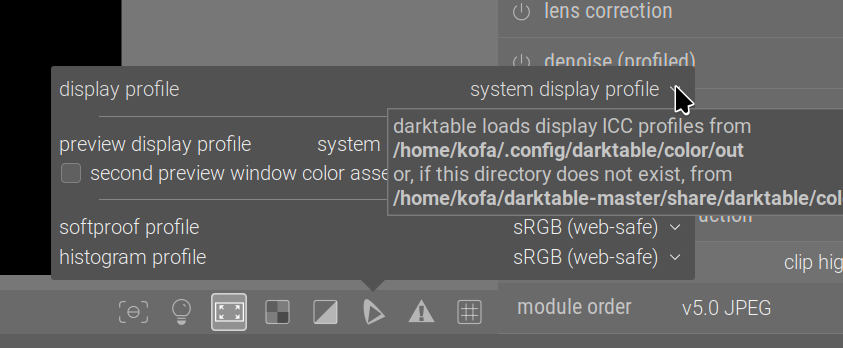
Im running Darktable 5.2.1 (AppImage) on Ubuntu 24 Wayland. Little CMS is activated under Processing in the Preferences menu. On the little screen (down&right) in lighttable view I have selected system profile. However - this is NOT working as the system profile is not used (I have confirmed this using other software). Also, there seems to be no way to manually apply profiles - which is necessary when soft proofing for instance (where I personally need to apply a Luster profile for printing). After struggling for a couple of days I am not really getting anywhere - does anyone have any suggestions on how to fix this?
darktable doesn’t support color management on wayland yet. Although gnome and kde are making progress and the APIs are now ready (except profiling the monitor), they haven’t been implemented into darktable yet.
So if I have a colour managed Wayland system with a wide gamut monitor and run dt, will I get accurate colours, but limited to a default srgb, or will I get inaccurate stretched colours?
When is 5.4 coming? And what is improved support? Does improved mean that Color Management, display profiles and soft proofing profiles will work (may be added)?
It is also possible to just put the icc profile imto ~./config/darktable/color/out.
Thats how it works on KDE Plasma 6.x. System wide wayland color management needs to be switched off for now.
I dont have this folder: ./config/darktable/color/out I only got until this: ./config/darktable/
When I run the cmstest I am getting this in Xorg:
flatpak run --command=darktable-cmstest org.darktable.Darktable
F: Not sharing “/usr/share/color/icc” with sandbox: Path “/usr” is reserved by Flatpak
darktable-cmstest version 5.2.1
this executable was built with colord support enabled
darktable itself was built with colord support enabled
primary CRTC is at CRTC 0
CRTC for screen 0 CRTC 1 has no mode or no output, skipping
CRTC for screen 0 CRTC 2 has no mode or no output, skipping
HDMI-3 the X atom and colord returned the same profile
X atom: _ICC_PROFILE (740464 bytes)
description: CS240 #1 2020-05-07 18-27 2.2 F-S XYZLUT+MTX
colord: “/home/peter/.local/share/icc/CS240 #1 2020-05-07 18-27 2.2 F-S XYZLUT+MTX.icc”
description: CS240 #1 2020-05-07 18-27 2.2 F-S XYZLUT+MTX
Your system seems to be correctly configured
I am getting this in Wayland:
flatpak run --command=darktable-cmstest org.darktable.Darktable
F: Not sharing “/usr/share/color/icc” with sandbox: Path “/usr” is reserved by Flatpak
darktable-cmstest version 5.2.1
this executable was built with colord support enabled
darktable itself was built with colord support enabled
primary CRTC is at CRTC 0
HDMI-3 the X atom and colord returned different profiles
X atom: _ICC_PROFILE (0 bytes)
description: (none)
colord: “/home/peter/.local/share/icc/CS240 #1 2020-05-07 18-27 2.2 F-S XYZLUT+MTX.icc”
description: CS240 #1 2020-05-07 18-27 2.2 F-S XYZLUT+MTX
Better check your system setup
some monitors reported different profiles
You may experience inconsistent color rendition between color managed applications
letting the application know about how to convert from its working space to your display’s space;
loading correction settings into your card’s LUTs
The setting I mentioned does the first.
Exactly what difference do you expect, how do you determine if colour management in darktable works or not?
This is how I load my display profile; it populates the LUT and sets up the config variables, as well (the 2nd command is just a check):
dispwin -I '/oldhome/shared_data/media/digicam/colour-management-profiles/dispcalGUI/storage/U2720Q #1 2024-07-13 10-06 D6500 S XYZLUT+MTX/U2720Q #1 2024-07-13 10-06 D6500 S XYZLUT+MTX.icc'
dispwin -V '/oldhome/shared_data/media/digicam/colour-management-profiles/dispcalGUI/storage/U2720Q #1 2024-07-13 10-06 D6500 S XYZLUT+MTX/U2720Q #1 2024-07-13 10-06 D6500 S XYZLUT+MTX.icc'
It’s not really needed, as KDE seems to load everything fine now, but I used to have issues, that’s when I created the script.
kofa@eagle:~$ dispwin -V '/oldhome/shared_data/media/digicam/colour-management-profiles/dispcalGUI/storage/U2720Q #1 2024-07-13 10-06 D6500 S XYZLUT+MTX/U2720Q #1 2024-07-13 10-06 D6500 S XYZLUT+MTX.icc'
Dispwin: Warning - new_dispwin: Expected VideoLUT depth 11 doesn't match actual 10
Verify: '/oldhome/shared_data/media/digicam/colour-management-profiles/dispcalGUI/storage/U2720Q #1 2024-07-13 10-06 D6500 S XYZLUT+MTX/U2720Q #1 2024-07-13 10-06 D6500 S XYZLUT+MTX.icc' IS loaded (discrepancy 0.1%)
kofa@eagle:~$ ~/darktable-master/bin/darktable-cmstest
darktable-cmstest version 5.3.0+747~g0e6abcc4eb
this executable was built with colord support enabled
darktable itself was built with colord support enabled

primary CRTC is at CRTC 0
CRTC for screen 0 CRTC 1 has no mode or no output, skipping
CRTC for screen 0 CRTC 2 has no mode or no output, skipping
CRTC for screen 0 CRTC 3 has no mode or no output, skipping

DP-2    the X atom and colord returned the same profile
        X atom: _ICC_PROFILE (969640 bytes)
                description: U2720Q #1 2024-07-13 10-06 D6500 S XYZLUT+MTX
        colord: "/var/lib/colord/icc/U2720Q #1 2024-07-13 10-06 D6500 S XYZLUT+MTX.icc"
                description: U2720Q #1 2024-07-13 10-06 D6500 S XYZLUT+MTX

Your system seems to be correctly configured
You can manually create ~/.config/darktable/color/out (note that the original path had a typo): mkdir -p ~/.config/darktable/color/out The copy (cp) or link (ln`) your profile into it.
Finally, in darktable, you’ll be able to select it if you right-click the ‘horseshoe’ icon, then select it in the dropdown: