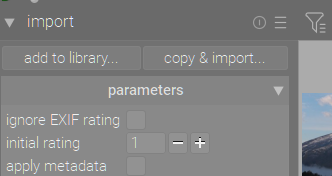
I used to import image files from my memory cards or, at times, from hard drive directories to which I had copied my image files from my cards. Lately, while I can use Win11 explorer to navigate to my files directory and open them with Darktable one file at a time by right clicking a file and “opening with” Darktable, the app will no longer allow me to open a group of files. I’ve done some searching on this problem, and none of the suggested solutions have been effective. I have used Darktable for several years and prefer it to RawTherapee, but, for now, have switched to RawTherapee until I can get this Darktable issue sorted.
Any suggestions would be greatly appreciated. I have already tried uninstalling/re-installing the app several times, but that has not solved this problem.
Just to get it ticked on the list: you know that some Sony “raw” formats are not supported? Yes, of course: I knew you would.
Can you please describe in more detail the method by which you are (attempting) importing pics? I have always used Import > add to Library. Never had a problem, other than when confirming which of my camera’s raw formats don’t work.
I’ve never used Copy and Import. Because I’ve done the copy bit and initial culling pre-darktanle.
I only use the OS-menu “Open with” occasionally, for single pictures. I’ve never tried it for multiples.
Need more information. Which Sony camera, and which exact format?
ARW has so many subvariants now that specifying ARW without any further information is useless. For example lossless compressed ARW took a LONG time for open source software to support (I think RT now supports it due to adopting libraw, but I’m not sure if rawspeed does?)
It does for the last couple of releases. The “faux” subsampled ARWs (i.e downsized M and S) are, however, not supported by RawSpeed ATM, and that is clearly stated in the release notes and on the camera support page.
Yes, I use it on my A7Miv camera, which is now just over two years. However, IF I remember correctly, only Lossless Compressed Large is supported.
But, unless this is an accidental camera-setting change, the OP seems to have a problem of the always worked before: doesn’t now kind.
It’s just that the basic questions should always be asked. Is your camera turned on, is it connected, is your computer booted etc etc. If it’s me, I want them to start at square one…
I remember assuring a support person that yes, my modem is connected to my computer, I’m looking at both ends of the cable right now. Only… I wasn’t. I was looking at ends that belonged to two different cables -blush-.
Sorry. They call me Off-Topic Thad. Hoping from more detail from @carusoswi…
I am using DT5.3 +951 on Windows 11 and I opened five ARW files from a new folder I created without a problem. Sorry I don’t have 5.2.1 to test but at least in the master this is not a problem on Windows 11.
Are you using the import features ? Add to library if your files are where you want them to be or copy and import if you need to move them or import from an sd card ??