It is there in the settings, and it recognises the newly installed onnx runtime. A quick check using the AI masking features and raw denoising work as well. 
After some tests with the appimage I installed today the deb version for Debian testing. Now I’m a bit irritated. I can’t change the size of the sidebars anymore. This only works with the appimage. Anybody else has similar problems?
Looks like 5.6 hit the Arch repos overnight. Arch Linux - darktable 2:5.6.0-3 (x86_64)
Awesome, hope Manjaro syncs with Arch soon
1 Like
And no sooner had I said the above, I wake up to an absolutely MASSIVE update (>500 packages) which apparently includes DT 5.6
Sync’ing now.
3 Likes
So DT 5.6 is on manjaro now, DT 5.6 seg faults on manjaro now … a lot.
First run was fine, but now it not even starts up most of the time.
CL is deactivated, AI is deactived
I’ve had no issues after the last stable update. ([Stable Update] 2026-07-11 - Kernels, COSMIC 1.2, Xorg, Firefox, Thunderbird, KDE Gear - Stable Updates - Manjaro Linux Forum)
Are you sure you don’t have some nasty AUR libraries plaguing you or one of the NVIDIA issues around discontinuing the 575xx drivers?
What does yours segfault with?
it’s not exactly telling much beside that it did segfault.
Most explicit I could see is:
darktable[13341]: segfault at 7fc5f5d7744a ip 00007fc0c493648e sp 00007ffd27008f70 error 4 in libgtk-3.so.0.2420.32[13648e,7fc0c4870000+3b7000] likely on CPU 7 (core 1, socket 0)
not sure about the NVIDIA issue … most parts of the system work normal though. And right now it stopped crashing
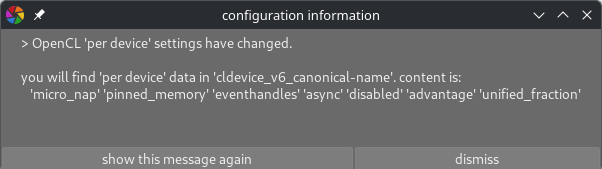
Press dismiss.
1 Like
That message is purely informational.
Dt works as expected → nothing to do.
Dt shows issues related to openCL after upgrade → you have an indication where to look for changes (less so, if you have other changes on your system!)
Isn’t this message just too technical for regular users?
Wouldn’t “OpenCL ‘per device’ settings have changed. Please check the manual or log X for further information. This has no impact for regular users etc etc”
Well, thanks that what I did  .
.
My thinking. I think it would be nice if this was less technical and actual documentation was available on what it means.
@hannoschwalm can you maybe help me out understanding this message?
It is available in the manual 
Would a simple hint “some OpenCL options have changed, inspect the manual for details” be better?
That would leave out the more technical users, they would know immediately what this is about and if they should care …
Simply don’t know …
1 Like
What do you think of
The syntax of OpenCL per device setting […] in darktablerc has changed as follows:
[new syntax]
Please refer to the manual (chapter xyz) for further information.
Good point. Won’t do for bug-fix 5.6.1 but will remember for 5.8
2 Likes
I think this is only relevant for people who fine-tune their settings, so it may be worth adding something like “unless you modified these advanced configuration settings manually, you have nothing to do / … you can ignore this message”.
6 Likes
I updated to 5.6 yesterday and darktable is running very slowly. several seconds of “working…” whenever I make any adjustments. Is this a known bug? Also less concerning (to me), I’ve noticed multiple cmd? type windows that pop up as it loads. Is there a way to submit documentation, or a log of some sort? I’m not the most technologically adept, but I can follow instructions. I could also try a screen recording to show the cmd windows or how slow darktable runs.
I doubt it’s a hardware issue since I’m using my gaming pc which has always handled darktable with no issues in the past. I could post my specs if that might help.
1 Like
I think this is a known bug, Popanz mentioned something about performance some time ago.
I have also had this problem. On 5.4.1, there was only one cmd-like window popping up once Darktable has launched, but on 5.6.0, there were consistently like 3 to 5.
I don’t know if this thread is the right place for problems with the new update so feel free to point me elsewhere.
Since updating to 5.6 I can’t switch between pictures in the lighttable view by scrolling when zoomed in. I used this quite a lot for culling and assessing sharpness between pictures. Now the zoomed picture is just scrolled up or down. I’m on Linux.
1 Like