2026-08-24T22:00:00Z
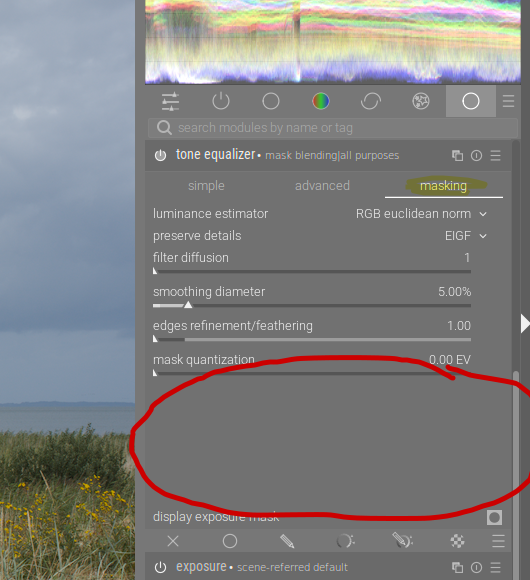
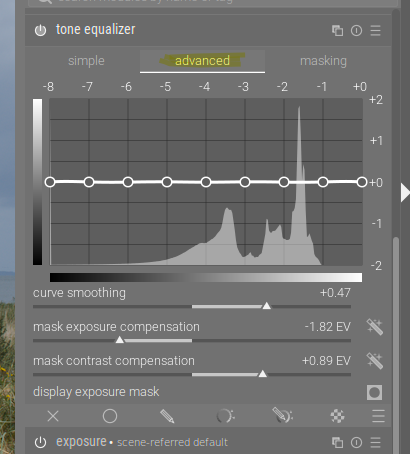
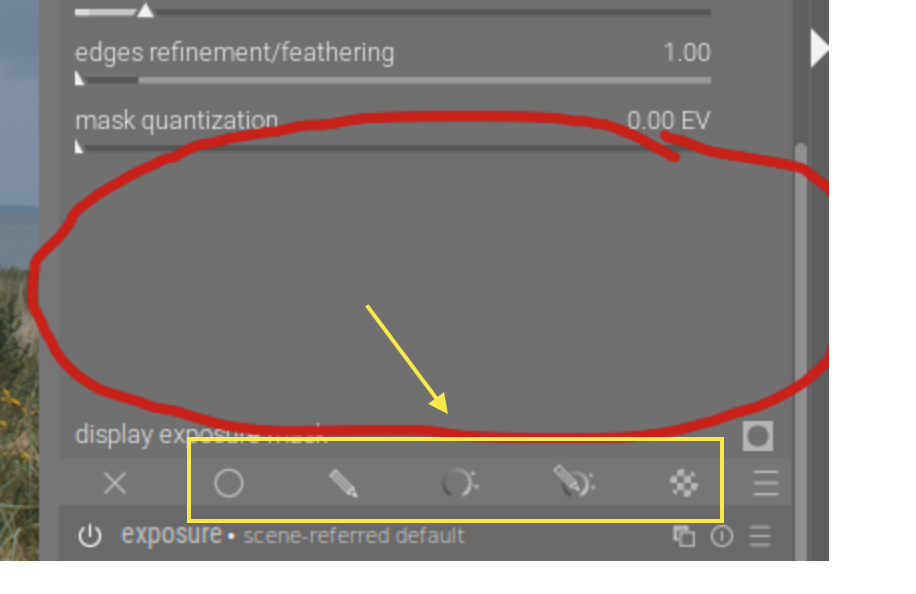
Hi, after an somewhat exhaustive break I returned to darktable (now version 5.6.0) only to find that in one of my favorite modules, the tone equalizer, I can’t see/find the mask adjustments any more!
System Info:
System:
Kernel: 5.15.0-190-lowlatency x86_64 bits: 64 compiler: gcc v: 11.4.0 Desktop: Cinnamon 6.0.5
tk: GTK 3.24.33 wm: muffin vt: 7 dm: LightDM 1.30.0 Distro: Linux Mint 21.3 Virginia
base: Ubuntu 22.04 jammy
Machine:
Type: Desktop Mobo: Gigabyte model: H81M-HD3 v: x.x serial:
UEFI: American Megatrends v: F5 date: 05/13/2014
CPU:
Info: dual core model: Intel Core i3-4130 bits: 64 type: MT MCP smt: enabled arch: Haswell
rev: 3 cache: L1: 128 KiB L2: 512 KiB L3: 3 MiB
Speed (MHz): avg: 798 high: 799 min/max: 800/3400 cores: 1: 798 2: 798 3: 799 4: 798
bogomips: 27135
Flags: avx avx2 ht lm nx pae sse sse2 sse3 sse4_1 sse4_2 ssse3 vmx
Graphics:
Device-1: Intel 4th Generation Core Processor Family Integrated Graphics vendor: Gigabyte
driver: i915 v: kernel ports: active: none empty: DP-1, HDMI-A-1, HDMI-A-2, HDMI-A-3, VGA-1
bus-ID: 00:02.0 chip-ID: 8086:041e class-ID: 0300
Device-2: AMD Cape Verde PRO [Radeon HD 7750/8740 / R7 250E] vendor: Gigabyte driver: radeon
v: kernel pcie: speed: 5 GT/s lanes: 16 ports: active: DVI-D-1 empty: DVI-D-2,HDMI-A-4,VGA-2
bus-ID: 01:00.0 chip-ID: 1002:683f class-ID: 0300
Display: x11 server: X.Org v: 1.21.1.4 driver: X: loaded: ati,modesetting,radeon
unloaded: fbdev,vesa gpu: radeon display-ID: :0 screens: 1
Screen-1: 0 s-res: 1920x1080 s-dpi: 96 s-size: 508x285mm (20.0x11.2") s-diag: 582mm (22.9")
Monitor-1: DVI-0 mapped: DVI-D-1 model: Dell U2311H serial: res: 1920x1080 hz: 60
dpi: 96 size: 509x286mm (20.0x11.3") diag: 584mm (23") modes: max: 1920x1080 min: 720x400
OpenGL: renderer: VERDE ( LLVM 15.0.7 DRM 2.50 5.15.0-190-lowlatency)
v: 4.5 Mesa 23.2.1-1ubuntu3.1~22.04.4 direct render: Yes
Audio:
Device-1: Intel Xeon E3-1200 v3/4th Gen Core Processor HD Audio driver: snd_hda_intel v: kernel
bus-ID: 00:03.0 chip-ID: 8086:0c0c class-ID: 0403
Device-2: Intel 8 Series/C220 Series High Definition Audio vendor: Gigabyte
driver: snd_hda_intel v: kernel bus-ID: 00:1b.0 chip-ID: 8086:8c20 class-ID: 0403
Device-3: AMD Oland/Hainan/Cape Verde/Pitcairn HDMI Audio [Radeon HD 7000 Series]
vendor: Gigabyte driver: snd_hda_intel v: kernel pcie: speed: 5 GT/s lanes: 16 bus-ID: 01:00.1
chip-ID: 1002:aab0 class-ID: 0403
Sound Server-1: ALSA v: k5.15.0-190-lowlatency running: yes
Sound Server-2: JACK v: 1.9.20 running: no
Sound Server-3: PulseAudio v: 15.99.1 running: no
Sound Server-4: PipeWire v: 0.3.48 running: yes
Network:
Device-1: Realtek RTL8111/8168/8411 PCI Express Gigabit Ethernet vendor: Gigabyte driver: r8169
v: kernel pcie: speed: 2.5 GT/s lanes: 1 port: d000 bus-ID: 03:00.0 chip-ID: 10ec:8168
class-ID: 0200
IF: enp3s0 state: up speed: 1000 Mbps duplex: full mac:
Drives:
Local Storage: total: 1.36 TiB used: 414.01 GiB (29.6%)
ID-1: /dev/sda model: SD Ultra 3D 500GB size: 465.76 GiB speed: 6.0 Gb/s type: SSD
serial: rev: 6100 scheme: MBR
ID-2: /dev/sdb vendor: Western Digital model: WD10EZRX-00L4HB0 size: 931.51 GiB
speed: 6.0 Gb/s type: HDD rpm: 5400 serial: rev: 1A01 scheme: GPT
Partition:
ID-1: / size: 235.68 GiB used: 113.24 GiB (48.0%) fs: ext4 dev: /dev/sdb6
ID-2: /boot/efi size: 96 MiB used: 6.1 MiB (6.3%) fs: vfat dev: /dev/sdb1
Swap:
ID-1: swap-1 type: file size: 2 GiB used: 0 KiB (0.0%) priority: -2 file: /swapfile
USB:
Hub-1: 1-0:1 info: Full speed or root hub ports: 2 rev: 2.0 speed: 480 Mb/s chip-ID: 1d6b:0002
class-ID: 0900
Hub-2: 1-1:2 info: Intel Integrated Rate Matching Hub ports: 4 rev: 2.0 speed: 480 Mb/s
chip-ID: 8087:8008 class-ID: 0900
Hub-3: 2-0:1 info: Full speed or root hub ports: 2 rev: 2.0 speed: 480 Mb/s chip-ID: 1d6b:0002
class-ID: 0900
Hub-4: 2-1:2 info: Intel Integrated Rate Matching Hub ports: 6 rev: 2.0 speed: 480 Mb/s
chip-ID: 8087:8000 class-ID: 0900
Hub-5: 3-0:1 info: Hi-speed hub with single TT ports: 10 rev: 2.0 speed: 480 Mb/s
chip-ID: 1d6b:0002 class-ID: 0900
Hub-6: 3-4:3 info: Genesys Logic Hub ports: 4 rev: 2.0 speed: 480 Mb/s power: 100mA
chip-ID: 05e3:0608 class-ID: 0900
Device-1: 3-4.1:4 info: Omnidirectional Control KVMLite type: Keyboard
driver: hid-generic,usbhid interfaces: 1 rev: 2.0 speed: 1.5 Mb/s power: 100mA
chip-ID: 0b39:0003 class-ID: 0301 serial:
Device-2: 3-4.3:5 info: HS6209 2.4G Wireless Receiver type: Keyboard,Mouse
driver: hid-generic,usbhid interfaces: 2 rev: 2.0 speed: 12 Mb/s power: 100mA chip-ID: 32c2:0012
class-ID: 0301
Device-3: 3-4.4:6 info: Logitech Keyboard K120 type: Keyboard,HID driver: hid-generic,usbhid
interfaces: 2 rev: 1.1 speed: 1.5 Mb/s power: 90mA chip-ID: 046d:c31c class-ID: 0300
Device-4: 3-6:2 info: Genesys Logic Multislot Card Reader/Writer type: Mass Storage
driver: usb-storage interfaces: 1 rev: 2.0 speed: 480 Mb/s power: 500mA chip-ID: 05e3:0716
class-ID: 0806 serial:
Hub-7: 4-0:1 info: Super-speed hub ports: 2 rev: 3.0 speed: 5 Gb/s chip-ID: 1d6b:0003
class-ID: 0900
Hub-8: 5-0:1 info: Hi-speed hub with single TT ports: 1 rev: 2.0 speed: 480 Mb/s
chip-ID: 1d6b:0002 class-ID: 0900
Hub-9: 5-1:2 info: VIA Labs Hub ports: 4 rev: 2.1 speed: 480 Mb/s power: 100mA
chip-ID: 2109:3431 class-ID: 0900
Hub-10: 6-0:1 info: Super-speed hub ports: 4 rev: 3.0 speed: 5 Gb/s chip-ID: 1d6b:0003
class-ID: 0900
Sensors:
System Temperatures: cpu: 29.8 C mobo: 27.8 C gpu: radeon temp: 39.0 C
Fan Speeds (RPM): N/A
Repos:
Packages: 3322 apt: 3267 flatpak: 45 snap: 10
No active apt repos in: /etc/apt/sources.list
No active apt repos in: /etc/apt/sources.list.d/additional-repositories.list
Active apt repos in: /etc/apt/sources.list.d/font-manager-staging-focal.list
1: deb http: //ppa.launchpad.net/font-manager/staging/ubuntu jammy main
Active apt repos in: /etc/apt/sources.list.d/kxstudio-debian-ppas-2.list
1: deb http: //ppa.launchpad.net/kxstudio-debian/libs/ubuntu focal main
2: deb http: //ppa.launchpad.net/kxstudio-debian/plugins/ubuntu focal main
3: deb http: //ppa.launchpad.net/kxstudio-debian/apps/ubuntu focal main
4: deb http: //ppa.launchpad.net/kxstudio-debian/kxstudio/ubuntu focal main
Active apt repos in: /etc/apt/sources.list.d/kxstudio-debian-ppas.list
1: deb http: //ppa.launchpad.net/kxstudio-debian/libs/ubuntu bionic main
2: deb http: //ppa.launchpad.net/kxstudio-debian/music/ubuntu bionic main
3: deb http: //ppa.launchpad.net/kxstudio-debian/plugins/ubuntu bionic main
4: deb http: //ppa.launchpad.net/kxstudio-debian/apps/ubuntu bionic main
5: deb http: //ppa.launchpad.net/kxstudio-debian/kxstudio/ubuntu bionic main
No active apt repos in: /etc/apt/sources.list.d/nilarimogard-webupd8-focal.list
Active apt repos in: /etc/apt/sources.list.d/official-package-repositories.list
1: deb http: //packages.linuxmint.com virginia main upstream import backport
2: deb http: //archive.ubuntu.com/ubuntu jammy main restricted universe multiverse
3: deb http: //archive.ubuntu.com/ubuntu jammy-updates main restricted universe multiverse
4: deb http: //archive.ubuntu.com/ubuntu jammy-backports main restricted universe multiverse
5: deb http: //security.ubuntu.com/ubuntu/ jammy-security main restricted universe multiverse
No active apt repos in: /etc/apt/sources.list.d/signal-xenial.list
Active apt repos in: /etc/apt/sources.list.d/spotify.list
1: deb http: //repository.spotify.com stable non-free
Active apt repos in: /etc/apt/sources.list.d/ubuntuhandbook1-darktable-focal.list
1: deb http: //ppa.launchpad.net/ubuntuhandbook1/darktable/ubuntu jammy main
Info:
Processes: 241 Uptime: 28m wakeups: 0 Memory: 7.64 GiB used: 2.89 GiB (37.9%) Init: systemd
v: 249 runlevel: 5 Compilers: gcc: 11.4.0 alt: 11/12/9 Client: Cinnamon v: 6.0.5 inxi: 3.3.13
I also try to add a screenshot - Question is: What am I missing??
Thank you for helpful information!