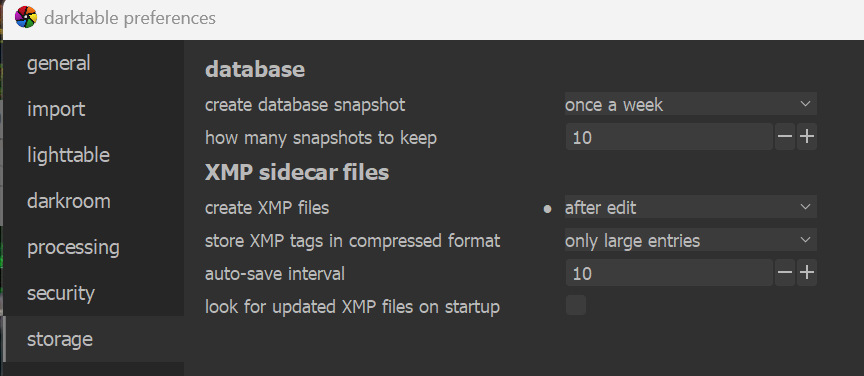
I doubt this is your problem, but in the preferences for storage make sure you do not have write xmp files set to never. I hope you get your problem resolved.
Do you have multiple underscores?? Not sure that should be an issue… I also get this error from time to time if I am toggling on and off a module quickly… I think I am making a change faster than the system can update probably because I am syncing to the cloud. When I turn that off/pause while editing I get less or maybe none of these notifications Not sure that helps in your case at all…
Hello @priort I’m not syncing to the cloud, this is my firs use with de Darktable. Evertimes
You can see your files .xmp? I can’t…
Does this error hinder you in something? I’m looking for a new photo editor and I’m afraid that if I dedicate myself to learning Darktable I won’t be able to use it correctly.
I can and they are not hidden files on Windows…seems maybe like Windows from your screen shot… What xmp setting do you have in preferences? By default DT keeps your edits in a database and it also has the ability to create sidecar files… If this only happens for one file then it might just be a corruption issue for that image in the database… You could remove and reimport it and this should reset the link…I know in the past in some situations special characters have caused issues with certain DT functions but I think most have been sorted out …
So far, the form has been quite successful at resolving issues. The developers are also present here to lend a hand. In the worst case, if there is a genuine bug, we can report it to them and they’ll fix it.
Is your home a local drive, or mounted from the network (e.g. NAS, file server, and so on)?
You can get a “Bad File Descriptor” error if you have no permissions to write to a location (create the file), or if the file name contains invalid characters.
What exactly is the name of the directory where you have your photos? I am only asking because I find it strange that you write:
But your screenshot with the error message contains what looks like a very long underscore:
Is that some special character (which could cause a problem), or simply multiple underscores that you did not copy exactly when you reported the location (quoted above)?