Not sure if this deserves a new topic, but I couldnt find one that deals with this - anybody knows how to get rid of the default “darktable” style folder?
I found that I can remove them from the .db file with a command, but they come back with every new nightly, and break the command (cause they get “re-imported” with new IDs) and its really annoying me 
We can disable the builtin presets for modules, but I found no way to disable that for the styles menu, but perhaps I am not looking deep enough?
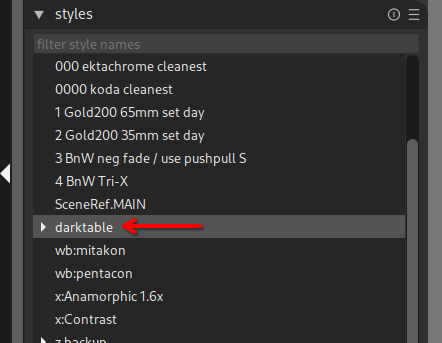
Could this be a bug or a nightly specific behaviour? I’ve never had this on stable ever since I deleted the styles way back when. But now I’m using some nightly builds regularly and the default styles are there, and for me they come back with every reinstall too
1 Like
Well, every appimage/nightly comes with its own pack, I dont think that this is a “bug” in the usual sense, theyre just default pre-packed styles that come with it and if theyre removed, theyre added again. But yeah, it is probably an issue for someone who keeps up with the nightlies.
1 Like
And on topic of styles - why are there two options to filter/search? One is the default “filter style names” on top, and one only appears if youre clicked into the styles and start typing - I dont like that one cause it steals the keyboard focus…
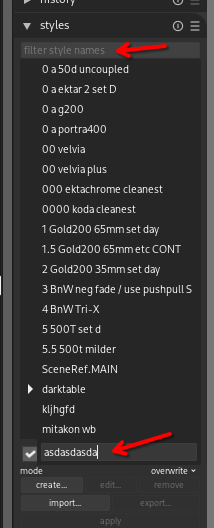
That sounds like worth opening an issue on github - I don’t know if it is possible but maybe it IS possible to pop the cursor into the search field at the top upon starting to type.
1 Like
Done! I will probably report the darktable style folder too, eventually, I guess there is no option to solve this without having to remove them with every new version