tiling failed for module diffuse the output most likely will be ok but you might want to check
Good afternoon! I am glad to write here again, as I am sure that I will be helped with warmth, kindness, and understanding!
I’m writing through a translator.
While processing some time ago, I started using a new processing process that includes diffusion.
Since my computer is very weak for a large number of iterations, I avoided this process. Now I started using it with a few iterations.
Recently, I encountered an error. I tried changing the module settings, but the image always looked different. I set the module to render 70 photos per day and left, but when I returned 12 hours later, only 54 photos had been rendered.
I fixed the processing without this module. And I forgot about the error for a while. Now I’ve processed about 300 photos, and only at the end did I notice that it was throwing an error during rendering.
I need a different solution. I’ve just thought that maybe Dithering before the diffusion module would help me? I haven’t tried it yet.
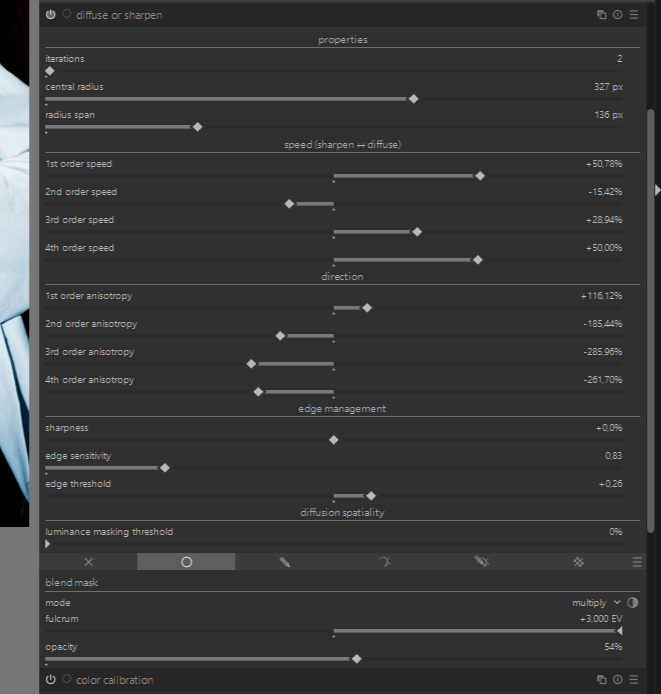
Can you tell me what ideas you have for fixing the error? The photos that were processed for 12 hours looked the same, even if something was skipped inside… Maybe I should force-disable the re-processing? After the error, only a reboot helps… That’s why I didn’t take a screenshot. I’ve attached a screenshot of the module settings. Thank you all!
It probably wouldn’t hurt to add. I’m exaggerating… Sometimes I use 15 iterations, which take a long time to load, but I use them when I blur. In this case, I think the problem lies in the lower part of the module, where the edges are bound.
I figured it out, it seems to be the central radius. I restarted my computer and was able to export without the Central Radius. I wonder how this can be overcome?
As I said, for the devs to know if this is a new or an old bug which might already be fixed in the upcoming 5.6. release, you need to run darktable from a terminal/powershell with
darktable.exe -d pipe -d tiling
and paste the output when it’s crashing here.
A graphics card for OpenCL will help with the speed for sure. You should think about getting one.
I understand that when a crash occurs, the computer freezes and needs to be restarted. Will this file be saved? Or should I put 1 file on the render and wait for the computer to freeze?
Use darktable.exe -d pipe -d tiling >> darktable-debug.log 2>&1 in the windows console (run “command” and parse to the folder where darktable exe is, like C:\programs\darktable whatever, I dont have windows) and it should write until the crash. Share the log file here
This means: The module memory requirements were too high (depending on image size and additional in-module parameters - in this case related to radius), the module tried to do that in “tiling mode” but that also didn’t work as requirements were still to high. So in the end dt tried “it’s best” but that could have lead to problems inside the file-writing-library. Thus the “note” telling you to check … nothing “special” requiring further investigations or logs.
11265,9914 cannot get iop-order for lut3d instance 0
11267,6747 cannot get iop-order for lut3d instance 0
11303,8954 cannot get iop-order for lut3d instance 0
11303,9531 cannot get iop-order for lut3d instance 0
11304,0058 cannot get iop-order for lut3d instance 0
11305,8145 cannot get iop-order for lut3d instance 0
11305,8818 cannot get iop-order for lut3d instance 0
11305,9331 cannot get iop-order for lut3d instance 0
11307,5428 cannot get iop-order for lut3d instance 0
11307,6887 cannot get iop-order for lut3d instance 0
11307,7675 cannot get iop-order for lut3d instance 0
11309,3102 cannot get iop-order for lut3d instance 0
11309,4984 cannot get iop-order for lut3d instance 0
11309,7331 cannot get iop-order for lut3d instance 0
11311,0678 cannot get iop-order for lut3d instance 0
11311,4267 cannot get iop-order for lut3d instance 0
11313,1041 cannot get iop-order for lut3d instance 0
11313,3743 cannot get iop-order for lut3d instance 0
11314,0994 cannot get iop-order for lut3d instance 0
ERROR in lualib, couldn’t find a container for `lua scripts installer’, this should never happen
11385,7522 cannot get iop-order for lut3d instance 0
I’m not sure: that I did everything correctly… I entered these commands, but they didn’t produce any actions in CMD. I decided to check, and in the documents, there was a darktable folder with a log file. I took a photo of the log, and later, I went to the Darktable and rendered the file that was giving me an error. The error worked, and I restarted my computer. New lines appeared in the file, and I’ll attach them.
You know, I noticed that there was an error with LUT 3D when I first installed the program. The LUT 3D module was available, but it didn’t launch the LUTs. You could open them and select a different space, but the image didn’t change. Later, it disappeared. I tried to figure it out myself and found an article.
It suggests reinstalling G`MIC in short.
Maybe my problem is related… I remember doing something similar (Diffusion and Multiply) on an older computer, and it worked well.
You know! Today I suggested that there is a relationship here. I follow the novelties of DT and installed a new version with Ai masks, I tried it but it was terribly buggy and the computer took a long time to load - I didn’t succeed. I removed it and used the old one… Perhaps something was installed on top and this leads to the Diffusion error?
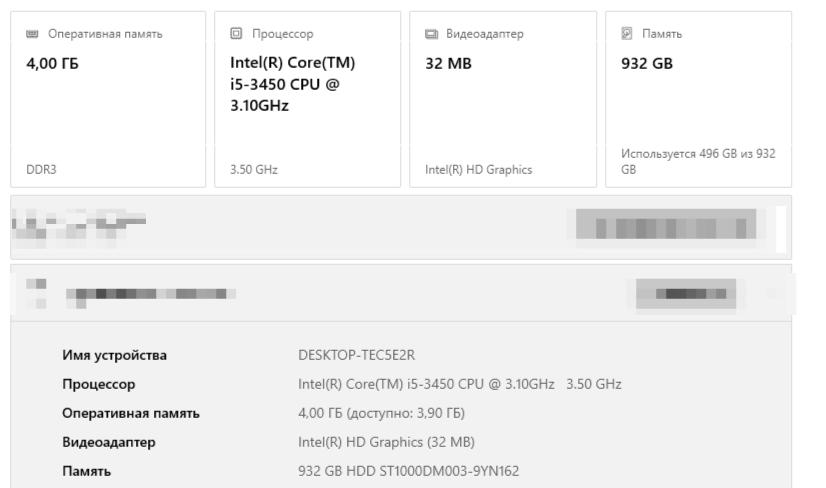
Your system is just too slow without a dedicated graphics card. AI is slow even on higher end systems with old GPUs so no wonder it’s very slow on yours. Also 4GB of RAM without a GPU is really hard for image editing.
A fact, as you think. Can you help me find a solution for writing the script? Which will not replay the operation again, but simply output it as it is in JEPG. Or I’ll have to take a screenshot through the key and paste it into the gimp. It’s not much of an occupation. I don’t need Ai. It’s enough for me to experiment with a couple of images myself.
Unless you click the little rectangle+four+arrows at the bottom of the screen, you are not looking at everything darktable can finally do to the whole picture. If you do click it, you are: and every small adjustment will take ages to show on the screen.
When you export (depending on settings) your pic to jpeg (or whatever: you can a huge lossless tif if you want!) then dt will do the whole job.
Save up your exports. Run them while you are asleep. Or away for the weekend if your pc is that bad
 )
)