Since a couple of darktable versions (at least 4.6 and 4.8, maybe even older ones) I have an issue with the export modules. First, everything looks good, but if I change something, e.g. by loading a preset, some of the options vanish. However, it only happens in my locale, not in the default locale (“C”, English).
The first picture shows the English dialog with all options:
After restarting darktable, everything is back to normal, until I load another preset.
Is this a known issue or even a PEBKAC? Are there any solutions known? I was not able to find a fitting report on github, but struggle to think I am the only one having this issue …
It does happen with any preset, also with new ones (at least it did in 4.6, I’ll re-try with a 4.8 preset tomorrow, but I definitely had the issue with fresh presets on 4.6 one or two months ago). Does your question mean you cannot reproduce?
To give some more background, it’s the OBS builds which I am using on ubuntu.
Not able to reproduce. Do you have this issue also with a completely fresh install ? What happens if you run darktable with debug option -a common and force the issue ? Messages ?
None at all. With -d all I get the following during reproduction:
    15,2024 [lighttable] expose took 0,0000 sec
    17,3550 [lighttable] expose took 0,0000 sec
    17,4746 [sql] ./src/libs/lib.c:448, function dt_lib_presets_popup_menu_show(): prepare "SELECT name, op_params, writeprotect, description FROM data.presets WHERE operation=?1 AND op_version=?2 ORDER BY writeprotect DESC, LOWER(name), rowid"
    22,1938 [sql] ./src/libs/lib.c:320, function dt_lib_presets_apply(): prepare "SELECT op_params, writeprotect FROM data.presets WHERE operation = ?1 AND op_version = ?2 AND name = ?3"
    23,2995 [lighttable] expose took 0,0000 sec
I tested with a fresh preset and it also happens.
I don’t know exactly what would qualify as fresh install, but at least when running with darktable --configdir test/ --datadir test/ with empty folder test I can as well reproduce.
Misunderstanding : “interface language” referred to darktable, not the operating system. My OS is german, darktable englisch (en@truecase). And looking at your screenshots in OP you also use english interface language for dt. So our setting seem to be (almost) identical in this regard.
Almost yes, completely fresh would also mean starting with an empty cache (~/.cache/darktable/). However, this should not be important in this case.
No and no.
You just answered while I was typing…
This makes me wonder if the behaviour is the same if you start dt without setting LANG on the command line but in the preferences dialog of darktable ?
Edit: Just poking in the fog - are there any “exotic” characters in the target storage path, for example “deutsche Umlaute” ?
I am using the German interface (I did not change the settings, darktable autodetects the interface language from my LANG environment variable. The screenshot is from testing with LANG=C which makes darktable use the default interface language, English.
No.
Now it becomes interesting. I never set the language explicitly as I don’t care if it is English or German. Therefore, darktable auto-detected the German locale and set the interface language accordingly. This is where the issue appears.
However: If I do the following:
Start darktable with LANG=C darktable → I get an English interface
Set the interface language via darktable’s preferences dialog to “German” → interface stays English, I think restarting darktable is required
Restart darktable with LANG=C darktable → The interface is now in German, and the issue disappeared
So my conclusion is that it has to do with the language autodetection. It would be great if somebody could test and reproduce before I file a bug report …
Still can’t reproduce your issue, tested with a fresh install of current master, OS german locale :
language auto detection : darktable → dt starts with german interface, created two new export presets → no issue
forced default interface language: LANG=C darktable → dt starts with english interface, tested both export presets → no issue
Set dt interface language to german (now via preferences) → quit dt LANG=C darktable → dt starts with german interface, tested both export presets → no issue
It does not happen when you select one or the other of these presets?
Hm, now I am a bit lost . I tested again with an empty cachedir, but this also does not change the issue. At least I have a workaround now, by manually setting the interface language in the config. However, it would have been nice to understand the issue better such that it can be fixed.
Sure, for me this is resolved, but it would have been nice to have some hint regarding the underlying bug. Or, to understand what is wrong with my system, if it only affects this single environment. Nevertheless, maybe somebody may reproduce in the future, it’s documented here now and when there is some evidence that it’s a bug, e.g. by a reproduction, I’ll write a bug report.

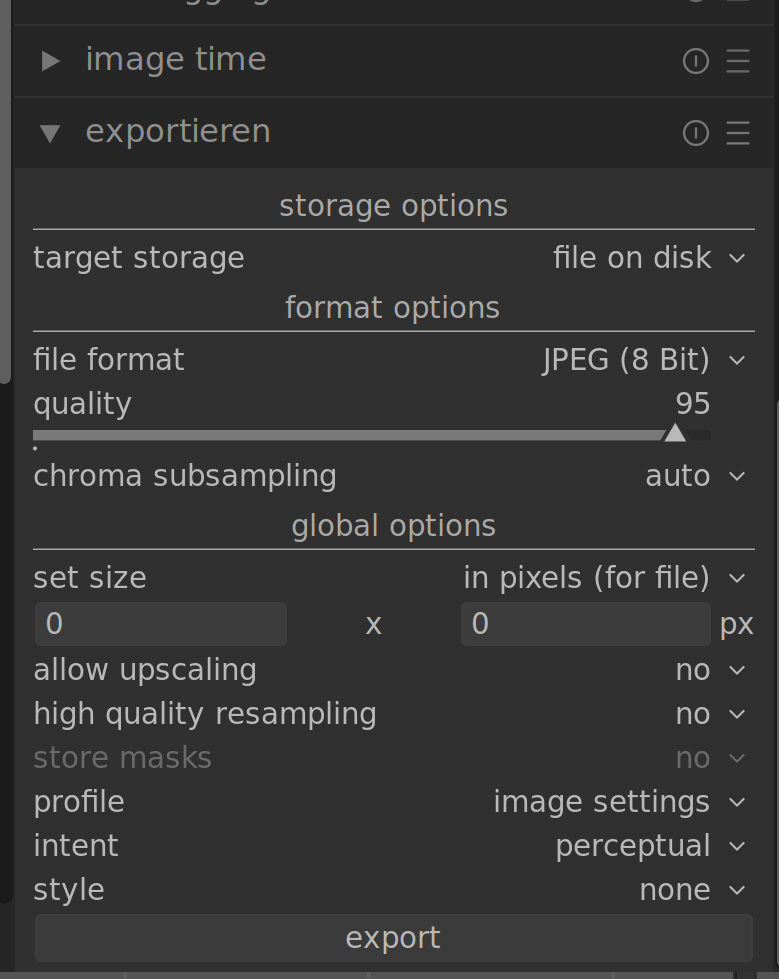
 .
. . I tested again with an empty cachedir, but this also does not change the issue. At least I have a workaround now, by manually setting the interface language in the config. However, it would have been nice to understand the issue better such that it can be fixed.