Since upgrade to 4.6 - I am noticing an interesting behavior with lighttable.
When I am browsing in full screennon processed images only - DT 4.6 appears to be noticeably slower than DT 4.4
I am on PopOS 22.04 and DT is installed from flatpak.
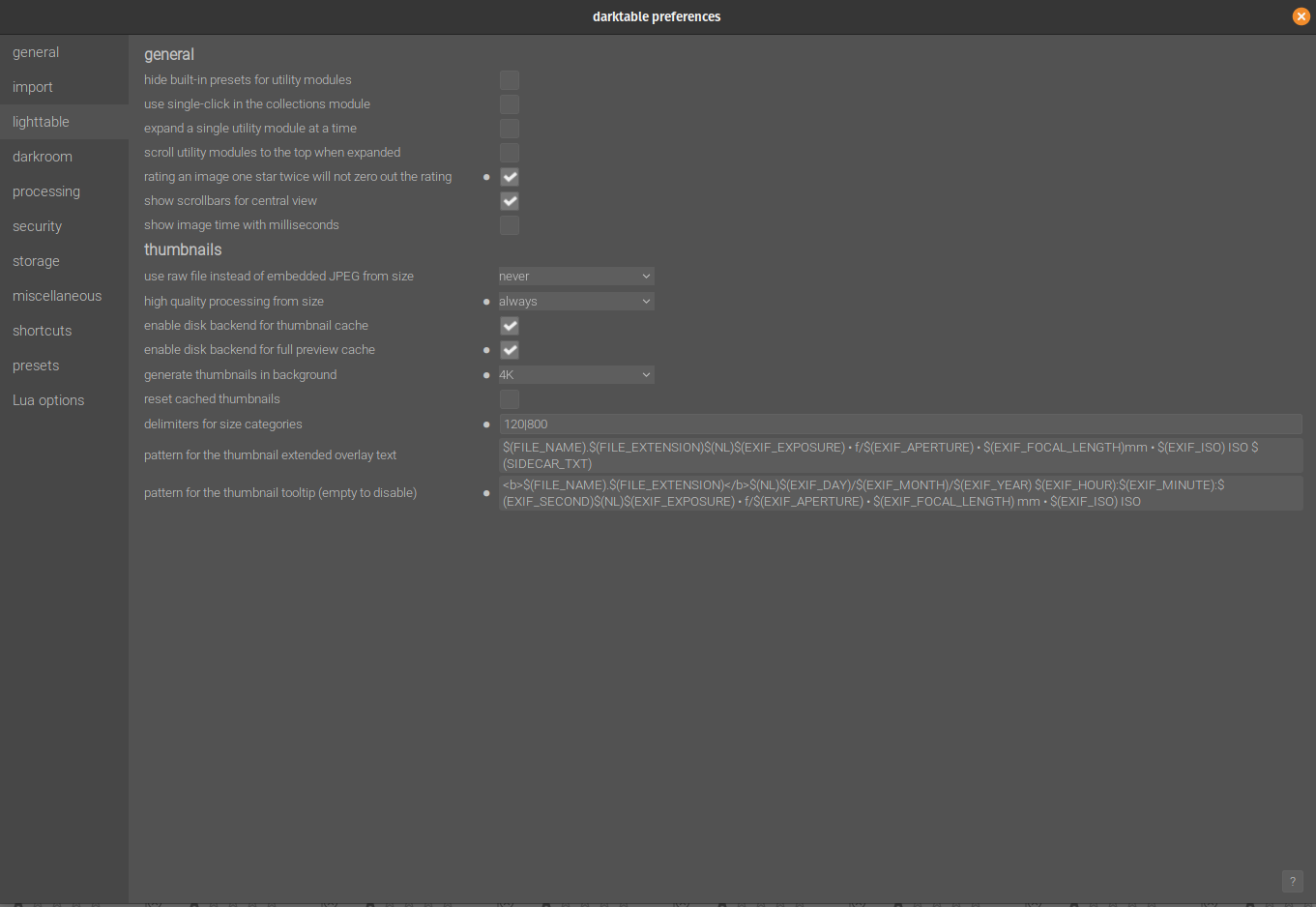
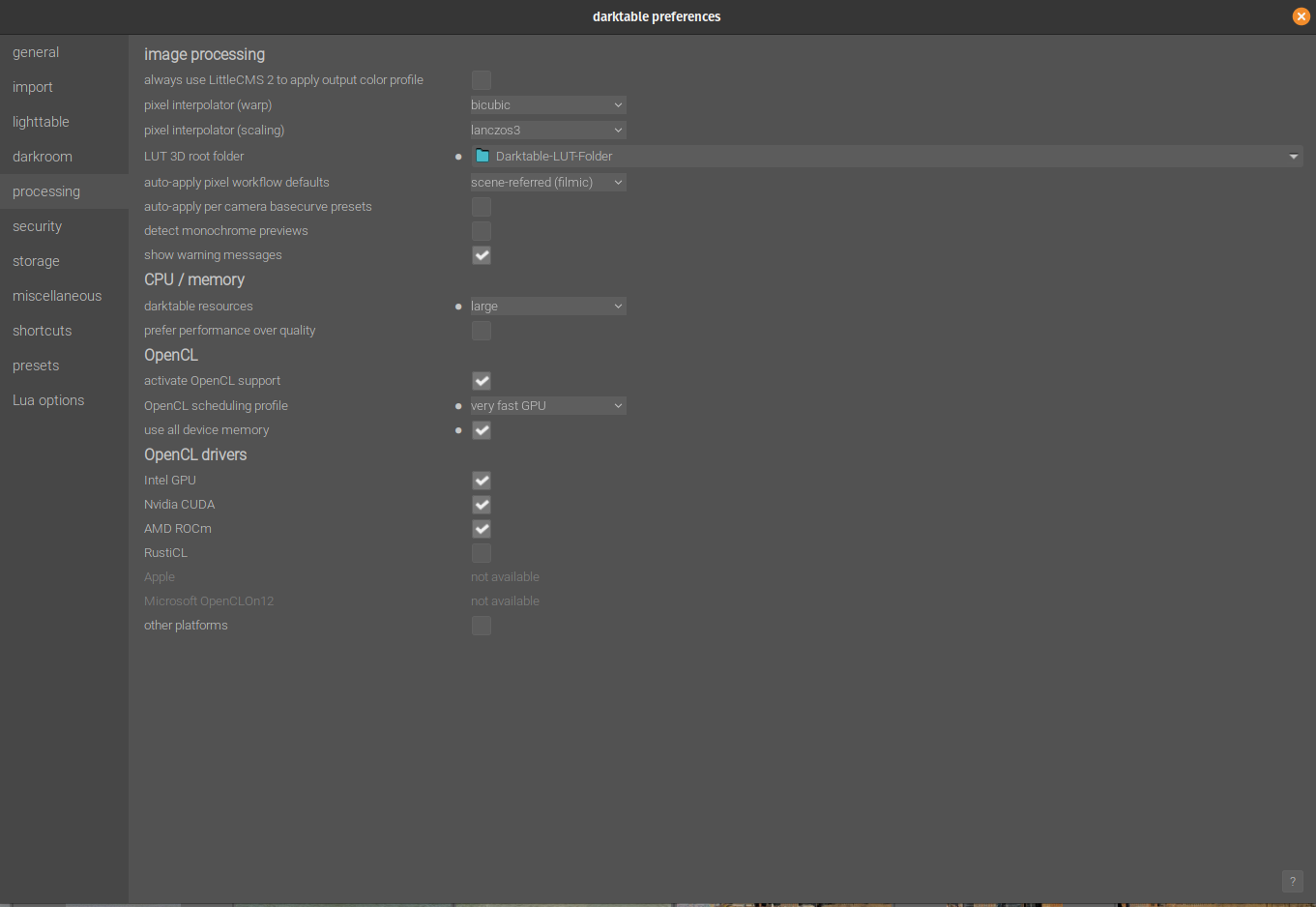
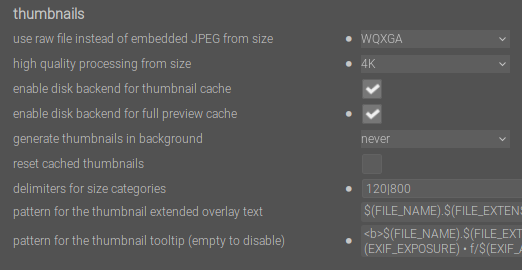
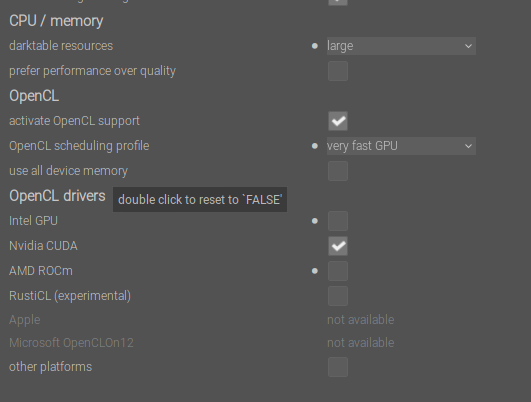
My settings are below
I already reset the cache twice
The cache is located locally on a fast nvme drive
The files are located on a shared (NFS) drive - not the fastest but it is okay
Use embedded .JPG is enabled intentionally (it was like this on 4.4)
I don’t think I am observing issues with files that are already processed - they can be seen fast at full screen
My screen resolution is 2k
I have plenty of available RAM.
If I am to monitor the traffic - when I am browsing processed images the network traffic is insignificant (including full screen)
As soon as I start browsing non processed images - the network traffic picks up significantly
As a workaround - currently I am zooming to displaying only 1 image on the screen (but not full screen). In this condition - it appears DT reads from the mipmap cache.
The behavior is almost like when the image is not processed - DT is ignoring the cached file but it is loading it from the RAW file.
My expectation is that even if .JPG from the RAW file is being used DT should be fast - since the back end cache is enabled - DT should read from the mipmap cache - not from the RAW file.
Now you mention it, I’m still on a 4.5 build, but I’ve noticed this. I wasn’t sure if was some change on my part, but I was noticing exactly what you describe. I’ll update to 4.6 soon and confirm (or try to).
There is a recent change… not sure if I recall the details but in an effort to have the displayed image match the exported one the full pipeline normally only used for export I think can be used. I think there should be a setting for this though and I recall something about a warning so I don’t think it would happen as a default… I would have to go looking to find the exact details around this but it should be easy to find by searching…just on my phone at the moment… maybe check for a new setting in the processing tab just in case?? I can’t even recall if this made it in to 4.6 so might not in any way be an issue…
If I understood correctly - the new setting is “use all device memory”. But this should not affect the thumbnails.
I can see more Open CL drivers but I left it as is - I am on Nvidia 2070
Tried to disable / enable disk backend for full preview cache but it did not help.
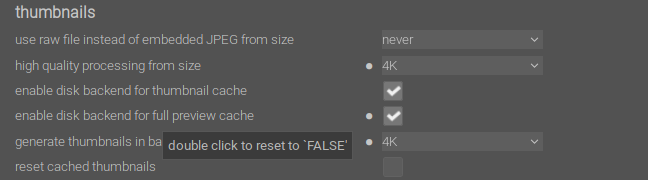
I am trying high quality processing from size - changed to 4k
This discarded thumbnails level 0-5 - it will be a few hours before it manages.
Since tagging is considered an edit - I can also try to tag the images. But .xmp are always generated for me so - not sure if this is going to help.
Do you have auto presets? If yes, then I think when going into full preview it will trigger the image to be processed (just like going into the darkroom). I believe the manual explains this.
I think you should set the use raw file instead... to always. By selecting never, I think you are telling the system not to generate the thumbnails even when idle.
I set my background to WQXGA for my 2k monitor. I dont think you gain anything from using 4K with the 2K monitor you have.
use raw file instead of embedded JPEG from size = always - this never uses the embedded JPG - always the RAW. I want to see the JPG initially. Once it is processed - it makes sense not to display the JPG anymore - this is working as expected I think.
I am setting it to “never” so it can use the embedded JPG even in full screen.
It does what I expect (displaying the jPG) but much slower than DT 4.4. IMO - because it re reads the RAW instead of reading mipmap cache.
done
The files are RAW but have JPG preview embedded. The -d common is from full screen and navigating to the next files. Not sure if I understood correctly what is needed.
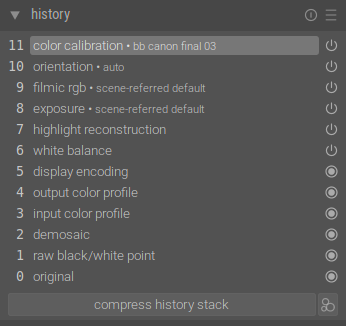
Here are the defaults - the picture is not processed
Only #11 is altered color calibration based on camera/model preset
I’ve updated my laptop (a fast AMD machine with a fast SSD) to 4.6 - previously 4.4.2 - and when in full screen lighttable there is now a short but noticeable delay as I move between images using the arrow keys. It was previously “instant”, or seemed so.
This is usual with edited images if the thumbnail or preview hasn’t been built, but I’m seeing this behaviour with unedited .nef files, using the embedded jpg preview.
Same here.
On my desktop, I’m seeing the same difference I think, between 4.4.2 and 4.5.0+1401~gc2455d4619, only the delay (with 4.5) is more pronounced, approaching at least half a second between images. Perhaps as this machine is using a USB 2.0 drive as storage. i.e. slower. Yet 4.4.2 still moves between images instantly, using the same drive.
I don’t want to update this machine to 4.6 right now as I’m in the middle of a project - sorry.
I am trying to troubleshoot performance issue. Sadly even in 4.8 - I am experiencing slower than desired performance on non processed images.
This is specifically related to full screen preview only in lightable
bojo@serval2:~/bin$ flatpak run org.darktable.Darktable -d perf
darktable 4.8.0
Copyright (C) 2012-2024 Johannes Hanika and other contributors.

Compile options:
  Bit depth              -> 64 bit
  Debug                  -> DISABLED
  SSE2 optimizations     -> ENABLED
  OpenMP                 -> ENABLED
  OpenCL                 -> ENABLED
  Lua                    -> ENABLED  - API version 9.3.0
  Colord                 -> ENABLED
  gPhoto2                -> ENABLED
  GMIC                   -> ENABLED  - Compressed LUTs are supported
  GraphicsMagick         -> ENABLED
  ImageMagick            -> DISABLED
  libavif                -> ENABLED
  libheif                -> ENABLED
  libjxl                 -> ENABLED
  OpenJPEG               -> ENABLED
  OpenEXR                -> ENABLED
  WebP                   -> ENABLED

See https://www.darktable.org/resources/ for detailed documentation.
See https://github.com/darktable-org/darktable/issues/new/choose to report bugs.

Gtk-Message: 21:12:27.937: Failed to load module "canberra-gtk-module"
Gtk-Message: 21:12:27.938: Failed to load module "canberra-gtk-module"
    14.9967 [dt_dev_load_raw] loading the image. took 1.084 secs (0.655 CPU)
    34.5527 [dt_dev_load_raw] loading the image. took 0.973 secs (0.639 CPU)
    35.7796 [dt_dev_load_raw] loading the image. took 0.984 secs (0.464 CPU)
    52.1421 [dt_dev_load_raw] loading the image. took 0.901 secs (0.374 CPU)
    54.2288 [dt_dev_load_raw] loading the image. took 1.067 secs (0.562 CPU)
    57.1558 [dt_dev_load_raw] loading the image. took 1.062 secs (0.419 CPU)
    58.2868 [dt_dev_load_raw] loading the image. took 0.881 secs (0.395 CPU)
    59.4948 [dt_dev_load_raw] loading the image. took 1.097 secs (0.407 CPU)
    94.0862 [dt_dev_load_raw] loading the image. took 1.111 secs (0.391 CPU)
    95.3973 [dt_dev_load_raw] loading the image. took 1.151 secs (0.423 CPU)
    96.6690 [dt_dev_load_raw] loading the image. took 0.929 secs (0.540 CPU)
    97.7797 [dt_dev_load_raw] loading the image. took 0.927 secs (0.399 CPU)
    99.5318 [dt_dev_load_raw] loading the image. took 0.892 secs (0.552 CPU)
   100.5483 [dt_dev_load_raw] loading the image. took 0.909 secs (0.377 CPU)
   101.7963 [dt_dev_load_raw] loading the image. took 1.129 secs (0.394 CPU)
   104.3963 [dt_dev_load_raw] loading the image. took 1.289 secs (0.401 CPU)
   113.6645 [dt_dev_load_raw] loading the image. took 0.849 secs (0.515 CPU)
   114.7824 [dt_dev_load_raw] loading the image. took 0.959 secs (0.674 CPU)
   118.0372 [dt_dev_load_raw] loading the image. took 0.839 secs (0.346 CPU)
   119.3822 [dt_dev_load_raw] loading the image. took 1.203 secs (1.568 CPU)
   120.5238 [dt_dev_load_raw] loading the image. took 0.963 secs (0.411 CPU)
   122.4527 [dt_dev_load_raw] loading the image. took 1.116 secs (0.421 CPU)
bojo@serval2:~/bin$
The above was taken when I am displaying non processed images (there might have been a few processed). I went back and forth a few images (I’d say 20-30) and I am observing “loading the image” messages.
Then I changed to display only processed images. I went back and forth about 50-100 images and I did not observe “loading the image” text.
Can you please point me in the right direction?
My biggest concern - I expect that when the image is read it should stay in the RAM (I have sufficient amount). Can I tweak DT to use more of the RAM and not load constantly the previews?
I am puzzled why it uses CPU. Is it the only option? I do have GPU, it is active and DT is using on other operations.
I can repeat the test just in case I have done something wrong but processed vs non processed images is something that I come again to as a discrepancy.
As nobody else observes such issue my conclusion is that likely my configuration is not set to the optimum state but I am lost what should I change.
------------
OS: Pop!_OS 22.04 LTS x86_64
Host: Serval WS serw12
Kernel: 6.9.3-76060903-generic
Uptime: 3 days, 21 hours, 17 mins
Packages: 3187 (dpkg), 81 (flatpak)
Shell: bash 5.1.16
Resolution: 2560x1440
DE: GNOME
WM: Mutter
WM Theme: Pop
Theme: Pop [GTK2/3]
Icons: Pop [GTK2/3]
Terminal: gnome-terminal
CPU: AMD Ryzen 9 3900 (24) @ 3.100GHz
GPU: NVIDIA GeForce RTX 2070 Mobile / Max-Q Refresh
Memory: 6923MiB / 64194MiB
I am hoping if I have to change the settings to understand “why”.
I changed it to see if the behavior will alter. The crawler was introduced in 4.6 and I never had issues before 4.6.
I also tried generating all the thumbnails to level 7 (5k) and confirmed that they were generated. The behavior remained the same (I mean slowness in full screen preview).
The current settings WQXGA is something that most people are running at and my own main screen is 2k. I tried to make it as basic as possible.
Admittedly - the “-d perf” was done only an hour ago (with the above settings) and this is when “loading the image” attracted my attention.